Overview
invisible_playwright_mcp is a browser-driving agent you talk to in plain language. It ships in two shapes from the same package: an MCP server that plugs into Claude Code, Codex or Gemini CLI so the assistant you already use gains a real browser, and a standalone web UI — `invisible-playwright-mcp ui` — that puts a chat on the left and the live browser on the right, needing nothing but an OpenRouter key. The default model is configurable and set to `z-ai/glm-5.3-flash` out of the box.
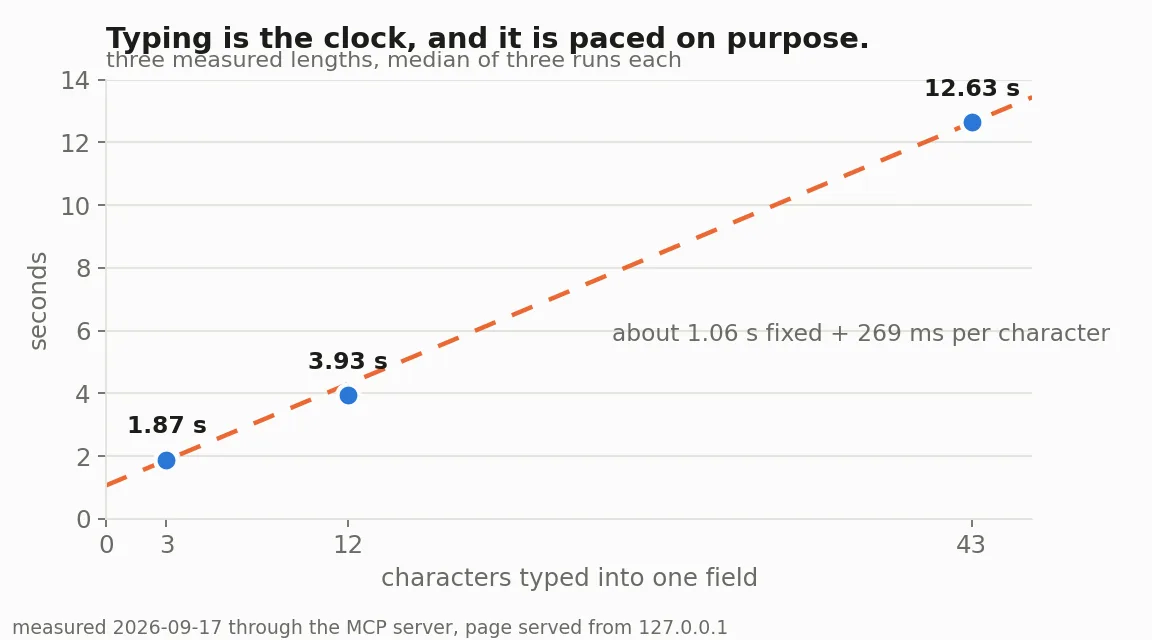
The point of it is the class of task that needs a browser rather than an API, plus a person's judgement about what is actually on the page. The README's worked example is a fare check: open a booking page, try every date from the 12th to the 16th one at a time, read the cheapest fare for each, say so when a date has no availability, and do not guess a number. The agent drives the page the way a person does — the pointer moves, keys are pressed — rather than firing synthetic events, and the project's own measurements show typing is what sets the pace, at roughly a second of fixed cost plus 269 ms per character.
Browser identity is explicit rather than incidental. A `--seed` integer pins the fingerprint, so the same seed produces the same browser identity on every run; `--profile-dir` keeps cookies and logins across restarts; and `--proxy` takes an HTTP or SOCKS5 endpoint with timezone, locale and egress all following it. The engine binary is version-pinned — passing `--binary` skips the download but not the check — and configuration resolves in a fixed order (`--flag` > environment > a `.env` in the directory you run from > the default), with the startup line naming which variables it applied and never printing their values.
It runs entirely on your machine and has no server of its own. The sites you visit see the browser as they would any Firefox; your model provider sees the conversation and what the agent reads; GitHub serves the engine download and a launch counter that carries no identifier. Sessions, profiles and screenshots stay local under `INVISIBLE_MCP_HOME`. The project is explicit about its own boundaries too, asking users to read the terms of the sites they point it at, respect rate limits, and never submit anything a human has not read. The engine is also published separately as the `invisible_playwright` Python library for people who would rather write code than prompts, with `invisible_core` handling seed-to-fingerprint, proxy and geolocation.
What it does
- Two front ends from one package: an MCP server for Claude Code, Codex and Gemini CLI, and a standalone web UI with the chat beside the live page
- Deterministic browser identity — `--seed` pins the fingerprint, `--profile-dir` persists logins and cookies, and the engine binary is version-checked even when you supply your own
- Proxy support for HTTP and SOCKS5 endpoints, with timezone, locale and egress all following the proxy
- Human-paced interaction: the pointer moves and keys are pressed, instead of synthetic events fired at the DOM
- Local-only operation — no service of its own, with sessions, profiles and screenshots kept under INVISIBLE_MCP_HOME on your machine
- A published Python library (`invisible_playwright`) exposing the same engine behind Playwright's own API for code rather than prompts
Getting started
Both modes need `uv` on the machine; the engine itself is downloaded from a GitHub release on first launch. Prefer `OPENROUTER_API_KEY` in the environment or in a `.env` beside the command over passing the key as a flag — a flag puts it in your shell history and, on Linux, in the process list.
Install uv
# Linux / macOS
curl -LsSf https://astral.sh/uv/install.sh | sh
source $HOME/.local/bin/env

# Windows, in PowerShell
powershell -ExecutionPolicy ByPass -c "irm https://astral.sh/uv/install.ps1 | iex"
$env:Path = "$env:USERPROFILE\.local\bin;$env:Path"
Add it to your assistant over MCP
Each client has its own one-liner; the MCP server ships inside the same package, so there is nothing else to install.
# Claude Code
claude plugin marketplace add feder-cr/invisible_playwright_mcp
claude plugin install invisible-playwright-mcp@feder-cr

# Codex
codex plugin marketplace add feder-cr/invisible_playwright_mcp
codex plugin add invisible-playwright-mcp@feder-cr

# Gemini CLI
gemini extensions install https://github.com/feder-cr/invisible_playwright_mcp
Or run the standalone web UI
Then open http://127.0.0.1:8765 and type the task. The default host and port are 127.0.0.1 and 8765 — changing the host exposes an interface that has no authentication.
uvx invisible-playwright-mcp ui --openrouter-key sk-or-...Keep the key and the binary in a .env
Only the directory you run from is read — there is no upward search — so running from a subfolder cannot silently pick up a different key. Values already set in the environment are never overridden by the file.
OPENROUTER_API_KEY=sk-or-...
STEALTHFOX_BINARY=/path/to/firefox
Pin the identity and route it through a proxy
The same seed reproduces the same browser identity on every run, the profile directory keeps logins and cookies alive across restarts, and the proxy carries timezone, locale and egress with it. Host and port are both required on the proxy URL.
uvx invisible-playwright-mcp ui \
  --seed 42 \
  --profile-dir ~/.invisible/profiles/research \
  --proxy socks5://proxy.example.com:1080
Commands and code are distilled from the project's own documentation — always check the official repo for the latest.
When to use it
- Reach for it when the job needs a real browser and a judgement call on the page — reading a calendar widget date by date, say — rather than an API call
- Reach for it when you want the coding agent you already use to gain a browser without leaving its session
- Reach for it when a run has to be reproducible: the same seed, the same profile and the same pinned engine build every time
- Reach for it when the work must stay on your own machine, with no hosted browser service in the path
How invisible_playwright_mcp compares
invisible_playwright_mcp alongside other open-source computer & browser use tools AI/TLDR tracks, ranked by GitHub stars.
| Tool | Stars | What it does |
|---|---|---|
| Browser Use | ★ 117k | A Python library that lets agents control a real browser to read pages and complete tasks online from natural-language instructions. |
| Open Interpreter | ★ 68.5k | A lightweight coding agent that runs code on your own computer to carry out tasks from natural-language requests. |
| Chrome DevTools MCP | ★ 52.7k | The Chrome team's MCP server that lets a coding agent control and inspect a live Chrome browser — performance traces, network requests, console messages and Puppeteer-backed automation. |
| UI-TARS Desktop | ★ 39.2k | ByteDance's multimodal agent stack and desktop app that controls a computer's graphical interface using vision-language models. |
| CloakBrowser | ★ 31.8k | Stealth Chromium build with source-level fingerprint patches that drops into Playwright or Puppeteer code, so agents and scrapers browse without tripping bot detection. |
| invisible_playwright_mcp | ★ 31.7k | A fingerprint-controlled Firefox driven in plain language — an MCP server for coding agents and a standalone chat-beside-the-page web UI, both running entirely on your own machine |
| AIHawk | ★ 31.7k | Browser agent on a stealth Firefox that takes plain-language tasks and clicks, types and reads real pages - usable as an MCP server from Claude Code, Codex or Gemini CLI, or via its own web UI. |
| OpenCLI | ★ 29.7k | Turns websites into deterministic CLI commands and lets agents drive your already-logged-in Chrome through a browser bridge extension, with adapters for sites and local binaries. |