
What is ESP32 iPhone Agent?
ESP32 iPhone Agent (also published as Handsy) is an open-source project by Henry Yuan that lets an AI agent use a real iPhone the way a person does: it looks at the screen, moves a pointer, taps, swipes and types. It sits in the Computer & Browser Use category of the Agents & Automation tools and is open-source, written in Swift and licensed MIT.
Overview
ESP32 iPhone Agent (also published as Handsy) is an open-source project by Henry Yuan that lets an AI agent use a real iPhone the way a person does: it looks at the screen, moves a pointer, taps, swipes and types. It needs no jailbreak, no Apple developer account and no Mac at run time. The trick is a small ESP32-S3 board — the README's tested board is a Seeed Studio XIAO ESP32S3, about $7 — plugged into the phone's USB port.
The board does two jobs. As the agent's eyes, it opens its own Wi-Fi hotspot and shows up in the iPhone's Screen Mirroring list, receives the AirPlay H.264 stream without decoding it, and forwards it to the companion iOS app on the same phone. As the agent's hands, it presents itself as a standard USB mouse and keyboard; with AssistiveTouch turned on, mouse movement drives an on-screen pointer, so a click becomes a tap and a drag a swipe. Bluetooth Low Energy carries commands and status between the app and the board.
The iOS app is the brain. It decodes the mirrored screen, sends screenshots to any OpenAI-compatible vision model — a cloud API or your own vLLM, SGLang, llama.cpp or Ollama server — and runs a planner and an actor that choose the next tap, swipe, keystroke or button press. Because the pointer is relative, the app tracks it, re-homes it in a corner and checks its position on screen before precise taps. Every run is saved on the phone for step-by-step replay, and an `esp32agent` CLI exposes the same board as an MCP server so coding agents such as Claude Code can drive the iPhone from a computer.
What it does
- Works on a stock iPhone running iOS 18 or later: AssistiveTouch is the only setting it changes — no jailbreak, Developer Mode or paid developer account
- AirPlay screen mirroring to the board for vision and USB HID mouse and keyboard for input, so it can use any app a person can see and tap
- Bring your own model: any OpenAI-compatible vision endpoint, with optional separate planner and actor models and editable plain-text prompts
- Pointer tracking and calibration that finds the cursor on screen and corrects missed taps; runs pause and resume if the board or mirroring link drops
- Run history with step-by-step replay and trace export of screenshots and actions
- `esp32agent` MCP server and Claude Code plugin, so a coding agent can see and drive the iPhone through the board
Getting started
You need an iPhone on iOS 18 or later with cellular data (the board's hotspot takes the Wi-Fi), an ESP32-S3 board with native USB and PSRAM (the README tests a plain Seeed XIAO ESP32S3), a short USB-C cable — Lightning iPhones need a Lightning to USB Camera Adapter — and an API key or endpoint for a vision model.

Flash the board
No toolchain: open handsy.tech/install in Chrome or Edge and flash the firmware over USB. From source on a Mac, install arduino-cli with the ESP32 core 3.3.x, then build with the repository's flash script, which applies the BLE buffer sizes the firmware needs.
arduino-cli lib install "NimBLE-Arduino@2.5.1"
hardware/flash.sh            # optional: [serial port] [--debug]
Install the iOS app
The easiest route is the ESP32 Agent TestFlight beta linked from the README. To build it yourself, set your team and bundle ID and run the IPhoneAgent scheme from Xcode; a free Apple ID can sign it but must re-sign every 7 days.
cp ios/Config/Local.xcconfig.example ios/Config/Local.xcconfig   # set DEVELOPMENT_TEAM and IA_BUNDLE_ID
open ios/IPhoneAgent.xcodeproj                                    # run the IPhoneAgent scheme on your iPhone
Run the four setup steps in the app
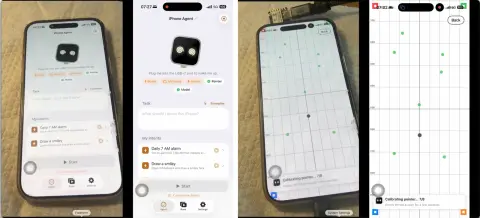
Plug the board into the iPhone and open ESP32 Agent. The app pairs the board over Bluetooth, has you join the board's Wi-Fi and pick "ESP32 Agent" under Control Center → Screen Mirroring, asks you to turn on AssistiveTouch and calibrates the pointer itself, then takes your model endpoint and key (stored in the Keychain) and lets you choose a vision model.
Give it a task
Type a goal such as "Open Settings and go to Wi-Fi" and press Start. The Dynamic Island shows what the agent is doing and has a stop button; saved tasks can also be run from Siri, Shortcuts, widgets and Control Center.
Drive the iPhone from a coding agent
The `esp32agent` CLI is an MCP server that talks to the board from your computer over Bluetooth or Wi-Fi (board firmware v0.2.2 or later), without the iPhone app. Add it to Claude Code as a plugin or as a bare MCP server; other MCP clients use the same `npx -y esp32agent mcp` command.
/plugin marketplace add onehumanbeing/esp32-iphone-agent
/plugin install esp32agent@handsy

# or only the MCP server
claude mcp add esp32agent -- npx -y esp32agent mcp
Commands and code are distilled from the project's own documentation — always check the official repo for the latest.
When to use it
- Reach for it to automate everyday tasks in iPhone apps that have no API — setting alarms, working through a lesson, filling a form — from a typed goal
- Reach for it to give Claude Code or another MCP client a real iPhone to look at and operate, for example to check an app on actual hardware
- Reach for it to test how well a vision model handles real phone UIs, with every run's screenshots and actions saved for replay and export
- Reach for it as a reference design for low-cost, computer-free device control built from AirPlay mirroring and USB HID
How ESP32 iPhone Agent compares
ESP32 iPhone Agent alongside other open-source computer & browser use tools AI/TLDR tracks, ranked by GitHub stars.
| Tool | Stars | What it does |
|---|---|---|
| Browser Use | ★ 121k | A Python library that lets agents control a real browser to read pages and complete tasks online from natural-language instructions. |
| Open Interpreter | ★ 68.9k | A lightweight coding agent that runs code on your own computer to carry out tasks from natural-language requests. |
| Chrome DevTools MCP | ★ 57.4k | The Chrome team's MCP server that lets a coding agent control and inspect a live Chrome browser — performance traces, network requests, console messages and Puppeteer-backed automation. |
| agent-browser | ★ 51.8k | Vercel Labs' native Rust browser automation CLI for AI agents: accessibility-tree snapshots with element refs, a per-session CDP daemon, an MCP server and built-in agent skills. |
| UI-TARS Desktop | ★ 39.6k | ByteDance's multimodal agent stack and desktop app that controls a computer's graphical interface using vision-language models. |
| CloakBrowser | ★ 32.9k | Stealth Chromium build with source-level fingerprint patches that drops into Playwright or Puppeteer code, so agents and scrapers browse without tripping bot detection. |
| Cua | ★ 32.4k | Infrastructure for computer-use agents, providing sandboxes and SDKs that let agents control full desktops on macOS, Linux, and Windows. |
| ESP32 iPhone Agent | ★ 5k | A $7 ESP32-S3 board gives a vision model eyes and hands on a real, unmodified iPhone |