
What is LLM Wiki?
LLM Wiki is an open-source implementation of Andrej Karpathy's LLM Wiki idea: instead of re-deriving answers from raw document chunks every time, a language model reads your sources once and compiles them into a persistent, cross-linked wiki that it keeps up to date. It sits in the Notes & Knowledge Bases category of the AI Productivity & Writing tools and is open-source, written in Python and licensed Apache-2.0.
Overview
LLM Wiki is an open-source implementation of Andrej Karpathy's LLM Wiki idea: instead of re-deriving answers from raw document chunks every time, a language model reads your sources once and compiles them into a persistent, cross-linked wiki that it keeps up to date. You collect the material — PDFs, Word and PowerPoint files, spreadsheets, Markdown notes and web clippings — and Claude (or any MCP-compatible client such as Claude Code or Codex) writes the wiki pages, with footnote citations pointing back to the sources they came from.
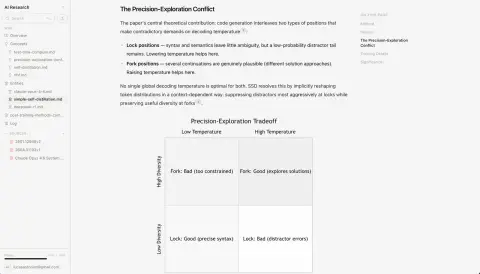
The project ships a Next.js web app for browsing the wiki and its underlying sources, a graph viewer of how concepts and entities relate, a Chrome extension for clipping pages and PDFs with highlights and margin comments, and an MCP server that gives Claude a small, deliberate tool set: guide, search, read, create, edit, append, delete and a deterministic lint pass that checks citations, dangling links, and orphan or stale pages. Pages can include charts, SVG and Mermaid diagrams.
It runs in two modes. Locally, you point it at any folder on your disk: your files are never moved or modified, and LLM Wiki adds only a wiki/ folder of ordinary Markdown pages plus a hidden, rebuildable .llmwiki/ SQLite search index. Hosted, the same operations run against Postgres and S3, either self-hosted or on the free llmwiki.app service. The README's recommended workflow is a nightly Claude Routine that reads whatever was added since the last run and folds it into the wiki, so the knowledge base maintains itself.
What it does
- MCP server with guide, search, read, create, edit, append, delete and lint tools, usable from Claude.ai, Claude Cowork, Claude Code, Codex or any MCP client
- Chrome extension that clips web pages and PDFs, with highlights and comments Claude can read over MCP; it targets either the hosted app or a local workspace
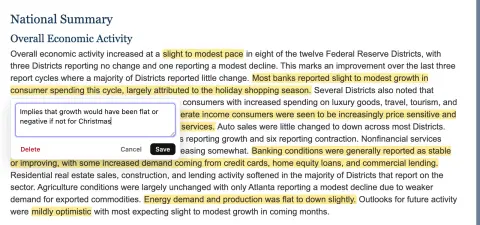
- Ingests PDF (optional Mistral OCR), Word and PowerPoint via LibreOffice, Excel sheet by sheet, cleaned HTML, Markdown, text, CSV, JSON and images
- Next.js web app to read the wiki and its sources, with native cross-links, a concept graph viewer, charts, SVG and Mermaid diagrams
- Local mode keeps the filesystem as source of truth: plain Markdown pages in wiki/, a derived SQLite index in .llmwiki/, and a watcher that re-indexes outside edits
- Deterministic lint for citation resolution, dangling links, orphan and stale pages, and frontmatter consistency
Getting started
Local mode needs Python 3.11+ and Node.js 20+. LibreOffice is optional (for Word and PowerPoint extraction), as is a MISTRAL_API_KEY for higher-quality PDF OCR. The hosted version can be tried at llmwiki.app instead.
Install
Clone the repository and install the Python and web dependencies (macOS / Linux; the README also lists the PowerShell equivalents for Windows).
git clone https://github.com/lucasastorian/llmwiki.git
cd llmwiki
python -m venv .venv && source .venv/bin/activate
pip install -r api/requirements.txt -r mcp/requirements.txt
cd web && npm install && cd ..
Point it at a folder of your files
Use any folder on disk that holds your documents, or an empty one. This initialises the workspace, indexes the folder, starts the API and web app, and opens localhost:3000. Local mode listens on 127.0.0.1 only.
./llmwiki open ~/researchConnect Claude over MCP
Print the MCP config for the workspace and paste the JSON into claude_desktop_config.json (Claude Desktop) or .claude/settings.json (Claude Code). One workspace is one MCP server entry. Then ask Claude to read the guide, ingest your sources and start building the wiki.
./llmwiki mcp-config ~/researchMake it self-maintaining
Schedule a Claude Routine (or a Desktop scheduled task) to run nightly with a prompt like the one from the README, so new uploads, clips and highlights are folded into the wiki without you remembering to.
Read the guide. Find everything added to the workspace since your last run — new sources, clips, and highlights. For each one, read it and update the wiki: write new pages where they're warranted, fold new material into existing pages, and fix any cross-references or citations it affects.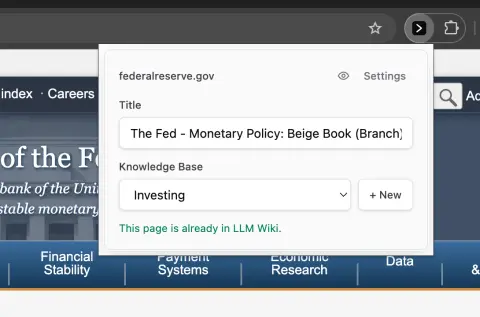
Clip from the browser
Install the LLM Wiki Chrome extension, flip its toggle to Local so it talks to your running workspace at http://localhost:8000, pick a destination folder (default /webclipper/) and start saving pages, highlights and comments. If the index ever needs rebuilding, `./llmwiki reindex ~/research` regenerates it from your source files.
Commands and code are distilled from the project's own documentation — always check the official repo for the latest.
When to use it
- Reach for it when you read a lot and want a cited personal wiki of those sources that updates itself instead of a pile of unconnected notes
- Reach for it to give Claude or Codex a context layer built from your own reading, highlights and comments
- Reach for it when a team wants institutional memory kept as plain Markdown pages that an agent maintains from shared documents
- Reach for it when you want Karpathy's LLM Wiki pattern with a ready-made web UI, MCP server and browser clipper rather than a bare folder of prompts
How LLM Wiki compares
LLM Wiki alongside other open-source notes & knowledge bases tools AI/TLDR tracks, ranked by GitHub stars.
| Tool | Stars | What it does |
|---|---|---|
| SiYuan | ★ 47k | A self-hosted, block-level knowledge base with Markdown WYSIWYG editing, SQL queries over blocks, spaced-repetition flashcards and AI writing and Q&A through an OpenAI-compatible API. |
| notebooklm-py | ★ 20.1k | An unofficial Python API, CLI and MCP server for Google's Gemini Notebook (formerly NotebookLM): bulk source import, cited Q&A, and batch export of audio, video, slides, quizzes, mind maps and data tables. |
| MineContext | ★ 5.5k | Local-first desktop app that captures and understands your screen context, then proactively delivers summaries, to-do lists and activity records. |
| Smart Connections | ★ 5.5k | Obsidian plugin that surfaces semantically related notes and excerpts as you write, using a bundled local embedding model that needs no API key and works offline and on mobile. |
| OpenKnowledge | ★ 4.8k | A local-first WYSIWYG markdown IDE and LLM wiki that keeps a knowledge base as plain files in git and exposes it to Claude, Codex and OpenCode over MCP. |
| ReadAny | ★ 2.9k | A local-first e-book reader for desktop and mobile that indexes your library into a local vector store, then answers questions about a book with hybrid vector + BM25 retrieval, alongside highlights, notes, TTS and WebDAV sync. |
| LLM Wiki Compiler | ★ 2.2k | CLI, MCP server and TypeScript SDK (llmwiki) that compiles raw sources into an interlinked, citation-traceable markdown wiki for people and agents. |
| LLM Wiki | ★ 1.7k | A personal wiki that Claude writes and maintains from your documents, clips and highlights over MCP |