
What is ReadAny?
ReadAny is an e-book reader built around three complaints about reading software: you forget what you read, your notes end up scattered, and you can only search by exact keyword. It sits in the Notes & Knowledge Bases category of the AI Productivity & Writing tools and is open-source, written in TypeScript and licensed GPL-3.0.
Overview
ReadAny is an e-book reader built around three complaints about reading software: you forget what you read, your notes end up scattered, and you can only search by exact keyword. Its answer is an AI-native reading workflow. You can ask questions about the current book or a selected passage and get answers grounded in your reading context — the app knows your position, your selection and your highlights. Retrieval is hybrid, combining vector search with BM25, so a concept is findable even when you cannot remember the words the author used.
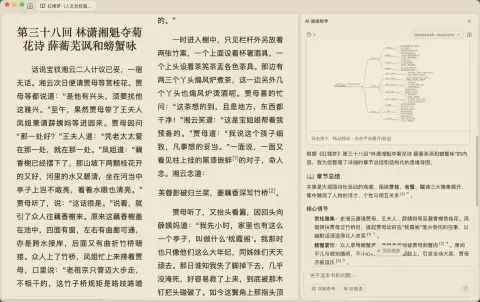
The privacy posture is the other half of the design. Embeddings are computed locally with Transformers.js and stored in a local vector store alongside a SQLite database, so books, highlights and notes stay on the device and the library remains usable offline. The language model is your choice and your key: OpenAI, Anthropic Claude, Google Gemini, Ollama, DeepSeek or any custom OpenAI-compatible endpoint. A Skills system ships built-in helpers — summariser, concept explainer, character tracker — and lets you write your own.
Around the AI sit the parts of a serious reader. Ten-plus formats are supported (EPUB, PDF, MOBI, AZW, AZW3, FB2, FBZ, CBZ, TXT, UMD; TXT and UMD are converted to EPUB on import so they get notes, search and sync too). Annotation covers five highlight colours and a WYSIWYG markdown note editor, with export to Markdown, HTML, JSON, Obsidian and Notion. Text-to-speech runs through Edge TTS, browser TTS or DashScope with 100-plus voices, adjustable speed and background playback. Reading statistics give a GitHub-style heatmap, trend charts and streaks, and WebDAV sync carries library, highlights and notes across devices with conflict merging. The desktop app is built on Tauri 2 with a React 19 front end; mobile ships as an Expo/React Native build for iOS and Android. It is GPL-3.0 licensed.
What it does

- RAG chat grounded in your reading context — the current book, your position, selected text and highlights
- Hybrid semantic search: local embeddings via Transformers.js in a local vector store, combined with BM25
- Bring your own model — OpenAI, Anthropic, Gemini, Ollama, DeepSeek or a custom OpenAI-compatible endpoint
- A Skills system with built-in summariser, concept explainer and character tracker, plus custom skills
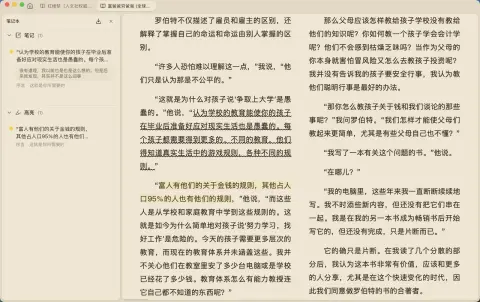
- Five-colour highlights and a WYSIWYG markdown note editor, exportable to Markdown, HTML, JSON, Obsidian and Notion
- Text-to-speech through Edge TTS, browser TTS or DashScope — 100+ voices, speed control and background playback
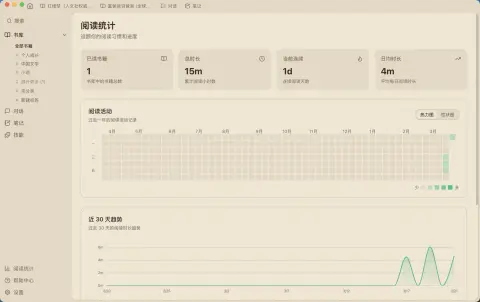
- Reading statistics with a contribution-style heatmap, trend charts, streaks and per-book completion
- WebDAV sync for library, highlights and notes with smart merge on concurrent edits, across macOS, Windows, Linux, iOS and Android
Getting started
ReadAny is a packaged desktop and mobile app. Installers for every platform are published on the releases page.
Install
macOS (.dmg for Apple Silicon and Intel), Windows (.msi), Linux (.AppImage) and Android (.apk) builds come from the latest release; iOS is distributed through TestFlight. On macOS there is a Homebrew cask.
brew tap codedogQBY/readany
brew install --cask readany
Three steps to reading
Drag and drop files into the library to import them, double-click a book to open it, then — optionally — go to Settings → AI and enter an API key for the provider you want to use. The reader works without AI configured.
Pick a model provider
OpenAI, Anthropic Claude and Google Gemini use their own console keys; Ollama and DeepSeek are configured as a local or custom endpoint. Embeddings run locally regardless of which chat provider you pick.
Run the mobile app from source
Mobile uses an Expo development build with `expo-dev-client`, not Expo Go — Expo Go cannot load ReadAny's native modules. Use the platform command the first time and whenever native dependencies change, then `pnpm expo:start` for day-to-day JS debugging.
git clone https://github.com/codedogQBY/ReadAny.git
cd ReadAny
pnpm install

pnpm expo:ios             # device
pnpm expo:ios:simulator   # simulator
pnpm expo:android         # start an emulator or connect a device first
pnpm expo:start           # Metro for the installed dev build
Commands and code are distilled from the project's own documentation — always check the official repo for the latest.
When to use it
- Interrogate a dense book — ask what a chapter argued, why a term was introduced, where an idea first appeared — without leaving the page
- Find a passage you remember by meaning rather than by the exact words the author used
- Keep an entire reading library, its highlights and its embeddings on your own devices, synced over your own WebDAV server
- Listen to a book through a chosen TTS voice while the reader keeps your position, notes and statistics in step
How ReadAny compares
ReadAny alongside other open-source notes & knowledge bases tools AI/TLDR tracks, ranked by GitHub stars.
| Tool | Stars | What it does |
|---|---|---|
| SiYuan | ★ 47k | A self-hosted, block-level knowledge base with Markdown WYSIWYG editing, SQL queries over blocks, spaced-repetition flashcards and AI writing and Q&A through an OpenAI-compatible API. |
| notebooklm-py | ★ 20.1k | An unofficial Python API, CLI and MCP server for Google's Gemini Notebook (formerly NotebookLM): bulk source import, cited Q&A, and batch export of audio, video, slides, quizzes, mind maps and data tables. |
| MineContext | ★ 5.5k | Local-first desktop app that captures and understands your screen context, then proactively delivers summaries, to-do lists and activity records. |
| Smart Connections | ★ 5.5k | Obsidian plugin that surfaces semantically related notes and excerpts as you write, using a bundled local embedding model that needs no API key and works offline and on mobile. |
| OpenKnowledge | ★ 4.8k | A local-first WYSIWYG markdown IDE and LLM wiki that keeps a knowledge base as plain files in git and exposes it to Claude, Codex and OpenCode over MCP. |
| ReadAny | ★ 2.9k | A local-first e-book reader that indexes your library into an on-device vector store, then answers questions about the book you are in |
| LLM Wiki Compiler | ★ 2.2k | CLI, MCP server and TypeScript SDK (llmwiki) that compiles raw sources into an interlinked, citation-traceable markdown wiki for people and agents. |
| LLM Wiki | ★ 1.7k | An open-source take on Karpathy's LLM Wiki that has Claude compile your documents, web clips and highlights into a cited, cross-linked Markdown wiki over MCP, with a web app, graph viewer and Chrome clipper. |