Overview
Odysseus is a self-hosted AI workspace rather than a chat window. One deployment covers chat and agents, deep research, a writing-first document editor, an email client, notes, tasks and a calendar — all running against local models or hosted APIs on hardware you control. It is packaged for Docker Compose, with native installs, GPU notes and Windows/macOS instructions in its setup guide.
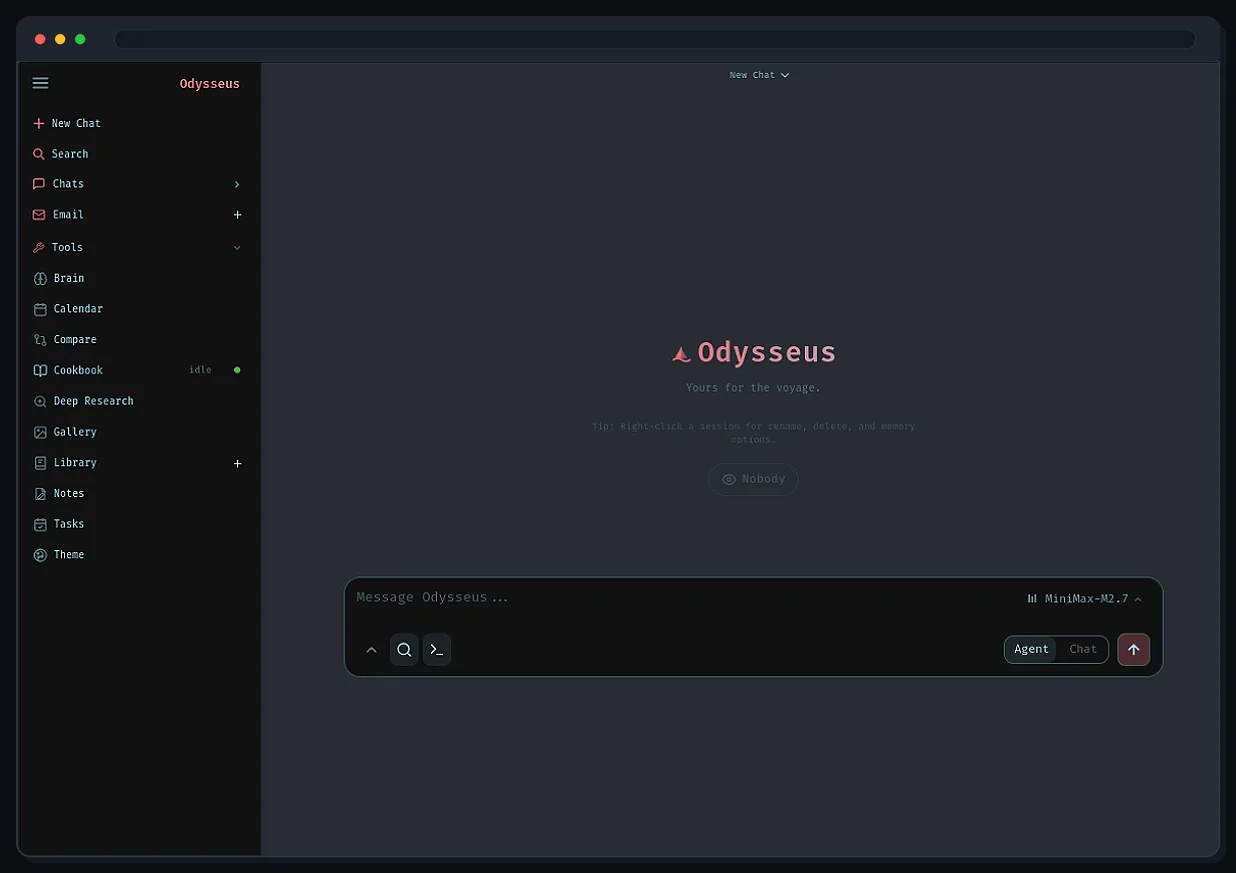
The agent side gives models tools, MCP servers, shell access, skills and memory, and the Cookbook makes the local-model half practical: hardware-aware model recommendations, downloads and serving from inside the app. Deep Research runs multi-step web research that reads sources and writes a report; Compare runs blind side-by-side model tests and synthesises the results. The document editor takes AI edits and suggestions over Markdown, HTML and CSV with syntax highlighting.
Beyond the model features it behaves like a personal workspace: an IMAP/SMTP inbox with triage, tags, summaries, reminders and reply drafts; notes, todos, scheduled agent tasks and CalDAV calendar sync; and extras including a gallery and image editor, themes, uploads, web search, presets, sessions and two-factor auth. Because the workspace holds powerful local tools, the project is explicit about deployment safety — keep `AUTH_ENABLED=true` on anything network-accessible, keep `LOCALHOST_BYPASS=false` outside local development, and never expose raw model or service ports. It is licensed AGPL-3.0-or-later.
What it does
- Chat and agents over local or API models, with tools, MCP servers, shell, skills and memory
- Cookbook: hardware-aware model recommendations, downloads and serving from inside the workspace
- Deep Research — multi-step web research that reads its sources and generates a report — plus Compare for blind side-by-side model tests
- A writing-first document editor with AI edits and suggestions across Markdown, HTML and CSV
- IMAP/SMTP email with triage, tags, summaries, reminders and reply drafts
- Notes, tasks, scheduled agent tasks and CalDAV calendar sync, alongside a gallery/image editor, web search, themes and 2FA
Getting started
The quickest path is the Docker Compose stack in the README. Note that `dev` is the default branch and gets changes first; `main` is the more curated branch.
Clone and configure
Copy the example environment file before starting the stack.
git clone https://github.com/odysseus-dev/odysseus.git
cd odysseus
cp .env.example .env
Bring the stack up
Builds and starts the containers in the background.
docker compose up -d --buildLog in
Open http://localhost:7011 once the containers are healthy. The first admin password is printed in the container logs.
docker compose logs odysseusHarden it before exposing it
The workspace ships shell and tool access, so anything reachable beyond your machine needs auth on and the localhost bypass off. Native installs, GPU notes, HTTPS and the rest of the configuration live in website/setup.md.
AUTH_ENABLED=true
LOCALHOST_BYPASS=false
Commands and code are distilled from the project's own documentation — always check the official repo for the latest.
When to use it
- Run one private workspace for chat, agents, research and documents on your own hardware instead of several hosted services
- Put a local model to work through the Cookbook without assembling a serving stack by hand
- Triage an IMAP mailbox with summaries, tags and drafted replies that never leave your server
- Compare models blind on your own prompts before committing to one
How Odysseus compares
Odysseus alongside other open-source assistants & chatbots tools AI/TLDR tracks, ranked by GitHub stars.
| Tool | Stars | What it does |
|---|---|---|
| OpenClaw | ★ 393k | OpenClaw is a self-hosted personal AI assistant that answers you on WhatsApp, Telegram, Slack, Discord, and many other channels, with voice and a live visual canvas. |
| Hermes Agent | ★ 257k | A self-improving personal AI agent from Nous Research that builds skills from experience, remembers across sessions, and reaches you on Telegram, Discord, Slack, and more. |
| Odysseus | ★ 94.3k | A self-hosted AI workspace: chat, agents, research, documents, email, notes and calendar in one stack |
| CowAgent | ★ 47.5k | A self-hosted assistant that plans and executes tasks with built-in file, terminal, browser and search tools, and answers across a web console plus a dozen messaging platforms. |
| AstrBot | ★ 43k | An all-in-one agent chatbot platform that puts LLM conversations, tools, knowledge bases and a plugin marketplace inside messaging apps like Telegram, Slack, Discord, QQ and Feishu. |
| OpenHuman | ★ 42.3k | A local-first desktop personal AI for macOS, Windows and Linux that keeps a compressed memory tree on your machine and orchestrates checkpointed research and automation workflows. |
| MindsHub | ★ 39.8k | An agent workspace for knowledge work and software development that runs swappable open-source agent harnesses against your choice of frontier or open models. |
| Khoj | ★ 37.8k | An open-source, self-hostable personal AI that chats with any local or online LLM, answers from your own documents and the web, and runs custom agents. |