
What is Parlant?
Parlant is an open platform from Emcie for building customer-facing chat agents: support bots, lead-generation agents and other assistants that talk to customers rather than to a cooperative internal user. It sits in the Agent Frameworks & Builders category of the Agents & Automation tools and is open-source, written in Python and licensed Apache-2.0.
Overview
Parlant is an open platform from Emcie for building customer-facing chat agents: support bots, lead-generation agents and other assistants that talk to customers rather than to a cooperative internal user. You describe how the agent should behave in plain-language policies, and the agent itself is ordinary Python code built on the `parlant` SDK, so it can call any system your code can reach and use any model provider you choose.
The core idea is that a customer-facing agent has to follow operating rules even when a customer changes the subject, mixes two topics or pushes back. You give one agent a catalog of policies, procedures, tools and canned responses, and on every turn Parlant works out which of them the conversation has made relevant and puts only those in front of the model. There are no conversation paths to predefine and no handoffs between sub-agents; adding policies makes the agent more capable without asking the model to weigh every rule at once.
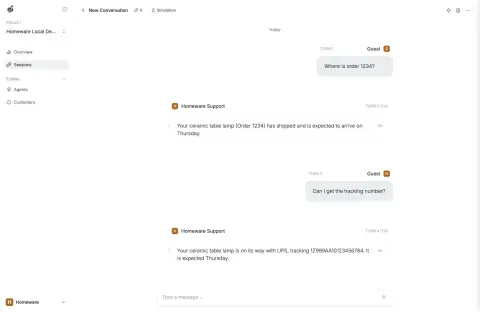
Around that engine Parlant ships the parts every customer-facing agent needs: checks on tool calls such as refunds before they run and on replies before they are sent, approved-wording canned responses, a chat widget for a website or app, human handoff in the same chat, simulated test conversations, conversation analytics and observability that links each reply to the policies and tool calls behind it. The framework is Apache-2.0 with no usage limits; the hosted Dashboard used for testing, hosting and monitoring is a flat monthly fee per workspace and free for development. The project's README positions it as a code-owned alternative to closed CX platforms such as Intercom Fin, Sierra and Decagon, and is aimed at teams that build with a coding agent.
What it does
- Plain-language policies and procedures that Parlant matches to each turn, so only the rules the conversation needs reach the model
- Tool reviews and message reviews that check actions like refunds before they run and replies before they are sent
- Canned responses: approved wording the agent adapts to each conversation
- Adaptive effort that spends more on a turn only when your rules mark it as high-stakes
- Chat widget, human handoff, simulated test conversations, session analytics and per-reply observability
- Any model provider: OpenRouter by default, plus OpenAI, Anthropic, Gemini, LiteLLM and custom providers
Getting started
Parlant runs on Python 3.10–3.14. The quickstart scaffolds a project, connects it to the Dashboard for testing, and runs the agent server locally.
Install the package
pip install parlantScaffold a project
Pick a scaffold: `retail-store` is a working support agent, `lead-gen` a website agent that qualifies visitors and books meetings, `basic` an empty one.
parlant init my-agent --scaffold retail-store
cd my-agent
cp .env.example .env
Add your model key and Dashboard token
OpenRouter is the default provider. In the Dashboard, create a Local development project and copy its project token into `.env`.
OPENROUTER_API_KEY=your-api-key
PARLANT_DASHBOARD_PROJECT_TOKEN=your-project-token
Start the agent server
Use `run.cmd` on Windows. The example agent listens on port 8800 and its tool service on port 8818; keep the terminal open.
./run.sh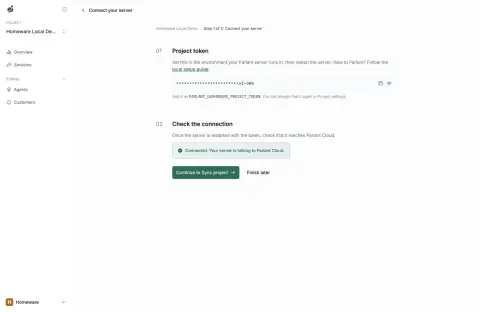
Check the connection and talk to it
In the Dashboard click Check connection, then Open project, and start a New session on the Overview page. Hot reload picks up Python changes; restart the server after editing `.env`.
Or write the agent by hand
The SDK defines tools, an agent, canned responses and policies in a few lines (abridged from the README).
import parlant.sdk as p

@p.tool
async def check_order_status(order_id: str) -> p.ToolResult:
    """Look up an order's current status."""
    return p.ToolResult(data=f"Order {order_id} is still being packed.")

async def main() -> None:
    async with p.Server() as server:
        agent = await server.create_agent(
            id="support",
            name="Homeware Support",
            instructions="You help customers of an online homeware store.",
        )
        await agent.create_policy(
            title="Order status",
            content="When a customer asks where an order is, ask for the order "
                    "number, look it up with check_order_status, and give the status.",
            tools=[check_order_status],
        )
Commands and code are distilled from the project's own documentation — always check the official repo for the latest.
When to use it
- A customer-support agent that must follow refund, escalation and wording rules in every conversation
- A website lead-generation agent that qualifies visitors and books meetings
- Replacing a per-resolution CX platform with an agent on your own code and model accounts
- Testing policy changes against simulated customer personas before shipping them
How Parlant compares
Parlant alongside other open-source agent frameworks & builders tools AI/TLDR tracks, ranked by GitHub stars.
| Tool | Stars | What it does |
|---|---|---|
| DeepSeek Harness | ★ 269k | DeepSeek AI's open-source agent harness (dsh), built on Cordis, where models, tools, skills, sessions, sandboxes, storage and the UI are all plugins composed through profiles. |
| AutoGPT | ★ 188k | One of the earliest autonomous agent projects, now a platform for building and running agents from reusable blocks and workflows. |
| DeerFlow | ★ 84.9k | ByteDance's open-source super agent harness built on LangGraph: skills, sub-agents, sandboxes, a filesystem and long-term memory for long-horizon research, coding and content tasks. |
| nanobot | ★ 49.8k | Lightweight self-hosted personal AI agent framework in Python, with a WebUI, terminal and chat-app channels, tools, long-term memory, MCP and scheduled automations. |
| LangGraph | ★ 44.3k | A library from the LangChain team for building stateful, graph-based agent workflows with explicit control over steps, memory, and human-in-the-loop checkpoints. |
| Agno | ★ 43k | A fast Python framework (formerly Phidata) for building agents with memory, tools, and multimodal inputs, plus a runtime for deploying them in production. |
| AgentGPT | ★ 36.3k | AgentGPT lets you name a custom AI, give it a goal, and watch it plan tasks, run them, and learn from the results, all from a web browser. |
| Parlant | — | Open-source Python framework for customer-facing chat agents that stay on your policies |