
What is rea-video?
rea-video is an agent skill and CLI that reverse-engineers a video shot by shot and writes a plan to remake it. It sits in the Video Generation category of the Multimodal Generation tools and is open-source, written in Python and licensed Apache-2.0. To get started: ask your agent to install it and break down a video.
Overview
rea-video takes any video — a talking head, a tabletop product clip, an AI-generated short, a 3D explainer, kinetic-type motion graphics or a mixed edit — and works out shot by shot how it was made: whether each shot was filmed, AI-generated, rendered from code or a template, or screen-recorded. On top of the picture it breaks down captions and styled text (with start and end times that export to SRT or ASS), stickers and picture-in-picture, where the cuts fall and whether they hit the beat, and the audio: human or AI voice, AI or library music and its BPM, and where each sound effect lands.
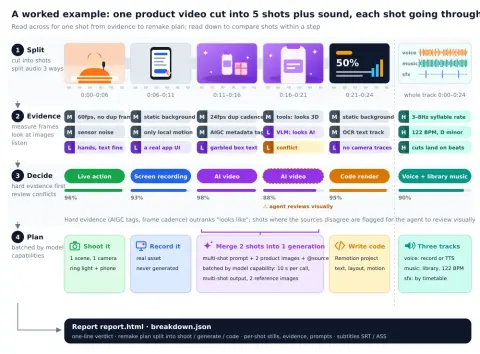
It is built to be driven by an AI agent. You ask Claude Code, Codex or any agent that can run commands to install the repository and break down a video; the agent installs a Python CLI, reads the bundled skill and runs the workflow. The pipeline splits the video into shots and separates voice, music and effects, gathers evidence by measuring frames (frame cadence, sensor noise, whole-image panning, AIGC tags in the metadata), looking at images (hands, text, physics) and listening (BPM, key, singing versus speech), then decides with hard evidence such as AIGC tags and frame cadence outranking "looks like". Shots where the signals conflict are flagged for the agent to review visually.
The output is a one-line verdict (for example "41% AI video + 59% code UI"), a remake plan split into what to film, what to generate and what to code, and a full `report.html` with per-shot frames, evidence, reverse-engineered prompts, camera and lighting notes and the audio breakdown. The tools-only mode runs offline and free; adding any OpenAI-compatible video-capable model (the README names Gemini and Doubao) improves the live/AI/3D calls on recompressed platform downloads. The project reports how-it-was-made accuracy of 98–99% on original files with tools alone, and publishes its evaluation in `eval/RESULTS.md`. It is Apache-2.0, written in Python, and states that it is meant for learning a video's structure and remaking it with material you have the rights to.
What it does
- Per-shot verdicts across live footage, AI video, avatar/lip-sync, 3D and animation, code or template renders, screen recordings and mixed edits
- Caption and styled-text tracks with timings exportable to SRT / ASS, plus sticker, emoji and picture-in-picture placement
- Audio breakdown into voice, music and effects stems, with human-vs-AI voice, AI-vs-library music, BPM and beat-matched cut detection
- A remake plan that batches AI shots by what the target video model supports, gives camera and lighting setups for live shots and a Remotion approach for code shots
- Offline, free tools-only mode, with an optional OpenAI-compatible VLM or the agent's own vision for review
- Remembers user corrections and preferences between runs (`rea-video correct`, `rea-video prefs`)
Getting started
You need Python 3.10+ and ffmpeg. The usual route is to let your agent do the install; the CLI is there for running it yourself.
Ask your agent to install it and break down a video
In Claude Code, Codex or any agent that can run commands, hand it the repository and a video. The agent installs the CLI, learns the workflow from the bundled skill and runs it.
Install https://github.com/JuneYaooo/rea-video, then break down this video: /path/to/video.mp4Or install by hand
The install script installs the CLI (pip, or pipx / a local .venv if pip is blocked) and links the skill into `~/.claude`, `~/.codex` and `~/.agents`. In Claude Code the skill can also be added as a plugin with `/plugin marketplace add JuneYaooo/rea-video`.
brew install ffmpeg            # or: sudo apt install ffmpeg
git clone https://github.com/JuneYaooo/rea-video && cd rea-video
bash scripts/install_skill.sh
rea-video --help
Run an offline breakdown
Tools-only mode is deterministic, offline and free. The first run downloads a roughly 67 MB voice-separation model.
rea-video decompose ref.mp4 -o out/ref
open out/ref/report.html
Add a vision model for recompressed downloads
Any OpenAI-compatible multimodal model works; several can be listed as fallbacks. Without one, an agent that can see images can review the uncertain shots instead.
export REA_VLM_BASE_URL=https://.../v1 REA_VLM_API_KEY=... REA_VLM_MODEL=gemini-2.5-pro,gpt-4o
rea-video decompose ref.mp4 -o out/ref --vlm

# or let the agent act as the VLM
rea-video review out/ref
rea-video apply-review out/ref --by zcode
Commands and code are distilled from the project's own documentation — always check the official repo for the latest.
When to use it

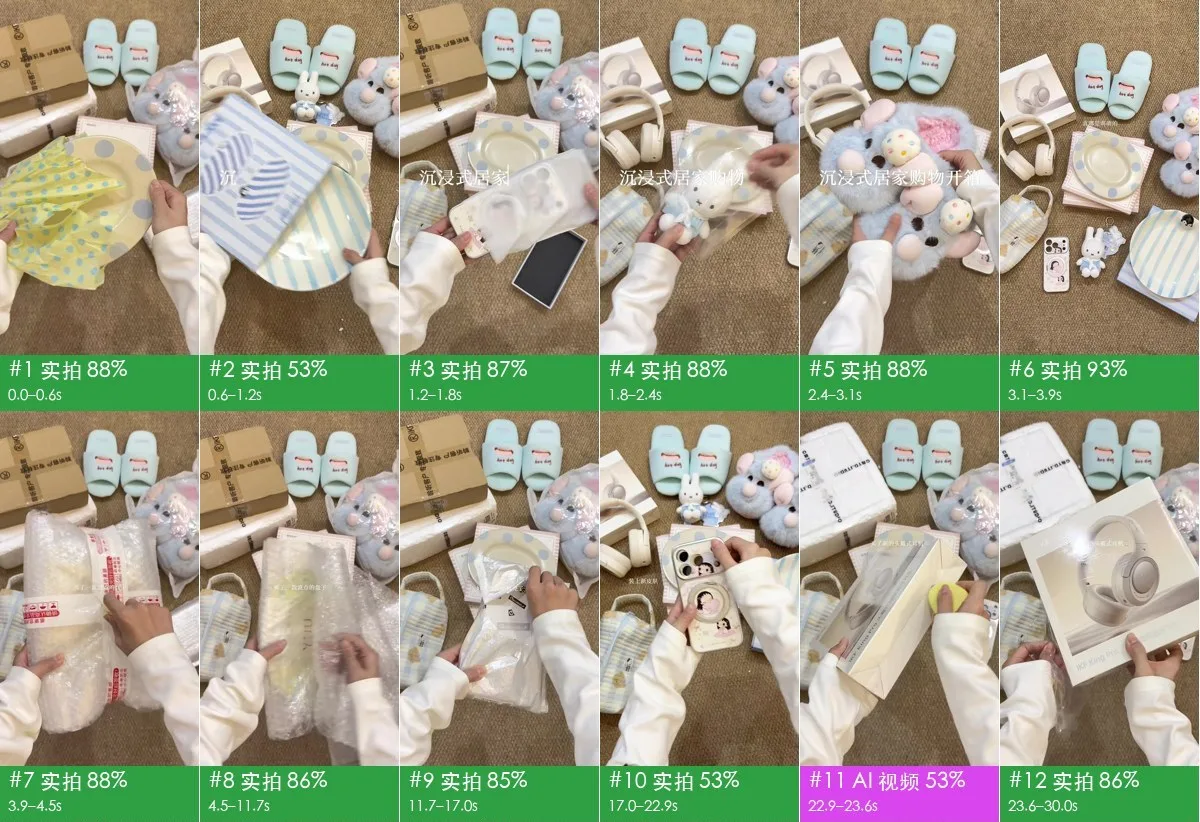
- Find out whether a viral clip or ad was filmed, AI-generated or built in code before deciding how to make something like it
- Turn a reference video into a shooting list, per-shot generation prompts and a Remotion plan for the code-built parts
- Pull a video's caption track, cut timings and music BPM to study its pacing
- Split a video into voice, music and effects stems with `rea-video stems`
How rea-video compares
rea-video alongside other open-source video generation tools AI/TLDR tracks, ranked by GitHub stars.
| Tool | Stars | What it does |
|---|---|---|
| MoneyPrinterTurbo | ★ 145k | A self-hosted WebUI, API and CLI that turns one topic or keyword into a finished short video — script, stock or generated footage, voiceover, subtitles and music. |
| HyperFrames | ★ 88k | HeyGen's HTML-to-video renderer: author a composition in HTML, CSS and JS, preview it in a browser, then render the same input to a deterministic MP4 locally or on AWS Lambda. |
| OpenMontage | ★ 82.3k | An agentic video production system that gives a coding assistant 12 pipelines and 100+ tools to research, script, generate and render a video end to end. |
| Open Generative AI | ★ 35.7k | MIT-licensed desktop and web studio for AI image, video and lip-sync generation that runs hosted models through the Muapi.ai API, with optional local image models in the desktop app. |
| Hypit | ★ 31k | A markup language and compiler that lets a coding agent rebuild a reference video as an editable workflow — footage, captions, B-roll and effects anchored to words rather than timestamps — and render variants in one command. |
| Toonflow | ★ 22.5k | Infinite-canvas workbench for AI short-drama production, taking a novel through chapter events, script, storyboards and video nodes. |
| Lemo-Opuscar | ★ 19.7k | A Claude Code skill and library of 59 film styles that has a coding agent make a narrated short film entirely in code — canvas and WebGL frames, scored music and TTS — with no video model. |
| rea-video | ★ 12k | An agent skill and CLI that reverse-engineers a video shot by shot and writes a plan to remake it |