
What is Scenario Agent Skills?
Scenario Agent Skills is a library of Agent Skills from Scenario (scenario.com), a creative AI platform. It sits in the Agent Skills & Plugins category of the Agents & Automation tools and is open-source, written in Python and licensed MIT. To get started: install the core skill, or pick from the menu.
Overview
Scenario Agent Skills is a library of Agent Skills from Scenario (scenario.com), a creative AI platform. Each skill is a `SKILL.md` file in the open Agent Skills format that an AI coding agent loads on demand; the `skills` CLI installs them into Claude Code, Cursor, Codex, Copilot and, per the README, 70+ other agents. The 71 Scenario skills teach the agent how to produce images, video, audio, textures, skyboxes, 3D assets and custom-trained models through the Scenario MCP server, for games, marketing and other creative work.
The skills are workflow knowledge rather than a new API. The core `scenario` skill lays out the generation loop — resolve the team and project, find a model with `recommend` or `search`, read its schema, run it, wait on the job, then display and download the asset — and has the agent price a payload with a `dry_run` before spending Creative Units. Goal skills build on that loop (product shots, brand kits, sprite animation, seamless textures, music videos, UGC-style ads, every placement size from one master), while model-family skills cover the quirks of specific image, video, audio and 3D models such as GPT Image, Gemini image, Veo, Kling, Seedance, ElevenLabs, Meshy and Rodin. Other skills hold one character or style consistent across a set, train custom models, review output against a brief, and let a team admin manage model access, spend caps and usage reports.
The skill files are MIT-licensed, but the Scenario skills only work with the Scenario MCP server connected and a Scenario account, signed in by OAuth or an API key; generation is billed in Scenario credits, and Scenario's pricing page lists a free plan with 50 daily credits alongside paid plans. The repository also ships expert-tool families that do not use Scenario at all: a lead skill plus specialists that drive desktop software installed on your machine — ZBrush, Blender, Maya, Unreal Engine, Unity and Godot — each family with a README recording how it was built and how far it was verified. Releases are cut with release-please; v0.56.0 shipped on October 14, 2026.
What it does
- 71 Scenario skills covering images, video, audio, textures, skyboxes, 3D meshes and worlds, consistent characters and custom model training
- A core generation loop over the Scenario MCP server — discover, schema, run, wait, display, download — with `dry_run` pricing before a billed run
- Model-family skills for image, video, audio and 3D models (GPT Image, Gemini image, Seedream, Veo, Kling, Seedance, Runway, ElevenLabs, Meshy, Rodin and more) that encode each model's modes, caps and cost traps
- Outcome skills for product shots, brand kits, sprite sheets, storyboards, video ads, music videos, captions and per-platform formats
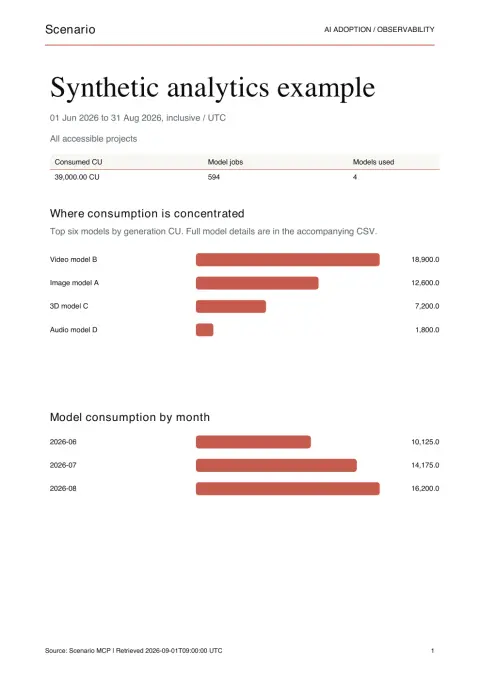
- Team-admin skills for model access control, per-member Creative Unit caps, API key roles and local usage dashboards and PDF reports
- Expert-tool families for ZBrush, Blender, Maya, Unreal Engine, Unity and Godot that drive the installed application rather than Scenario
Getting started
You need an agent that supports Agent Skills (Claude Code, Cursor, Codex and others), Node.js for `npx`, and a Scenario account for the Scenario skills. The expert-tool families need the matching desktop application instead; their install commands are in each family's README.
Install the core skill, or pick from the menu
The installer menu opens with nothing preselected, so select skills before pressing enter.
# A single skill
npx skills add scenario-labs/skills --skill scenario

# Pick from the installer menu, grouped by topic
npx skills add scenario-labs/skills
Or install a goal bundle
The README gives one command per outcome; this one installs the consistent-characters and custom-models set. Add `-y` to skip prompts in a script or CI.
npx skills add scenario-labs/skills --skill scenario --skill scenario-consistency --skill scenario-identity-library --skill scenario-model-training --skill scenario-image-editing --skill scenario-sprite-animation --skill scenario-video --skill scenario-asset-analysis --skill scenario-quality-gate --skill scenario-seedream --skill scenario-gemini-imageConnect the Scenario MCP server
In Claude Code, add the server below; in any other MCP client add `https://mcp.scenario.com/mcp`. Sign in with your Scenario account (OAuth) or use an API key.
claude mcp add --transport http scenario https://mcp.scenario.com/mcpAsk your agent for an asset
Example prompts from the README:
Generate four style-matched potion icons with transparent backgrounds for my RPG inventory
Make a seamless brick texture, then upscale it to 2048 without breaking the tiling
Turn this concept sketch into a 3D prop and let me preview it before I export the GLB
Keep the skills up to date
Installs fetch each skill from `main` with no version pinning; pull changes by updating where you installed.
npx skills updateCommands and code are distilled from the project's own documentation — always check the official repo for the latest.
When to use it
- Have a coding agent produce game art — sprites, tilesets, seamless textures, skyboxes and 3D props — in one consistent style without leaving the editor
- Turn one product shot and a brief into on-brand stills, video ads and every placement size, with the agent quoting the cost before it runs
- Keep a character or brand consistent across a whole batch, or train a custom model on your own art and generate with it
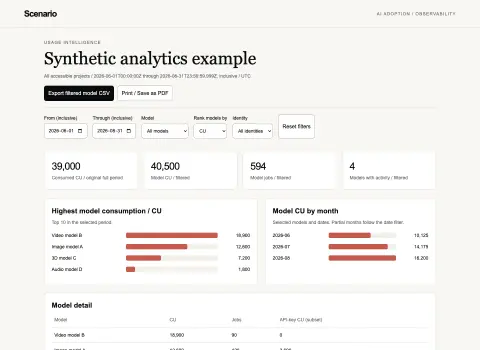
- Give a team admin usage rankings, CSV exports and a local dashboard of who spent which Creative Units on which models
- Drive Blender, Maya, ZBrush, Unreal Engine, Unity or Godot from an agent with the expert-tool skill families
How Scenario Agent Skills compares
Scenario Agent Skills alongside other open-source agent skills & plugins tools AI/TLDR tracks, ranked by GitHub stars.
| Tool | Stars | What it does |
|---|---|---|
| Superpowers | ★ 311k | A composable skills plugin that installs a spec-first, TDD, subagent-driven development methodology into Claude Code, Codex, Cursor, Gemini CLI and other coding harnesses. |
| Skills for Real Engineers | ★ 309k | Matt Pocock's everyday agent skills for coding agents, covering alignment grilling, planning, code review and research — small, composable and meant to be edited. |
| ECC | ★ 295k | An installable plugin that adds 68 agents, 286 skills, hooks, rules, memory and an agent-config security scanner to Claude Code, Codex and other coding harnesses. |
| Karpathy Coding Guidelines | ★ 228k | A Claude Code plugin and CLAUDE.md rule set built from Andrej Karpathy's observations on LLM coding pitfalls: think before coding, keep it simple, make surgical changes, and work to verifiable success criteria. |
| Ponytail | ★ 182k | A skill and plugin that makes a coding agent take the laziest correct route — a seven-rung ladder from "does this need to exist?" to "the minimum that works" — while keeping validation, security and accessibility off the chopping block. |
| Caveman | ★ 117k | A skill plus local proxy that shortens an AI coding agent's prose while leaving code, commands and paths untouched — the rule file cuts what the agent writes, the proxy compresses what it reads. |
| Addy’s Agent Skills | ★ 112k | A pack of production engineering skills for AI coding agents, with nine lifecycle slash commands — /spec, /plan, /build, /test, /review, /ship — installable into 70+ agents. |
| Scenario Agent Skills | ★ 1.4k | Agent Skills that teach coding agents to make images, video, audio and 3D through the Scenario MCP server, plus expert teams for DCC tools and game engines |