
What is Yogurt?
Yogurt is a free, open-source desktop app from Frigade for AI meeting notes. It runs in the background and records your microphone and the audio playing on your computer, so no bot joins the call and nobody else has to install anything. It sits in the Meeting & Notes AI category of the AI Productivity & Writing tools and is open-source, written in TypeScript and licensed MIT.
Overview
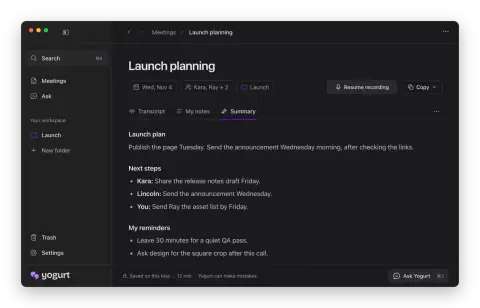
Yogurt is a free, open-source desktop app from Frigade for AI meeting notes. It runs in the background and records your microphone and the audio playing on your computer, so no bot joins the call and nobody else has to install anything. During the call you can add your own notes; afterwards Yogurt merges them with the conversation into one set of notes, and you can ask questions about the meeting with the original transcript close by. Its maker presents it as a private, open-source alternative to Granola.
The AI runs on your machine. According to its maker, transcription uses whisper.cpp, or Apple's on-device SpeechAnalyzer where the Mac supports it, and summaries and questions use a local open-weight model run through llama.cpp. On first run Yogurt downloads the models it needs from Hugging Face and picks the largest notes model your computer can run, which can be about 14 GB on a Mac with 64 GB of memory. After that one-time download, transcription, notes and questions work offline.
Audio, transcripts, notes and questions stay on the computer, there is no telemetry, and the app only goes online to download models and check GitHub for updates. A local MCP server lets you share notes with other AI apps; those apps may send what they read to their own online model. Yogurt is an Electron app written in TypeScript under the MIT license and runs on Apple silicon Macs, 64-bit Windows and 64-bit Linux.
What it does
- Records the microphone and computer audio of any call app, with no meeting bot
- Transcription on device with whisper.cpp, or Apple's SpeechAnalyzer on supported Macs
- Summaries that merge your own notes with the conversation: a plan, next steps per person and personal reminders
- Ask questions about a meeting and see the answer next to the original transcript
- Local notes model chosen and downloaded to fit your hardware, run through llama.cpp; works offline after setup
- A local MCP server for sharing notes with other AI apps
- Calendar integration and speaker names from calls on macOS
- No account, no telemetry, and all data saved in a local folder
Getting started
Yogurt needs at least 8 GB of memory and runs on macOS 14.4 or later (Apple silicon), Windows 10 version 2004 or later (x64) and Ubuntu 22.04 or a compatible newer system (x64). If your computer is too slow, setup tells you.
Download the app
Download the build for your system from the latest GitHub release. On Windows, the app is not yet signed with a Microsoft certificate, so choose More info, then Run anyway. On Ubuntu 22.04 install libfuse2 first (libfuse2t64 on 24.04 and newer) so the AppImage can start.
https://github.com/FrigadeHQ/yogurt/releases/latest/download/Yogurt-mac-arm64.dmg
https://github.com/FrigadeHQ/yogurt/releases/latest/download/Yogurt-windows-x64.exe
https://github.com/FrigadeHQ/yogurt/releases/latest/download/Yogurt-linux-x86_64.AppImage
Let it download the models
On first run Yogurt downloads its models from Hugging Face. A smaller notes model comes first, then the best one your computer can run. On Windows and Linux, setup also checks how fast transcription runs on your machine.
Grant permissions on macOS
On a Mac, Yogurt needs Microphone access and call audio access, which macOS lists under Screen & System Audio Recording. Calendar, Notifications and Accessibility (to read speaker names from supported call apps) are optional.
Record a meeting
Recording always waits for your click. Tell the other people on the call that you are recording, add notes when something matters, and open the summary or ask Yogurt a question when the call ends.
Commands and code are distilled from the project's own documentation — always check the official repo for the latest.
When to use it
- Taking meeting notes without inviting a recording bot into Zoom, Meet or Teams
- Keeping sensitive calls off third-party servers by transcribing and summarizing on your own computer
- Getting per-person next steps and reminders after a call, mixed with the notes you typed
- Giving a coding or chat assistant access to past meeting notes through Yogurt's local MCP server
How Yogurt compares
Yogurt alongside other open-source meeting & notes ai tools AI/TLDR tracks, ranked by GitHub stars.
| Tool | Stars | What it does |
|---|---|---|
| Cicada | ★ 2.2k | An open-source macOS app that adds live bilingual subtitles, structured meeting notes and push-to-talk interpreting to any call or stream, with speech recognition on device. |
| Otter.ai | — | AI meeting assistant that records, transcribes in real time, and summarizes conversations with speaker labels and action items. |
| Fireflies.ai | — | AI notetaker that joins calls to transcribe, summarize, and search meetings, with conversation analytics and CRM integrations. |
| Granola | — | Bot-free AI notepad that transcribes meeting audio in the background and turns your rough notes into structured summaries. |
| Fathom | — | AI notetaker that records, transcribes, and instantly summarizes calls with action items synced to Slack, Salesforce, and HubSpot. |
| tl;dv | — | AI meeting recorder and notetaker that transcribes, summarizes, and clips highlights across Zoom, Meet, and Teams. |
| Avoma | — | AI meeting assistant and conversation intelligence platform for sales teams, with transcription, scheduling, and CRM automation. |
| Yogurt | — | Free, open-source desktop app that records, transcribes and summarizes meetings with AI that runs on your own computer |