In plain English
An AI agent picks its tools the same way a new employee picks a process from a runbook: by reading the title, skimming the description, and making a judgment call. If two processes have nearly identical names, the employee guesses. If the description omits a key constraint, they apply the tool in the wrong context. If the runbook has thirty overlapping procedures, they waste time deliberating instead of acting.
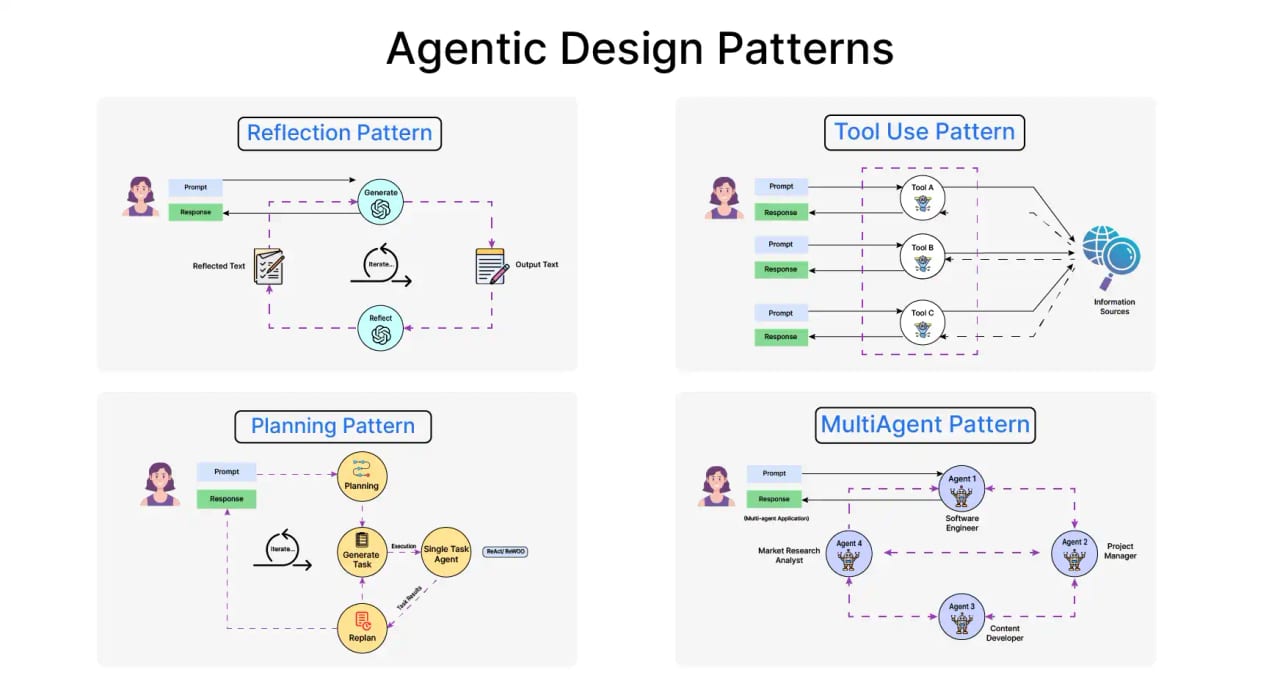
Tool design is the discipline of making that runbook unambiguous. The name, description, and scope of each tool are the primary inputs the model uses — on every single request — to decide whether to call a tool, which tool to call, and what arguments to pass. There is no other documentation the model can consult. If those three things are right, your agent is reliable. If they are wrong, even the most capable model will stumble.
Think of it like a well-labeled breaker box. Each breaker has a crisp label ('Kitchen outlets', 'Master bedroom lights', 'HVAC') and covers exactly the right scope — not so broad that flipping one breaker kills the whole house, not so narrow that you need to flip seven to run a single appliance. Tool design is that same problem: right label, right scope, no surprises.
Why it matters
When a tool is poorly named or described, the cost is not a single bad step — it cascades. A wrong tool call in step two produces bad output that feeds step three, corrupting the rest of the task. Researchers studying agentic systems consistently find that tool-side failures are among the most common causes of task breakdown, and that they are often more sensitive to description quality than to the model's raw capability.
Three failure patterns show up most often in production:
- Selection confusion. Two tools with overlapping descriptions cause the model to pick arbitrarily or to hedge by calling both. The Anthropic engineering team found that tool overlap 'distracts agents from pursuing efficient strategies' — the model deliberates instead of acting.
- Over-broad tools. A single tool that does too many things forces the model to pass complex parameter combinations it's likely to get wrong. A
manage_calendartool that handles creation, deletion, and editing is three separate decision surfaces bundled into one confusing call. - Too many tools. Research on LLM agents consistently shows accuracy degradation when the active tool list grows beyond roughly 10–15 tools. Each additional tool adds noise to the selection step, raising the probability of a wrong pick. This is sometimes called 'choice overload' and it costs real money: more deliberation means more output tokens.
How names, descriptions, and granularity work together
Every tool definition the model sees has three parts that determine selection: the name (a short identifier), the description (a prose briefing), and the parameter schema (structure and constraints). Names and descriptions drive which tool gets called; granularity — how narrowly or broadly each tool is scoped — determines whether the model can call it correctly at all.
Names: the verb_noun contract
The most reliable naming pattern is verb_noun in snake_case: search_web, create_event, get_weather, delete_file. This format immediately signals two things — the action (search, create, get, delete) and the target (web, event, weather, file). A model scanning a list of ten tool names will orient itself faster when each name is structured this way.
For larger tool sets covering multiple domains, add a namespace prefix: calendar_create_event, calendar_list_events, crm_search_contacts, crm_update_contact. The prefix groups related tools visually, reduces the chance of cross-domain confusion, and makes the selection signal cleaner. Anthropic's engineering team tested prefix vs. suffix namespacing on real agents and found 'non-trivial effects on selection accuracy' — it is not a cosmetic choice.
Descriptions: writing the briefing the model actually reads
The description is not a label or a comment — it is the complete briefing the model uses to decide whether to invoke the tool. It is re-read on every request. Every word is a signal. A description that is vague, ambiguous, or missing key context is a guarantee of errors.
A well-structured description answers four questions: what the tool does, what inputs it expects and in what format, what it returns, and — critically — when not to use it. That last point is the one most developers skip. Without it, the model will use a tool in every situation that seems plausible, including situations it was not built for.
A practical template from the field:
Tool to <what it does>. Use when <specific situation>.
Returns <what comes back>.
Do NOT use when <exclusion case> — use <alternative tool> instead.
Applied to a real example:
{
  "name": "search_employee_directory",
  "description": "Search the internal employee directory by name or email. Use when you need to find a current employee's contact details or department. Returns up to 5 matching results with name, email, and team. Do NOT use for external customers or vendors — use search_crm_contacts instead."
}
Notice what this description does that a vague one would not: it scopes the data source (internal employees only), states the return shape (up to 5 results, three fields), and explicitly redirects the model to a different tool for the out-of-scope case. A model that hits an empty result searching for a customer won't loop — it will immediately reach for search_crm_contacts instead.
Granularity: the scoping decision
Granularity is about how much one tool is expected to do. It lives on a spectrum from atomic (one specific action, one result) to composite (multiple actions bundled together). The right point on that spectrum depends on the task — but the most common mistake is building tools that are too wide.
A composite manage_calendar tool that creates, edits, and deletes events sounds convenient. In practice, it requires the model to supply a action parameter set to 'create', 'edit', or 'delete', and then a different set of sub-parameters depending on which action was chosen. This is a conditional schema — and conditional schemas are hard for models to fill correctly. Splitting into calendar_create_event, calendar_edit_event, and calendar_delete_event gives the model three unambiguous choices, each with a flat, predictable parameter set.
Granularity tradeoffs: atomic vs. composite
Atomic tools are easier to name, describe, and call correctly — but taken too far, they force the model to make many sequential calls for a single logical operation. Composite tools reduce round-trips — but they create conditional logic the model must navigate. Neither extreme is universally right.
| Signal | Go more atomic | Go more composite |
|---|---|---|
| Parameter complexity | Parameters vary by call mode (conditional schema) | Parameters are always the same set |
| Call frequency | Each sub-action is used independently in different tasks | Sub-actions are always called together in a fixed sequence |
| Error recovery | Failures need granular diagnosis per sub-action | One success/fail outcome is sufficient |
| Tool list size | Already fewer than 10–12 tools | Tool list is growing; consolidation reduces noise |
| Model tier | Using a smaller or less capable model | Using a frontier model with strong instruction-following |
One consolidation pattern that works well: if two tools are always called in sequence and the output of the first is only ever used as input to the second, merge them into one. OpenAI's function-calling documentation explicitly recommends this: 'combine functions that are always called in sequence.' The merged tool has a simpler call signature from the model's perspective and fewer failure points.
Conversely, if a tool is being called differently in different task contexts — sometimes with argument set A, sometimes with argument set B — it's trying to be two tools at once. Split it.
How many tools is too many?
There is no universal hard limit, but production experience and research point in the same direction: accuracy tends to degrade noticeably when an agent is presented with more than roughly 10–15 tools simultaneously. Beyond that threshold, the selection step itself becomes a source of errors — the model spends more reasoning budget comparing similar-sounding tools and more often picks the wrong one.
The practical mitigation for large tool collections is tool routing: rather than giving the model all tools at once, use a fast retrieval step (semantic search or a simple keyword match) to select the 5–8 most relevant tools for the current task before the model ever sees them. Semantic tool retrieval on AWS Bedrock, LangChain's tool selection middleware, and similar mechanisms all implement this pattern. The model then runs its normal selection over a short, focused list.
Common pitfalls and how to fix them
Most tool design mistakes fall into a small set of recurring patterns. Recognizing them by name makes them easier to catch during review.
The mirror pair problem
Two tools that do nearly the same thing with nearly identical descriptions. search_contacts and list_contacts are a classic example — one searches, one lists, but if both descriptions say 'returns a list of contacts', the model can't tell them apart. Fix: make the distinguishing behavior the first sentence of each description. 'Search the contact database by keyword query' vs. 'Return all contacts in a specified department without filtering' — now they are unambiguously different.
The parameter that accepts anything
A parameter with a type of string and a description of 'the user' will receive names, emails, integer IDs, and UUIDs interchangeably — whichever format the model happens to infer from context. Rename it to user_email or user_id, narrow the type to match what your backend actually accepts, and add an example value in the description: 'The user's numeric ID, e.g. 4821'. Each of these changes independently reduces argument errors.
The tool that does everything
A database_tool or file_manager that accepts a command string and executes arbitrary operations is a design smell. It collapses the entire selection and argument-generation problem into a single opaque string, removing every schema-level constraint that would otherwise help the model call it correctly. Break it into specific, named operations with typed parameters.
The description written for humans
Descriptions like 'Helper function for calendar operations' or 'Wraps the Google Calendar v3 API' are useful in a code comment but useless in a tool definition. The model does not know what 'helper function' means in terms of when to call this vs. another tool, and it does not benefit from knowing which API version you wrapped. Write the description for the model's decision problem: given this task, should I call this tool? If the description doesn't answer that question, rewrite it.
Going deeper
Once the fundamentals of naming, description, and granularity are solid, several advanced techniques extend the same principles further.
Tool use examples in the schema
Both Anthropic and OpenAI support including explicit usage examples alongside a tool definition — showing the model a sample input and expected output for the tool. Anthropic's internal testing of this feature showed accuracy improving from 72% to 90% on complex parameter-handling tasks. Examples are especially valuable for tools with format-sensitive parameters (dates, structured strings, nested objects) where a description alone is not enough to convey the exact shape expected.
Dynamic tool lists and tool routing
For agents with large capability surfaces — such as an assistant that can touch dozens of internal systems — including the full tool list on every call is both expensive and accuracy-degrading. The production pattern is to dynamically assemble the tool list per request: retrieve the top-k tools by semantic similarity to the user's request, and pass only those to the model. This keeps the selection problem small regardless of how many tools you've defined.
Measuring selection accuracy
Tool design should be treated as an empirical, not a theoretical, problem. The signal comes from running evaluation tasks — representative real-world scenarios — and measuring two metrics per tool: selection accuracy (did the model reach for the right tool?) and argument accuracy (were the parameter values correct?). Reading the model's reasoning trace before each tool call reveals the exact confusion point: uncertainty between two tools, wrong assumptions about a parameter type, or a description that the model interpreted differently than you intended.
Small, targeted changes to tool descriptions can produce large, measurable improvements. Anthropic's engineering team documented a case where Claude was appending the year to web search queries because the description didn't clarify that the tool handles recency automatically — a single sentence fix eliminated the behavior entirely. Tool descriptions deserve the same iterative refinement as system prompts.
Strict schema enforcement
Both the Anthropic and OpenAI APIs support a strict mode for tool schemas that guarantees the model's output will conform exactly to the defined schema — no extra fields, no missing required parameters. Enabling strict: true in your tool definition is a low-cost reliability improvement: it eliminates a whole class of argument-format errors at the API level, before your code ever tries to execute the call. This is especially important for tools that interact with external systems where a malformed argument would create a real side-effect.
FAQ
How many tools should I give my agent?
Production experience and research both point to accuracy degrading noticeably above roughly 10–15 tools presented simultaneously. Below that threshold, more tools generally expand capability without harming selection. Above it, consider tool routing: dynamically selecting the most relevant 5–8 tools per request rather than passing the full list every time.
What is the best format for tool names?
verb_noun in snake_case is the most widely recommended convention: search_web, create_event, delete_file. For larger tool sets that span multiple domains, add a namespace prefix: calendar_create_event, crm_search_contacts. Consistent prefixes measurably improve selection accuracy compared to mixed naming conventions.
Should I include 'when NOT to use' in every tool description?
For tools that have a natural neighbor — another tool that handles a related but distinct case — yes. Without the exclusion, the model will use the wrong tool for out-of-scope inputs and discover the limitation only after a failed call. The 'do NOT use for X — use Y instead' pattern redirects the model before the mistake, not after.
Is it better to have one broad tool or several narrow ones?
Narrow tools with flat, predictable parameter sets are almost always easier for models to call correctly. Broad tools that accept a mode or command parameter create conditional schemas where the correct parameters depend on a prior choice — that conditional logic is a consistent source of argument errors. Split when a tool's required parameters vary by call type.
Do tool descriptions consume tokens and affect cost?
Yes. Every tool definition — name, description, and parameter schema — is included in the input tokens sent to the model on each request. Descriptions should be thorough enough to be unambiguous, but not padded with redundant prose. The baseline tool-use system prompt tokens (set by the provider) are also fixed per request, so the marginal cost per tool is primarily the schema and description size.
What is 'strict mode' for tool calls and should I use it?
Strict mode (strict: true in the tool definition, supported by both Anthropic and OpenAI) guarantees that the model's generated tool call will exactly match the declared schema — no extra fields, no missing required parameters. It is a low-cost reliability improvement and is generally recommended for production tools that interact with real systems, since it eliminates a class of argument-format errors before execution.