In plain English
A modern language model can have billions of weights. Classic fine-tuning means nudging all of them on your data — which needs a lot of GPU memory, produces a fresh full-size copy of the model, and is slow and costly to repeat. For most teams that is overkill.
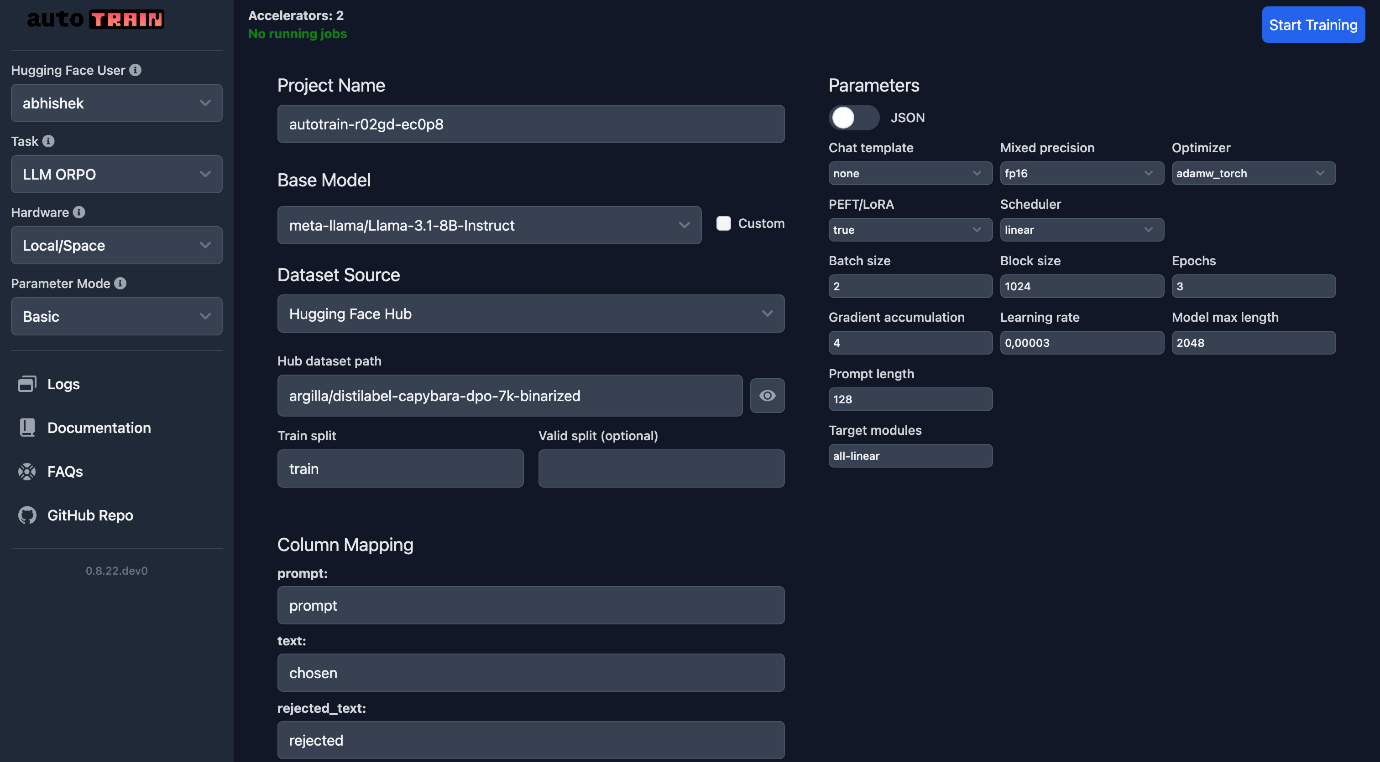
PEFT stands for parameter-efficient fine-tuning, and Hugging Face PEFT is the open-source Python library that makes it easy. Instead of retraining the whole model, you freeze the original weights and train a tiny set of extra weights — often a fraction of a percent of the total. The big model stays untouched; you only learn a small "patch" that steers it toward your task.
Think of a giant printed encyclopedia you are not allowed to rewrite. To make it answer your questions better, you don't reprint all 30 volumes — you slip in a thin stack of sticky notes at the right pages. The encyclopedia is unchanged and shared by everyone; your sticky notes are small, cheap to make, and easy to swap out. In PEFT those sticky notes are called adapters, and the most popular kind is LoRA.
Why it matters
PEFT exists because full fine-tuning is expensive in three ways that block most builders, and parameter-efficient methods relieve all three at once.
- Memory. Full fine-tuning has to keep gradients and optimizer state for every weight, which often needs many times the model's size in GPU RAM. PEFT trains only the small adapter, so the heavy optimizer state shrinks dramatically — large models become trainable on a single consumer or mid-range GPU.
- Storage and shipping. A full fine-tune yields another multi-gigabyte model. A LoRA adapter is typically a few megabytes. You can keep dozens of task-specific adapters next to one shared base model instead of dozens of full copies.
- Speed and iteration. Fewer trainable parameters means each run is faster and cheaper, so you can try more ideas. And because the base is frozen, swapping behaviour is as simple as loading a different adapter.
Who should care? Anyone fine-tuning open-weight models on their own hardware or a rented GPU: teams adapting a model to a domain, hobbyists training a style or persona, researchers running many small experiments. There is also a quieter reason PEFT matters — it is infrastructure. Many popular higher-level training toolkits (Axolotl, LLaMA-Factory, and Hugging Face's own TRL among them) call PEFT under the hood. Even if you never import it directly, you are probably using it.
What it does not replace: PEFT is about how you train cheaply, not whether you should train at all. If your problem is missing facts, RAG or a better prompt is usually the right tool. Fine-tuning — efficient or not — teaches a model a skill, format, or style, and PEFT just makes that affordable.
How it works
The core idea behind most PEFT methods is freeze the base, train a small add-on. LoRA, the default, is the clearest example, so it's worth understanding once — the rest of the library follows the same pattern.
Adapters: a small detour around frozen weights
Inside a transformer, learning lives in large weight matrices. LoRA leaves each of those matrices frozen and adds a tiny pair of matrices beside it — a narrow "down" projection and a narrow "up" projection (their small width is the rank). During training, only this small pair learns. At run time the model adds the adapter's contribution to the original output, so the frozen weight and the learned patch work together. Because the pair is narrow, it holds a tiny fraction of the parameters the full matrix does.
Only the right-hand path receives gradients. The base weights never change, which is why the original model is never overwritten and why so little optimizer memory is needed.
The PEFT workflow
Using the library is a short, repeatable loop. You load a normal Hugging Face model, describe which adapter you want with a config, wrap the model, train as usual, then save just the adapter.
from transformers import AutoModelForCausalLM
from peft import LoraConfig, get_peft_model

# 1) A normal base model. PEFT does not change how you load it.
model = AutoModelForCausalLM.from_pretrained("some-base-model")

# 2) Describe the adapter: rank r, scaling alpha, which layers to adapt.
config = LoraConfig(
    r=8,                       # adapter rank (small = fewer params)
    lora_alpha=16,             # scaling for the adapter's effect
    target_modules=["q_proj", "v_proj"],  # which weight matrices to wrap
    lora_dropout=0.05,
    task_type="CAUSAL_LM",
)

# 3) Wrap the model. The base is frozen; only the adapter is trainable.
model = get_peft_model(model, config)
model.print_trainable_parameters()
# -> e.g. "trainable params: 0.2% of all params"

# 4) Train with your usual loop / Trainer, then save ONLY the adapter.
model.save_pretrained("./my-adapter")  # a few MB, not the whole model
At inference you reverse it: load the same base model, then attach the saved adapter. The base is downloaded once and reused for every adapter you own.
from peft import PeftModel
from transformers import AutoModelForCausalLM

base = AutoModelForCausalLM.from_pretrained("some-base-model")
model = PeftModel.from_pretrained(base, "./my-adapter")
# 'model' now behaves like the fine-tuned model.The methods PEFT gives you
LoRA is the headline, but PEFT bundles several parameter-efficient methods. They differ in where the small trainable weights live. You rarely need all of them — most projects use LoRA or QLoRA — but it helps to know the menu.
| Method | What it trains | Good when |
|---|---|---|
| LoRA | Low-rank matrices beside chosen weight layers | The default; strong quality, tiny adapters |
| QLoRA | Same LoRA adapters, but on a 4-bit quantized base | You are short on GPU memory and want big models on small cards |
| Prompt / prefix tuning | A few learned 'virtual tokens' prepended to the input | Very lightweight tweaks; minimal extra parameters |
| IA3 | Small learned vectors that rescale activations | Even fewer parameters than LoRA, on supported tasks |
QLoRA deserves a special mention because it is how people fine-tune large models on modest hardware. It loads the frozen base in 4-bit precision to slash memory, then trains ordinary LoRA adapters on top. PEFT and the quantization libraries handle the heavy lifting; from your side it is mostly a couple of extra config flags.
PEFT vs full fine-tuning
The honest trade-off: full fine-tuning can squeeze out the last bit of quality on very large or very different datasets, because every weight is free to move. PEFT trades a usually-small amount of that ceiling for enormous savings in memory, storage, and iteration speed. For the vast majority of real fine-tuning jobs, that trade is clearly worth it.
- Trains a tiny add-on; base stays frozen
- Runs on modest GPUs
- Adapter is a few MB
- Many tasks share one base
- Fast, cheap, easy to iterate
- Trains every weight
- Needs large, costly GPUs
- Produces a full model copy
- One full model per task
- Highest ceiling on hard, large datasets
If you want a deeper, decision-focused comparison, see full fine-tuning vs PEFT. The short version: reach for PEFT first, and only consider full fine-tuning if you have measured that the adapter genuinely can't reach the quality you need.
Common pitfalls
PEFT removes a lot of pain, but it doesn't remove the parts of fine-tuning that need care. Most problems are about data and configuration, not the library itself.
- Expecting it to add knowledge. A small adapter is great at teaching style, format, or a narrow skill, but it is a poor way to inject large amounts of new facts. If you need current or private facts, pair it with retrieval, not a bigger rank.
- Forgetting you saved only the adapter. A PEFT checkpoint is not a standalone model. You must load the exact same base, then attach the adapter — point it at the wrong base and results are garbage.
- Adapting the wrong layers. The
target_modulesyou choose matter. Too few and the model can't learn your task; the right set depends on the architecture, so check what works for your model family. - Rank set blindly. A huge rank wastes parameters and can overfit; a tiny rank may underfit. Tune it like any other hyperparameter, and watch for the usual signs of overfitting on a held-out set.
- Skipping data quality. Efficient training of bad data still gives a bad model. Clean, well-formatted training data matters as much here as in full fine-tuning.
Going deeper
Once the basic LoRA loop clicks, a few practical capabilities make PEFT genuinely powerful in production.
Merging adapters. You can fold a trained LoRA back into the base weights to produce a single standalone model with no adapter overhead at inference. This is handy when you've settled on one behaviour and want the simplest possible deployment — at the cost of giving up the swap-on-demand flexibility.
Serving many adapters at once. Because adapters are tiny and the base is shared, serving stacks can host one base model and hot-swap dozens of LoRAs per request. That makes per-customer or per-task specialization cheap: one GPU, many behaviours, instead of one full model per behaviour.
Where PEFT sits in the stack. Most people meet PEFT through a higher-level toolkit. Tools like TRL, Axolotl, and LLaMA-Factory wrap data loading, chat templating, and training loops around PEFT's adapter machinery, so you write a config file instead of Python. Understanding PEFT directly still pays off, because those configs expose the same rank, alpha, and target-module knobs — and when something breaks, the error is usually in the PEFT layer underneath.
Open questions and good habits. The honest open issues are familiar: choosing rank and target modules is still partly empirical, very large behaviour shifts may justify full fine-tuning, and an adapter trained on narrow data can quietly degrade general ability. The durable lesson is the same one that holds for all fine-tuning — efficient training does not lower the bar on evaluation. Always test the adapted model against a held-out set, and compare it to a strong prompt-only baseline before declaring victory.
FAQ
What is Hugging Face PEFT used for?
PEFT (parameter-efficient fine-tuning) is a library for adapting large models cheaply. Instead of retraining every weight, you train a small set of extra weights — usually LoRA adapters — while the base model stays frozen. It is used to fine-tune open-weight models on modest hardware for a specific style, format, or skill.
What is the difference between PEFT and LoRA?
LoRA is a method; PEFT is the library that implements it (and several others). LoRA adds small low-rank matrices beside frozen weight layers and trains only those. PEFT wraps LoRA, QLoRA, prefix tuning, IA3, and more behind one consistent API, so you pick a method via a config rather than coding it from scratch.
Is PEFT better than full fine-tuning?
For most jobs, yes — it uses far less memory and storage and iterates faster, usually with quality close to a full fine-tune. Full fine-tuning trains every weight and can edge ahead on very large or very different datasets, but it needs costly GPUs and produces a full model copy per task. Start with PEFT and only switch if you've measured a real quality gap.
How big is a PEFT or LoRA adapter file?
Usually just a few megabytes, because it stores only the small trainable add-on rather than the whole model. That is why you can keep many task-specific adapters next to one shared base model instead of saving a multi-gigabyte copy for each task.
Can I use PEFT to add new knowledge to a model?
Not really — a small adapter is good at teaching style, tone, format, or a narrow skill, but it is a weak way to inject large amounts of new facts. If you need current or private information, retrieval-augmented generation (RAG) is the better tool, optionally combined with a PEFT adapter for behaviour.
Do I need PEFT if I use a toolkit like Axolotl or TRL?
You are already using it. Many higher-level fine-tuning toolkits call PEFT under the hood for their LoRA and adapter support. Learning PEFT directly still helps, because those tools expose the same rank, alpha, and target-module settings and surface PEFT's errors.