In plain English
Kokoro TTS is a text-to-speech model: you feed it written text, and it produces a spoken-audio waveform you can play back. What makes it stand out is its size. Most text-to-speech that sounds genuinely natural either runs on a hosted cloud service or needs a beefy GPU. Kokoro is tiny — roughly an 82-million-parameter model — small enough to run on a laptop, a cheap server, or even some edge devices, while still sounding clearly better than the robotic voices people associate with old TTS.
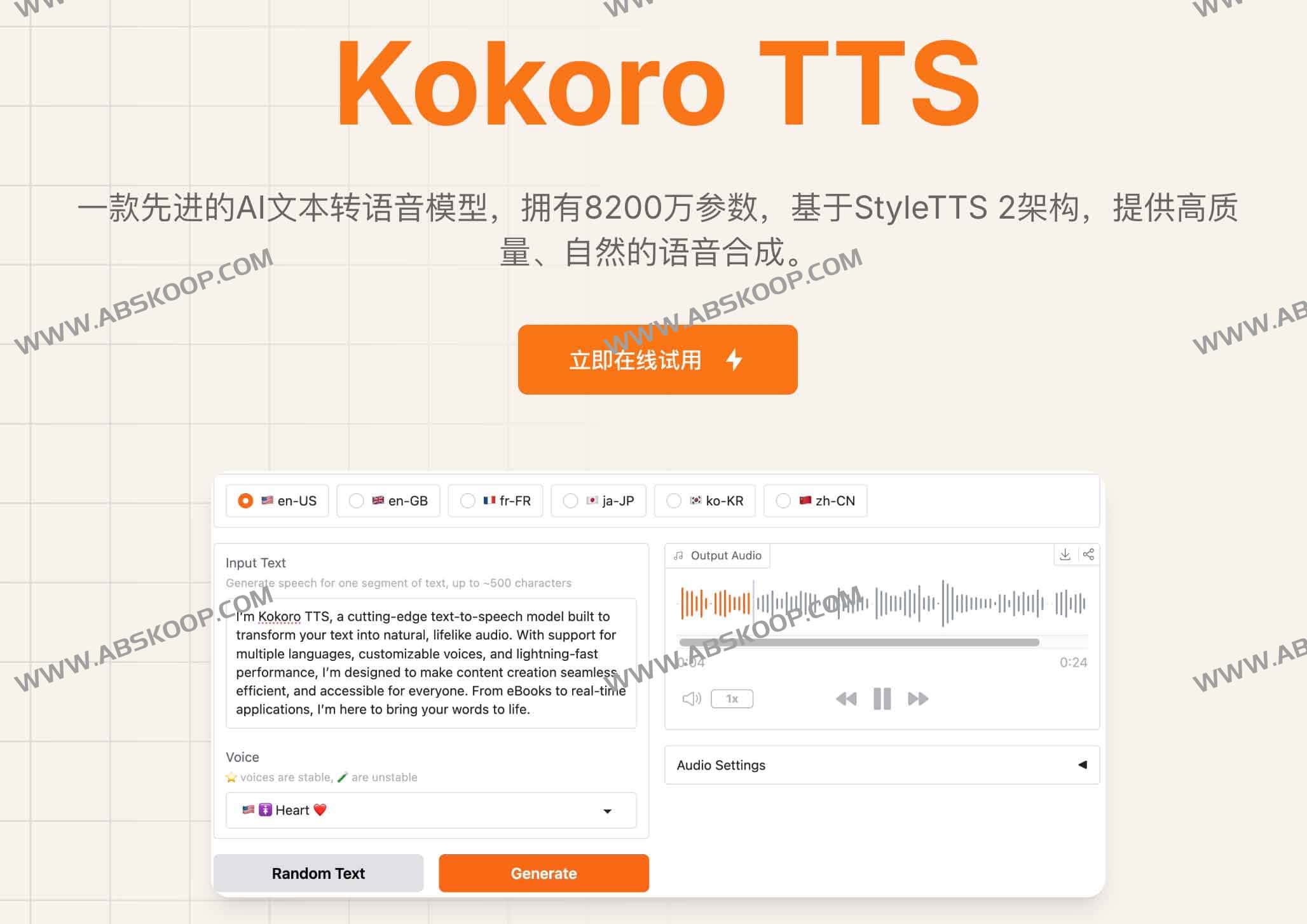
Think of the difference between hiring a recording studio and buying a good USB microphone. The studio (a hosted service like ElevenLabs) gives you polished results, but you pay per minute, you need an internet connection, and your text leaves your machine. Kokoro is the USB mic: a small, one-time download you own outright, that works offline, costs nothing per request, and is yours to plug into anything.
Kokoro is open-weight and released under the permissive Apache 2.0 license. That means you can download the actual model file, run it on your own hardware, ship it inside a product, and study how it behaves — no API key, no usage meter, no terms that forbid commercial use. For a model this small that still sounds good, that combination is why people called it a breakout.
Why it matters
Adding a voice to an app used to force an uncomfortable choice. Either you called a hosted TTS API — great quality, but a recurring bill, an internet dependency, and your text travelling to someone else's servers — or you self-hosted an open model that was big, slow, or simply did not sound good. Kokoro matters because it weakens that trade-off: small enough to self-host cheaply, yet good enough that the output is pleasant to listen to.
What a tiny open model unlocks
- Cost. A hosted service charges per character or per minute of audio. At scale — an audiobook generator, a screen reader, a high-traffic assistant — that adds up fast. A model you run yourself has a fixed hardware cost and then effectively-free generation.
- Privacy and offline use. Because nothing leaves your machine, Kokoro suits medical, legal, on-device, or air-gapped settings where you cannot send user text to a third party. It also keeps working with no internet at all.
- Control and ownership. The weights do not change under you, there is no deprecation email, and no rate limit. You pin a version, test it once, and it behaves the same forever.
- Edge and embedded. A small footprint means it can run on consumer laptops, single-board computers, and modest cloud instances without a dedicated GPU — places a multi-billion-parameter model simply will not fit.
Who should care? Builders adding narration, voice assistants, accessibility readers, or audio for games and kiosks who want speech without a per-request bill or a network round-trip. The honest counterpoint, which the comparison section below covers, is that hosted platforms still lead on the most expressive voices and on instant voice cloning. Kokoro trades a little of that polish for ownership, privacy, and near-zero marginal cost.
How it works
At a high level, Kokoro does what every modern neural TTS system does: it turns a string of text into a sound wave, in stages. The text is first normalized and converted into phonemes — the basic units of pronunciation, so that "2026" becomes the sounds you actually say and "read" gets the right vowel for its context. A neural network then predicts the acoustic shape of that speech, and a final step renders it into an audio waveform you can save as a WAV or play through speakers.
Kokoro is what people loosely call a non-autoregressive TTS model: rather than generating audio one tiny slice at a time and feeding each slice back in (which is slow), it predicts the speech for a whole utterance in a more parallel way. That design is a big reason a model this small can synthesize speech quickly even without a GPU. You choose a voice (the model ships with a set of preset speaker voices across a few languages and accents), pass your text, and get audio back.
Running it in practice
Because Kokoro is just a downloadable model, using it is a few lines of code. A small Python wrapper loads the weights and exposes a generator that yields audio for your text and chosen voice:
# pip install kokoro soundfile
from kokoro import KPipeline
import soundfile as sf

# 'a' selects an American-English voice pack; other packs exist.
pipeline = KPipeline(lang_code="a")

text = "Kokoro runs text to speech entirely on your own machine."

# The pipeline yields audio in chunks; here we take the first segment.
for _graphemes, _phonemes, audio in pipeline(text, voice="af_heart"):
    sf.write("out.wav", audio, 24000)  # save a 24 kHz WAV file
    break
No API key, no network call. The first run downloads the weights once; after that, generation happens locally. The same model can be wrapped behind a small web server so the rest of your app calls it like any other TTS endpoint — except the endpoint is yours.
Kokoro vs hosted TTS like ElevenLabs
The clearest way to understand Kokoro is to put it next to a polished hosted platform. They are not really competitors so much as two ends of a trade-off: ownership and cost on one side, top-tier expressiveness and convenience on the other.
| Dimension | Kokoro (open, self-hosted) | Hosted TTS (e.g. ElevenLabs) |
|---|---|---|
| Where it runs | Your machine, offline-capable | Vendor cloud, needs internet |
| Cost model | Fixed hardware, ~free per request | Pay per character / minute |
| Data privacy | Text never leaves your device | Text sent to the provider |
| Voice quality | Good and natural for the size | Often more expressive, top-tier |
| Voice cloning | Not its focus; preset voices | Instant custom voice cloning |
| Setup effort | Install + run the model yourself | Sign up, call an API |
| Control / stability | You pin the weights; no churn | Vendor can change or deprecate |
A useful rule of thumb: if you generate a lot of speech, care about privacy, or need it to work offline, Kokoro's economics are hard to beat. If you need the single most expressive voice, want to clone a specific person's voice, or just want zero infrastructure, a hosted service earns its bill. Many teams use both — Kokoro for high-volume, routine narration, and a premium service for the few places that demand a standout voice.
When to reach for Kokoro
Kokoro is a strong default whenever you want good-enough, owned speech rather than the absolute best voice. Some situations where it shines:
- Accessibility readers that turn articles, documents, or UI into speech — high volume, where a per-character bill would be punishing.
- Voice for assistants and bots where you pair it with an LLM for the words and Kokoro for the voice, keeping the speech layer cheap and local.
- Offline and embedded products — kiosks, in-car systems, on-device apps — that cannot rely on a network call for every sentence.
- Prototypes and side projects where you want a real voice today without signing up for a paid API or worrying about usage limits.
- Privacy-sensitive pipelines in healthcare, legal, or internal tools where sending user text to a third-party API is a non-starter.
When not to reach for it: if your product's whole value is a uniquely expressive or celebrity-grade voice, or you need to clone a specific speaker on demand, a model built for those tasks will serve you better. Kokoro optimizes for small, open, and solid — not for being the single most lifelike voice on the market.
Going deeper
Once the basics click, a few nuances are worth knowing before you build something serious on Kokoro.
Phonemes are where pronunciation lives. Because the pipeline converts text to phonemes before synthesis, the quality of that step shapes the output. Unusual names, acronyms, foreign words, or numbers can be mispronounced if normalization guesses wrong. The fix is usually to clean or spell out tricky text before sending it — and to test on your real content, not just simple sentences.
Language and voice coverage are finite. Kokoro ships a set of preset voices across a handful of languages and accents. It is not an everything-in-every-language model, and the voice you want may not exist. Check the available voice packs against your target audience before committing.
Latency vs streaming. A non-autoregressive design makes Kokoro fast, but for a live, conversational experience you still want to stream audio out sentence-by-sentence rather than wait for a long passage to finish. If low latency is your goal, see how to reduce TTS latency. For fully interactive voice, the frontier has moved toward speech-to-speech models and realtime voice APIs that fuse listening, reasoning, and speaking — a different architecture from a pure text-to-speech model like Kokoro.
Quality has a ceiling. Being tiny is the feature and the limit. Kokoro sounds good for its size, but a much larger model or a top hosted voice will usually win on emotional range and subtle prosody. Set expectations accordingly: choose Kokoro when ownership, cost, privacy, and offline operation matter more than squeezing out the last few percent of expressiveness.
Where to go next. Pair Kokoro on the output side with speech-to-text on the input side to build a full voice loop, and read the broader text-to-speech overview to see how Kokoro fits among the alternatives. The durable lesson: a small open model that is good enough and yours often beats a perfect one you have to rent.
FAQ
What is Kokoro TTS?
Kokoro TTS is a small open-weight text-to-speech model — roughly 82 million parameters — that converts written text into natural-sounding speech. It is released under the permissive Apache 2.0 license, so you can download it, run it on your own hardware, and use it commercially without an API key or per-request fee.
Is Kokoro TTS free to use?
Yes. Kokoro is open-weight and Apache 2.0 licensed, so the model itself is free to download and run, including in commercial products. Your only real cost is the hardware you run it on; there is no usage meter the way a hosted API has.
Can Kokoro run without a GPU?
Generally yes. Kokoro's small size and largely non-autoregressive design let it synthesize speech quickly on a regular CPU, which is a big part of why it can run on laptops, modest servers, and some edge devices. A GPU speeds things up but is not required for many use cases.
How does Kokoro compare to ElevenLabs?
ElevenLabs is a polished hosted service with very expressive voices and instant voice cloning, billed per use and run in the cloud. Kokoro is a model you self-host: cheaper at volume, private, and offline-capable, but more limited in voice range and not focused on cloning. Pick Kokoro for ownership and cost, a hosted service for top-tier expressiveness.
Does Kokoro support voice cloning?
Voice cloning is not Kokoro's focus. It ships with a set of preset speaker voices across a few languages and accents, which you select at generation time. If you need to clone a specific person's voice, a platform built specifically for cloning is a better fit.
What languages and voices does Kokoro support?
Kokoro includes a set of preset voices spanning a handful of languages and accents rather than every language. Because coverage is finite and evolves, check the official model card for the current list of voice packs before assuming your target language is supported.