In plain English
The OpenAI Realtime API is a way to build a voice assistant that you can talk to like a person — you speak, it listens, it thinks, and it speaks back, all in the same conversation. The thing that makes it special is that one model handles the whole loop: it takes your raw audio in, understands it, decides what to say, and produces spoken audio out, without converting everything to text and back along the way.
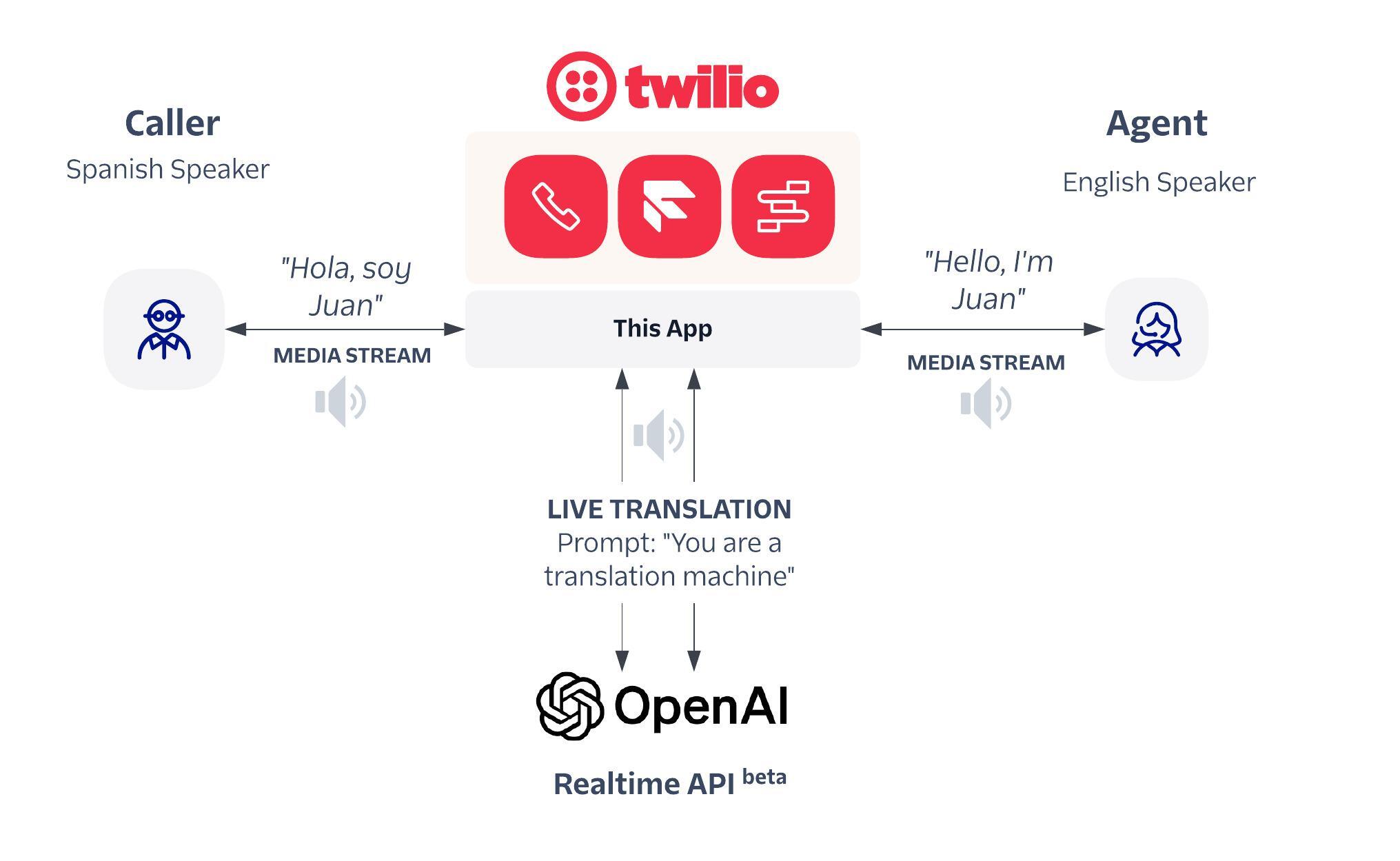
Think of the difference between a translator who works through a chain of three people — one who only transcribes, one who only thinks, one who only reads aloud — versus a single bilingual person who hears you and answers directly. The chain works, but every handoff costs time and loses something: the tone of your voice, where you paused, whether you sounded annoyed. The single person hears all of that at once. The Realtime API is the single-person model for voice.
Because it works directly with sound, it picks up things plain text throws away — your tone, your pace, a laugh, a hesitation — and it can answer while you are still finishing your sentence. That is what makes a voice agent feel like a real conversation instead of a walkie-talkie where you take turns and wait.
Why it matters
For years, building a voice assistant meant wiring together three separate tools, each from a different vendor possibly. The Realtime API exists because that old pipeline has problems that no amount of tuning the individual pieces can fix.
- Latency adds up. In the old setup, you wait for speech-to-text to finish, then wait for the LLM to think, then wait for text-to-speech to render audio. Each step adds delay, and they stack. The gaps that feel fine in a chat box feel painfully slow in a conversation, where humans expect a reply in well under a second.
- Lost signal. When you flatten speech into a text transcript, you throw away tone, emphasis, emotion, and timing. The model only sees the words, so it can't tell an excited "great" from a sarcastic one. Speech-to-speech keeps the audio, so the model hears how you said it, not just what you said.
- Clumsy interruptions. Real conversation is full of interruptions — you cut in, the other person stops. A stitched pipeline has no natural place to handle that; bolting it on is fragile. A single streaming model can stop talking the instant it hears you start.
- Operational sprawl. Three services means three failure points, three latency budgets, three bills, and a lot of glue code. One API replaces all of it.
Who cares about this? Anyone building something you talk to: phone-support agents that can actually resolve a request, hands-free assistants in cars or kitchens, language-practice tutors, accessibility tools, and voice interfaces inside apps. If your product's killer feature is natural spoken conversation — not just dictation — this is the class of API you reach for.
How it works
The mechanism rests on three ideas: a persistent streaming connection, a single multimodal model that speaks audio natively, and an event-driven protocol that lets either side talk at any time. Let's take them in order.
A connection that stays open
A normal API call is one request and one response: you send, you wait, you get an answer, the connection closes. That model is hopeless for live audio. Instead, the Realtime API opens a long-lived connection — over a WebSocket, or for browser/phone clients a WebRTC peer connection — that stays open for the whole conversation. Audio streams up in small chunks as you talk, and audio streams back down as the model replies. Nothing waits for a whole turn to finish before moving.
- Audio → speech-to-text
- Text → LLM thinks
- Text → text-to-speech
- Three services, three delays
- Tone and timing lost as text
- Audio streams straight in
- One model hears + reasons + speaks
- Audio streams straight out
- One connection, one delay budget
- Tone and timing preserved
One model that hears and speaks
Inside, a single multimodal model takes audio as input and produces audio as output. It was trained to work in the audio domain directly, so it never needs an intermediate text transcript to understand you (though it can also produce a text transcript on the side, which is handy for logging or showing captions). Because it reasons over the sound itself, it keeps the prosody — rhythm, stress, emotion — that a transcript would strip out. This is what separates true speech-to-speech models from a transcription-plus-chatbot bolt-on.
Events flow both ways
The connection carries a stream of small events in both directions, rather than one big request and one big reply. Your client sends events like "here is more audio" or "start responding now"; the server sends events like "the user started speaking," "here is a chunk of my audio reply," "here is the running transcript," or "I want to call a tool." Because both sides emit events continuously, the model can detect that you've started talking and stop its own speech immediately — that's how natural interruption ("barge-in") works.
// client → server: append captured microphone audio
{ "type": "input_audio_buffer.append", "audio": "<base64 PCM chunk>" }

// server → client: the model detected you started talking
{ "type": "input_audio_buffer.speech_started" }

// server → client: a chunk of the spoken reply, as it is generated
{ "type": "response.output_audio.delta", "delta": "<base64 audio>" }
Voice-activity detection usually runs on the server: it watches the incoming audio, decides when you've started and stopped speaking, and triggers a response automatically — so you don't have to push a button to take turns. The exact event names and options evolve, so always check the official docs; the shape — open connection, stream audio, exchange events, handle interruption — is the durable part.
Calling tools mid-conversation
A voice agent that can only chat is a toy. The reason the Realtime API is an agent API is that the same model can call tools (functions you define) in the middle of a spoken turn — look up an order, check a calendar, book a table — then weave the result back into what it says next, all without dropping out of the audio stream.
The pattern mirrors normal LLM function calling: you declare the tools the model is allowed to use when the session starts. During the conversation, if the model decides it needs one, it emits a function-call event with the arguments instead of (or alongside) speaking. Your code runs the real function, sends the result back as another event, and the model continues talking with the answer in hand.
A natural touch: while your function runs (say it takes a second to hit a database), the model can keep the conversation warm — "let me check that for you" — so there's no awkward dead air. Filling silence gracefully is part of what makes a voice agent feel competent.
When to use it (and when not to)
Speech-to-speech is powerful but it is not the answer to every audio task. Match the tool to the job.
| Your goal | Best fit |
|---|---|
| A live, interruptible spoken conversation | Realtime API (speech-to-speech) |
| Just turn a recording into a transcript | A plain speech-to-text model |
| Just read finished text aloud | A text-to-speech model |
| Heavy step-by-step reasoning, no live audio | A standard text LLM, optionally with separate TTS |
| Label who spoke when in a meeting | Speaker diarization, not a voice agent |
There are also real-world constraints to plan for. Streaming voice is more expensive per minute than text, network quality directly affects how good the conversation feels (which is why WebRTC, designed for live media, is preferred for browsers and phones), and you'll want fallbacks for bad connections. For a broader, vendor-neutral view of this whole category, see realtime voice APIs explained.
Going deeper
Once the basics click, a handful of nuances separate a demo from a product.
Interruption handling is subtle. When the user barges in, you must do two things at once: stop the model's audio playback on the client and tell the server to cancel the rest of its in-progress response, so it doesn't keep "thinking" about a turn the user abandoned. Getting this clean — no double-talk, no lingering audio — is most of the polish in a good voice agent.
WebSocket vs WebRTC is a real choice. A WebSocket connection is simplest for a server-to-server setup, where your backend holds the connection. WebRTC is built for live media between a client and the service: it handles jitter, packet loss, and echo cancellation, so it's the better fit for browsers, mobile apps, and telephony. Many production designs put WebRTC at the edge (the user's device) and keep secrets on a backend that mints short-lived session credentials.
Sessions carry configuration. When a conversation starts you configure the session: the system instructions (persona, rules), which voice it uses, the tools it may call, and how turn-taking/voice-activity detection behaves. Treat that session config like a system prompt for voice — it's where you set guardrails and tone.
Cost and context grow with talk time. Audio is token-heavy, and a long conversation accumulates context. Plan for trimming or summarizing old turns on long calls, and watch per-minute cost — a chatty agent left running is not free.
The honest limits. It's proprietary and hosted, so you inherit the provider's availability, pricing, and policy. Voice agents can still mishear in noise, talk over the user if interruption isn't wired correctly, or hallucinate just like any LLM — and now they do it out loud, in real time, which raises the stakes. Where to go next: compare it against the general category in realtime voice APIs explained, and read how voice cloning works to understand the voice side of the output. The durable takeaway: speech-to-speech wins by not throwing your voice away, and by keeping one connection open so the conversation can flow both ways at once.
FAQ
What is the OpenAI Realtime API in simple terms?
It is an API for building voice agents that you can talk to naturally. A single model takes your spoken audio in, understands and reasons over it, and speaks back — over one streaming connection, so the conversation feels live and can be interrupted like a real one.
What does speech-to-speech mean?
It means the model's input is audio and its output is audio, with no required text step in between. Older voice apps did speech-to-text, then ran a language model on the text, then did text-to-speech. Speech-to-speech collapses those three stages into one model, which keeps tone and timing and cuts delay.
How is the Realtime API different from using Whisper plus a chatbot plus TTS?
That stitched pipeline has three separate services, so delays stack up, tone is lost when audio becomes plain text, and interruptions are hard to handle. The Realtime API uses one streaming model for the whole loop, so it is lower latency, keeps the audio signal, and can stop talking the moment you start.
Can the Realtime API call functions or tools?
Yes. You declare the tools when the session starts, and during the conversation the model can emit a function-call event with arguments. Your code runs the real function and sends the result back as an event, and the model continues speaking with the answer included — all without leaving the audio stream.
Should I use WebSocket or WebRTC with it?
Use a WebSocket for simple server-to-server setups where your backend holds the connection. Use WebRTC for browsers, mobile apps, and telephony, because it is built for live media and handles jitter, packet loss, and echo cancellation, which makes the voice experience noticeably smoother.
Do I always need speech-to-speech for audio features?
No. If you only need to transcribe a recording, a plain speech-to-text model is cheaper, and if you only need to read finished text aloud, use text-to-speech. Reach for the Realtime API specifically when you need a live, two-way, interruptible spoken conversation.