In plain English
A PDF looks like a tidy document to you, but to a computer it is mostly a bag of characters scattered across a page, plus instructions for where to draw each one. There is often no reliable record of which text is a heading, which cells belong to which table, or even what order to read things in. A two-column research paper, copied with a naive text tool, frequently comes out as the left column and right column zippered together into nonsense.
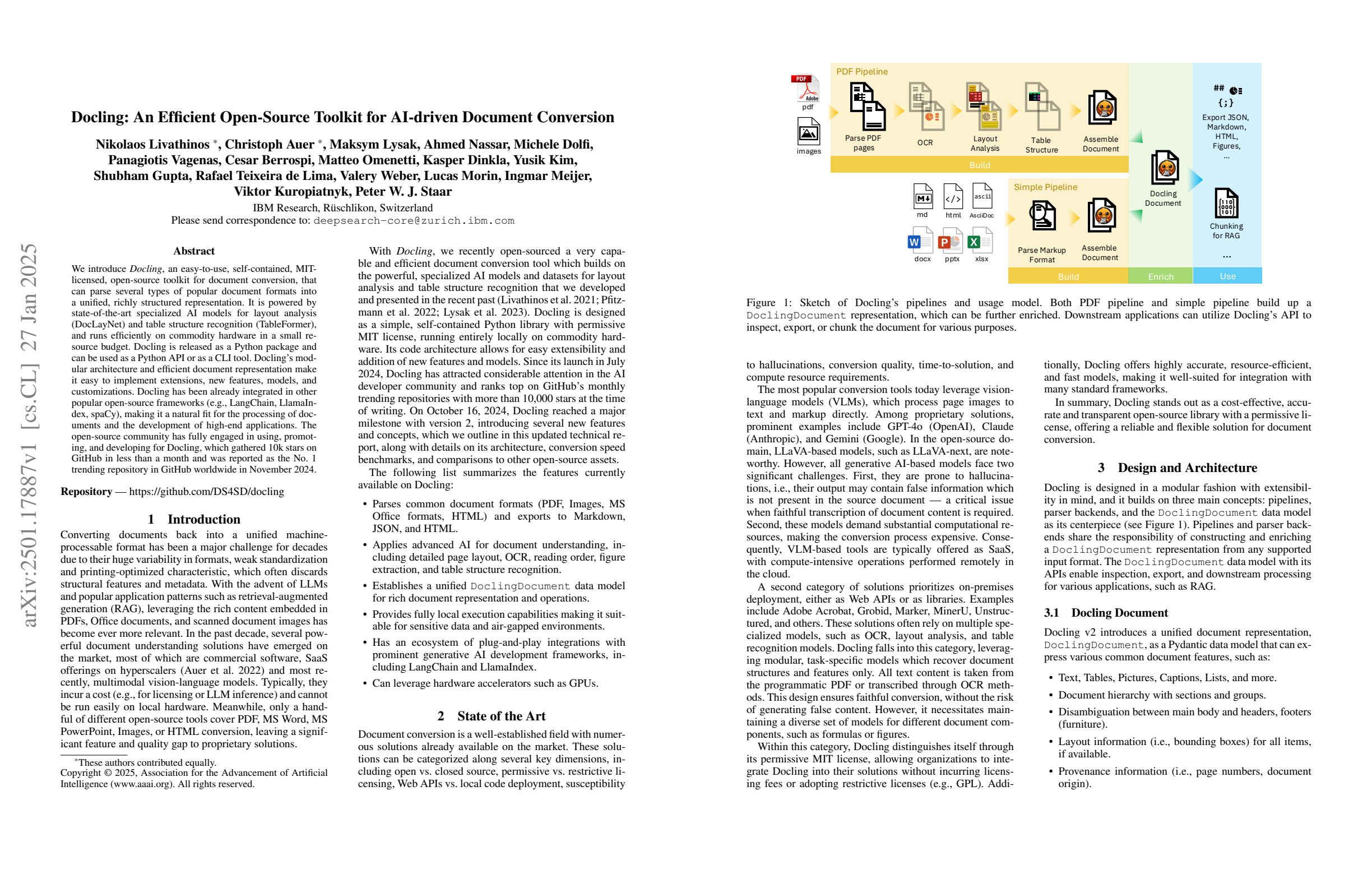
Docling is an open-source document parser that fixes this. Instead of yanking raw characters off the page, it understands the layout — it figures out reading order, finds headings, lists, and tables, and rebuilds the document as clean, structured Markdown or JSON. That clean output is exactly what a RAG pipeline wants before it starts chunking.
Think of the difference between a careless intern and a careful one. The careless intern photocopies a report, runs the pages through a shredder, and hands you the strips in a random pile — every word is technically there, but the structure is gone. The careful one retypes the report, keeps the headings as headings, keeps each table as a real table, and reads the columns in the right order. Docling is the careful intern: same source PDF, but the meaning survives the trip.
Why it matters
In any RAG system, retrieval can only be as good as the text you fed in. The famous rule is garbage in, garbage out — and for document-heavy pipelines, the garbage almost always enters at the very first step: extraction. If your parser mangles the source, no clever embedding model or reranker downstream can un-mangle it.
Here is what naive text extraction quietly breaks, and why each one hurts retrieval:
- Reading order. Multi-column pages, sidebars, headers, and footnotes get interleaved. A chunk that mixes half a paragraph with a page footer is noise — it matches the wrong queries and confuses the model.
- Tables. A table flattened to a wall of space-separated numbers loses the link between each value and its row and column header. Ask "what was Q3 revenue?" and the answer is technically in the chunk, but the structure that made it findable is gone.
- Headings and hierarchy. Without knowing what is a section title, you can't chunk along natural boundaries or attach a heading as context to its section. Everything becomes one undifferentiated stream.
- Scanned pages and images. A PDF that is really a photo of a page has no text layer at all. Naive extraction returns nothing; you need OCR to read the pixels.
Who should care? Anyone building RAG over real-world documents — financial reports, scientific papers, legal contracts, manuals, government filings. These are exactly the documents that are full of tables, columns, and scans, and exactly where naive extraction fails worst. Docling exists so that the cleaning step — see clean your data before RAG — starts from structured output instead of a scrambled mess.
It also matters that Docling runs locally and open-source. You can parse sensitive documents on your own machine without shipping them to a third-party API, which is often a hard requirement in legal, medical, and financial settings.
How it works
Docling is best understood as a pipeline: a raw document goes in one end, and a single structured in-memory representation comes out the other, which you then export to the format you want. The clever part is the middle, where machine-learning models analyze the page the way a human eye would.
Layout understanding
The heart of Docling is a layout model — a computer-vision model that looks at each page and labels regions: this is a title, this is body text, this is a table, this is a figure, this is a caption. From those labeled regions it reconstructs the correct reading order, so a two-column page is read column-by-column instead of left-to-right across the gutter. This is the single biggest reason layout-aware parsing beats a plain text dump.
Table structure recognition
Tables get their own dedicated model. Instead of treating a table as loose text, Docling recovers the grid — how many rows and columns, which cells span multiple columns, and which cells are headers. The result is a real table you can export as a Markdown table or as structured JSON, so the relationship between a value and its headers is preserved for retrieval. Handling tables well is a known weak spot of naive parsers; see chunking code, tables, and Markdown.
OCR for scans
When a page has no text layer — a scanned contract, a photographed receipt — Docling runs OCR (optical character recognition) to read the characters out of the pixels, then feeds those through the same layout pipeline. So born-digital PDFs and scanned PDFs both end up in the same structured form.
One document, many exports
All of this lands in a single in-memory document object. From there you ask for whatever you need: Markdown for clean, human-readable text that chunkers love; JSON for the full structured tree with positions and types when you want programmatic control. A minimal run is just a few lines:
from docling.document_converter import DocumentConverter

converter = DocumentConverter()

# Point it at a local file or a URL.
result = converter.convert("annual-report.pdf")
doc = result.document

# Clean Markdown — headings, lists, and tables preserved.
markdown = doc.export_to_markdown()

# Or the full structured tree for programmatic use.
structured = doc.export_to_dict()

print(markdown[:500])Where Docling fits in a RAG pipeline
Docling is a parsing tool, not a whole RAG system. It owns one job — turning raw documents into clean structured text — and then hands off. Knowing exactly where the handoff happens keeps you from expecting it to do things it doesn't.
Because Docling preserves headings and table boundaries, the chunking step that follows gets much easier. You can split along section titles instead of blind character counts, attach the parent heading to each chunk as context, and keep a table in one piece rather than slicing a row in half. The chunk-size choices you make next — see chunk size and overlap and chunking strategies compared — all start from cleaner raw material.
Docling vs simpler extraction
Layout-aware parsing is more work than a one-line text dump, so it is worth being clear about what you gain and when you actually need it.
| Aspect | Naive text extraction | Docling (layout-aware) |
|---|---|---|
| Reading order | Often scrambled on multi-column pages | Reconstructed column-by-column |
| Tables | Flattened to loose text | Recovered as real rows and columns |
| Headings | Lost — one flat stream | Preserved as Markdown structure |
| Scanned PDFs | Returns little or nothing | OCR reads the pixels |
| Speed & cost | Instant, near-zero compute | Heavier — runs ML models per page |
| Best for | Clean, single-column, text-only files | Real-world tables, columns, scans |
The honest takeaway: if your corpus is plain, single-column, born-digital text, a simple extractor may be all you need, and it is faster. The moment your documents have tables, multiple columns, or scanned pages — which describes most enterprise PDFs — layout-aware parsing like Docling pays for itself in retrieval quality. For the broader question of parsing strategy, see parse PDFs for RAG.
Common pitfalls
- Assuming parsing is solved. Docling is strong, but no parser is perfect on messy, low-quality, or unusual layouts. Spot-check the Markdown output on a few of your hardest documents before trusting the whole pipeline.
- Forgetting the compute cost. Running layout and table models on every page is far heavier than a plain text dump. For large batches, plan for processing time and consider whether a GPU helps.
- Skipping the cleanup step. Clean structure is not the same as clean content. Boilerplate, repeated headers and footers, and navigation cruft may still need stripping — see clean your data before RAG.
- Treating it as the whole solution. Docling parses; it does not chunk, embed, retrieve, or generate. It is the first link in the chain, and the later links still need care.
- Ignoring OCR limits. OCR on a blurry or skewed scan will introduce character errors. Garbage pixels still produce garbage text, just structured garbage.
Going deeper
Once the basic convert-to-Markdown flow clicks, a few directions are worth exploring.
The structured JSON output, not just Markdown. Markdown is convenient, but the full document representation carries richer metadata — element types, page numbers, and bounding boxes (where each block sits on the page). That metadata is gold for advanced RAG: you can store the page number with each chunk so the model can cite exactly where an answer came from, or filter retrieval to specific document sections.
Layout-aware chunking. Because Docling knows the document hierarchy, you can chunk along its natural structure rather than by raw character count — keeping a whole section or a whole table together as one unit. This pairs naturally with semantic chunking and with contextual retrieval, where each chunk is enriched with surrounding context before embedding.
Local model vs hosted service trade-off. Docling runs its models locally, which is great for privacy and cost control but means you manage the compute. The alternative camp is LLM- or VLM-powered hosted parsers, which can handle extremely messy documents by reading them like a vision model. Each side has strengths: local-and-private versus hosted-and-powerful-on-hard-docs. Knowing both helps you pick per project.
It is moving fast as an open project. Now under the Linux Foundation, Docling gains models and format support steadily. The durable lesson outlasts any version: in document RAG, the parser is the foundation. Time spent getting structured, faithful text out of your sources pays off at every later stage, because nothing downstream can recover information that was destroyed at extraction.
FAQ
What is Docling used for?
Docling parses documents — especially PDFs — into clean, structured Markdown or JSON. Its main use is preparing real-world documents (with tables, columns, and scans) for a RAG pipeline, so that chunking and retrieval start from faithful text instead of scrambled output.
Is Docling free and open source?
Yes. Docling is open source and runs locally, and it is now hosted as a Linux Foundation project, so it is community-governed rather than tied to one vendor. Running it on your own machine also means sensitive documents never have to leave your environment.
How is Docling different from a simple PDF text extractor?
A simple extractor pulls raw characters off the page and often scrambles reading order, flattens tables, and loses headings. Docling uses machine-learning layout and table models to reconstruct the document's real structure — correct reading order, intact tables, and preserved headings — which dramatically improves retrieval quality.
Can Docling read scanned PDFs?
Yes. When a PDF has no text layer (it is really an image of a page), Docling runs OCR to read the characters out of the pixels, then sends them through the same layout pipeline. Quality still depends on the scan: blurry or skewed pages will introduce OCR errors.
Does Docling do chunking and embedding too?
No. Docling's job is parsing — turning documents into clean structured text. Chunking, embedding, storing in a vector database, and generation are separate later steps. Docling just makes those steps start from much better raw material.
Should I export Markdown or JSON from Docling?
Markdown is the easy choice for RAG: its headings and table syntax let chunkers split along real structure. Use the structured JSON export when you need richer metadata like element types, page numbers, and bounding boxes — for example, to attach exact source citations to each chunk.