
What is AssetFurnace?
AssetFurnace is a local studio that turns a sentence or a picture into a textured, rigged and animated 3D game asset. It runs on Apple Silicon Macs and on Linux with NVIDIA or AMD (ROCm) cards, with Windows support marked as lightly tested. It sits in the 3D & CAD Generation category of the Multimodal Generation tools and is open-source, written in Python and licensed Apache-2.0.
Overview
AssetFurnace (the GitHub repository image-to-3dlab, renamed from Image to 3D Lab) is an open-source studio that runs on your own machine and takes a game asset from idea to engine: type a sentence or drop a picture, and it makes the picture, builds a textured 3D model, cleans the mesh up for games, fits a skeleton and animates it, then hands back a GLB for Godot, Unity, Unreal, Blender or three.js. It runs on Apple Silicon Macs and on Linux with NVIDIA or AMD (ROCm) cards, with Windows support marked as lightly tested. Nothing is uploaded, and there are no credits or per-run limits.
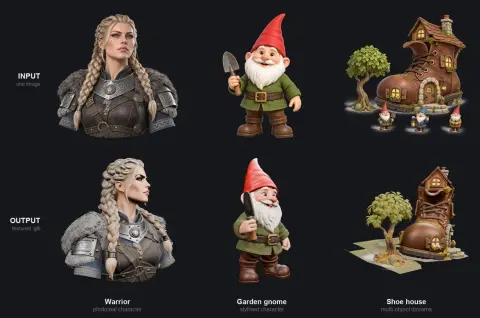
The project trains no models of its own. It puts several open image-to-3D models behind one browser studio and one CLI: Pixal3D (a C++/GGML build, the README's recommended starting point), TRELLIS.2, Hunyuan3D-2.1 and its MLX ports for the Mac, and Stable Fast 3D. Text-to-image runs Qwen-Image locally, background removal uses BiRefNet-lite, and auto-rigging uses SkinTokens with 21 preset moves such as walk, run, jump, dance and kicks. Much of the work in the repository is the glue that makes these models run on Apple Silicon.
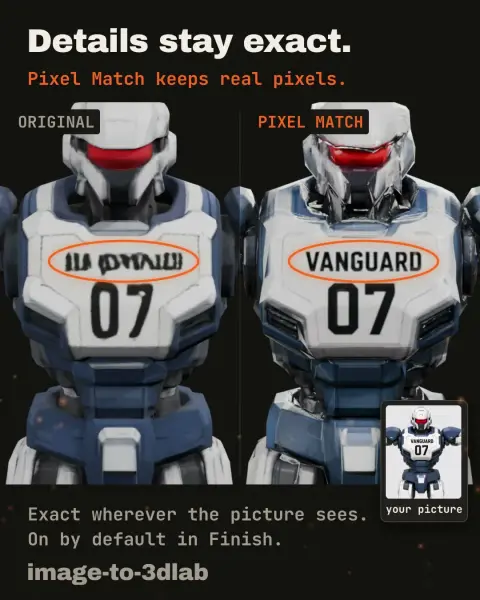
Generated models arrive dense and heavy, so a Finish step retopologises the mesh, optionally repaints it, and compresses the textures, taking a typical asset from about 32 MB to under 5 MB according to the README. Its Pixel Match stage copies the source picture's real pixels back onto every surface the picture can see, so lettering, logos and faces stay legible even at around 5k faces. Every run writes a `.provenance.json` sidecar recording hashes, settings and the licences of the components involved, because the model weights carry different licences (Hunyuan3D's, for example, are not licensed in the EU, UK or South Korea). The repository's own code is Apache-2.0.
What it does
- One sentence or one picture in, a textured GLB out; for humanoids, an auto-rigged skeleton and any of 21 fitted animation presets
- Six image-to-3D backends behind one studio and CLI — Pixal3D, TRELLIS.2, Hunyuan3D-2.1 and two Hunyuan3D-MLX routes, and Stable Fast 3D — with a side-by-side Compare view
- Finish pipeline: retopology, optional Hunyuan 2.1 PBR repaint, Pixel Match from the source image (front, or front and back), and texture compression
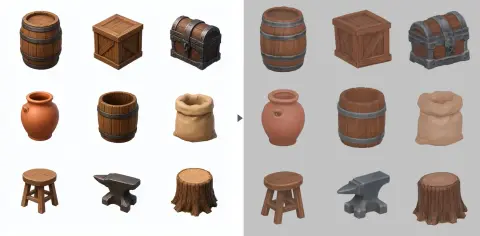
- Prop sheets: one generated picture of a 3×3 grid becomes nine separate, upright, named props, each with three levels of detail
- An MCP server (`lab mcp`) so Claude Code, Codex, Kimi, Cursor and other agents can make, check and tweak assets on your machine
- Reproducible runs from JSON manifests and a provenance record with licence classification for every generated file
Getting started
Requirements per the README: an Apple Silicon Mac (32 GB recommended) or Linux with an NVIDIA (24 GB VRAM tested) or AMD ROCm card, plus Blender 4.2+ for Finish and rigging. Model weights run to tens of GB and are only downloaded when you choose a backend.
Install and open the studio
The installer checks the machine, installs the code and Python 3.11, then starts the studio in your browser. It downloads no model weights. The README invites you to read `install.sh` before running it.
# Mac (Apple Silicon) or Linux
curl -fsSL https://assetfurnace.com/install.sh | bash

# Windows (PowerShell)
irm https://assetfurnace.com/install.ps1 | iex
Pick a 3D engine
In Setup & Status, choose a backend; each states its download size and licence and asks before fetching. Pixal3D is the recommended start. Set a Models folder on another drive first if disk space is tight. The same setup can be run from the command line.
python scripts/bootstrap_pixal3d.pyMake a character
Press + Create, type a sentence and press Make it. The studio generates the picture with Qwen-Image, builds the 3D model, and runs the steps you keep enabled; you can stop after any step, and closing the tab does not stop the run. Press Rig on a humanoid, then pick a move and download the animated GLB.
Or run an engine from the CLI
Each backend has a script that takes a picture (ideally a pre-masked transparent PNG) and writes a GLB. Finish the result to a lighter game asset with `retopo_repaint.py`.
python scripts/pixal3d_generate.py input.png output.glb --seed 42

python scripts/retopo_repaint.py output.glb input.png finished.glb \
    --faces 40000 --skip-paint
Connect your coding agent
AssetFurnace's MCP server lets an agent generate and inspect assets; it never downloads weights without your yes and cannot delete or rename assets. Use your own install folder if it differs.
claude mcp add assetfurnace -- ~/image-to-3dlab/lab mcp
# or, for Codex
codex mcp add assetfurnace -- ~/image-to-3dlab/lab mcp
Commands and code are distilled from the project's own documentation — always check the official repo for the latest.
When to use it
- Prototype rigged, animated characters for an indie game on a Mac or a single GPU, without paying per generation
- Fill a scene with consistent props by turning one prop-sheet picture into nine game-ready models with LODs
- Keep brand lettering, numbers and faces readable on low-poly models made from concept art
- Let a coding agent generate and iterate on 3D assets for a Godot, Unity or three.js project, with a licence record for each file
How AssetFurnace compares
AssetFurnace alongside other open-source 3d & cad generation tools AI/TLDR tracks, ranked by GitHub stars.
| Tool | Stars | What it does |
|---|---|---|
| MCP for Blender | ★ 34.6k | MCP server and Blender addon that let an LLM drive Blender directly — creating, modifying and inspecting 3D objects, materials and scenes from a chat prompt. |
| text-to-cad | ★ 26.4k | A library of agent skills for CAD, CAE and CAM: plain-language to STEP models, DXF drawings, URDF/SRDF/SDF robot files, printability checks and sliced G-code. |
| Pascal Editor | ★ 25.5k | A local-first 3D building editor built on React Three Fiber and WebGPU, with a typed architectural node hierarchy and an authenticated MCP service so AI agents can inspect and edit the scene. |
| img2threejs | ★ 21.4k | An agent skill that rebuilds the object in a single reference image as procedural, animation-ready Three.js code, gating each sculpting pass on a vision review against the reference. |
| SolidCraft | ★ 16.6k | An open-source parametric 3D CAD app in Rust for desktop and browser, with a built-in MCP server so AI agents can sketch, model, measure and export editable parts. |
| CADAM | ★ 5.4k | An open-source text-to-CAD web app that has an LLM write OpenSCAD, then exposes the model's parameters as live sliders and exports STL, SCAD and DXF. |
| AssetFurnace | ★ 1.2k | A local studio that turns a sentence or a picture into a textured, rigged and animated 3D game asset |
| MAC (Multi-Agent CAD) | ★ 1.1k | A multi-agent framework that turns natural-language design briefs into editable CAD parts and multi-part assemblies, exporting STEP, STL, GLB and URDF. |