
What is SolidCraft?
SolidCraft is an open-source parametric 3D CAD application written in pure Rust by Tangency Labs. You sketch on a plane, constrain and dimension the sketch, and turn profiles into solids with features on an editable timeline; change a dimension and the model rebuilds. It sits in the 3D & CAD Generation category of the Multimodal Generation tools and is open-source, written in Rust and licensed MIT OR Apache-2.0.
Overview
SolidCraft is an open-source parametric 3D CAD application written in pure Rust by Tangency Labs. You sketch on a plane, constrain and dimension the sketch, and turn profiles into solids with features on an editable timeline; change a dimension and the model rebuilds. It runs as a desktop app (Windows, macOS and Linux), a web app in the browser, a headless CLI and an MCP server, and its docs call it early: sketching, solid modelling, parameters, components with joints, sheet metal and a plastic-enclosure subset work, while surfaces, drawings, CAM and simulation are deferred. The README reports that 75 of 76 public reference parts match their analytic or FreeCAD-computed volume, area, centre of mass and bounding box.
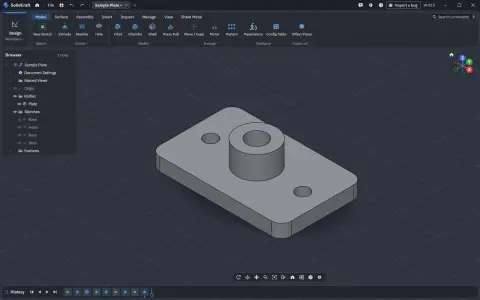
The design choice that makes it relevant to AI is that everything a user can do is a command with JSON parameters, and the toolbar, dialogs, scripts, the CLI, the control channel and MCP all run the same commands. `solidcraft-cli mcp` is a Model Context Protocol server over stdio: headless it runs its own design session, and bridged to the running desktop app it drives the window so you can watch the agent model. Its tools let an agent list and describe commands, `execute` one or `batch` many (stopping at the first error and rolling the design back), `inspect_design`, `measure` bodies or picked faces and edges, `set_parameter`, take a `screenshot`, and `open`, `save` or `export` STEP, 3MF, STL, OBJ or URDF.
The server limits which files an agent can reach — by default the open design's folder inside your home directory, its recovery folder and a private scratch folder, with `--allow-path` to add more — and annotates each tool as read-only or destructive for clients that ask before running tools. `solidcraft-cli mcp setup` writes the server into the config of Claude Code, Claude Desktop, Cursor, Codex, Gemini, GitHub Copilot CLI, Windsurf, Zed, VS Code and OpenCode, and the project ships five Agent Skills (modelling, editing, checking, mechanisms and bug reporting) that an agent can also read through the `skill_reference` tool. The desktop app adds an Assistant chat panel that talks to a coding agent you already use, or to an OpenAI- or Anthropic-compatible endpoint such as Ollama or LM Studio, about the open design. SolidCraft is licensed MIT OR Apache-2.0.
What it does
- Sketches with lines, arcs, splines and text, solved by the project's own constraint solver, with parameter-driven dimensions
- Extrude, revolve, sweep, loft, fillet, chamfer, shell, draft, holes, threads, patterns, mirror, split and combine on an editable parametric timeline
- Parameters and configurations with unit-aware expressions; assemblies with joints, motion studies, contact sets, interference and mass properties
- Sheet metal with flanges, hems, fold/unfold and flat patterns, plus plastic enclosure features
- STEP, IGES, 3MF, STL, OBJ and glTF in and out where supported, and URDF export
- Built-in MCP server (`solidcraft-cli mcp`), headless or bridged to the running app, with batch rollback, measurement and screenshot tools
- One-command MCP client setup for Claude Code, Claude Desktop, Cursor, Codex, Gemini, Copilot CLI, Windsurf, Zed, VS Code and OpenCode
- Headless CLI and JSON command scripts that run the same commands as the UI
Getting started
Commands come from the SolidCraft README, the getting-started guide and the MCP docs. Prebuilt downloads for Windows, macOS and Linux are on solidcraft.io/download, and the browser app at solidcraft.io/app needs no install.
Install the app
On Linux the Snap is one line (the README also links a Windows installer, a macOS disk image and an AppImage). The Snap exposes the CLI as `solidcraft.cli`; other packages put `solidcraft-cli` on your `PATH`.
sudo snap install solidcraft
solidcraft                # or open SolidCraft from the app menu
solidcraft.cli --version  # the CLI, for scripts and `solidcraft.cli mcp`
Connect your AI agents
`mcp setup` adds a `solidcraft` server to every supported client it finds on the computer, backing each config file up first; `--live` also adds `solidcraft-live`, which drives the open app. For Claude Code you can add it by hand instead. Restart the client afterwards.
solidcraft-cli mcp setup            # every client found on this computer
solidcraft-cli mcp setup --dry-run  # show what it would write, change nothing

# or, for Claude Code only
claude mcp add solidcraft -- solidcraft-cli mcp
Watch the agent model in the app
Headless, the server runs its own design session with no window. With the desktop app running, `solidcraft-cli mcp` finds it through the app's control channel (on by default, local only, token-protected) so you can watch each step.
# Headless, optionally starting from a design file
solidcraft-cli mcp
solidcraft-cli mcp --in part.sc

# Bridged to the running app
solidcraft &
solidcraft-cli mcp
Choose which folders the agent may touch
Tool calls only read and write inside the open design's folder, SolidCraft's recovery folder and a private scratch folder. Name extra folders for saves and exports with `--allow-path`.
solidcraft-cli mcp --allow-path ~/designs --allow-path ~/exports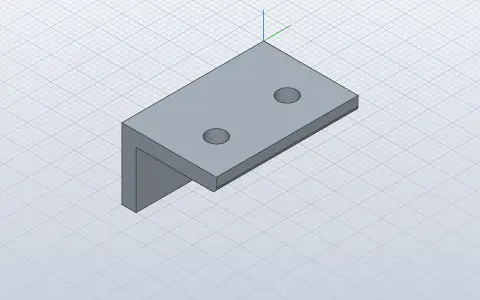
Script a part without the UI
A script is a JSON list of the same commands the UI runs. From a source checkout, the CLI can list the command registry, run an example script to STEP and render a snapshot of it.
cargo run --release -p solidcraft-cli -- commands
cargo run --release -p solidcraft-cli -- run examples/bracket.json --out bracket.step
cargo run --release -p solidcraft-cli -- snapshot examples/bracket.json --out bracket.png
Commands and code are distilled from the project's own documentation — always check the official repo for the latest.
When to use it
- Let Claude Code, Cursor or Codex build an editable parametric part through MCP and hand you a STEP or 3MF file
- Watch an agent model live in the desktop app, then take over the same timeline by hand
- Generate parts in CI or scripts with the headless CLI and JSON command scripts
- Model 3D-printable enclosures and brackets driven by named parameters, then change one value and rebuild
- Export an assembly to URDF for robotics work
How SolidCraft compares
SolidCraft alongside other open-source 3d & cad generation tools AI/TLDR tracks, ranked by GitHub stars.
| Tool | Stars | What it does |
|---|---|---|
| MCP for Blender | ★ 34.6k | MCP server and Blender addon that let an LLM drive Blender directly — creating, modifying and inspecting 3D objects, materials and scenes from a chat prompt. |
| text-to-cad | ★ 26.4k | A library of agent skills for CAD, CAE and CAM: plain-language to STEP models, DXF drawings, URDF/SRDF/SDF robot files, printability checks and sliced G-code. |
| Pascal Editor | ★ 25.5k | A local-first 3D building editor built on React Three Fiber and WebGPU, with a typed architectural node hierarchy and an authenticated MCP service so AI agents can inspect and edit the scene. |
| img2threejs | ★ 21.4k | An agent skill that rebuilds the object in a single reference image as procedural, animation-ready Three.js code, gating each sculpting pass on a vision review against the reference. |
| SolidCraft | ★ 16.6k | Open-source parametric 3D CAD in pure Rust, with a built-in MCP server so AI agents can model |
| CADAM | ★ 5.4k | An open-source text-to-CAD web app that has an LLM write OpenSCAD, then exposes the model's parameters as live sliders and exports STL, SCAD and DXF. |
| AssetFurnace | ★ 1.2k | A local studio and CLI that turns a prompt or picture into a textured, rigged and animated GLB game asset through Pixal3D, TRELLIS.2 or Hunyuan3D, on Apple Silicon, NVIDIA or AMD. |
| MAC (Multi-Agent CAD) | ★ 1.1k | A multi-agent framework that turns natural-language design briefs into editable CAD parts and multi-part assemblies, exporting STEP, STL, GLB and URDF. |