Overview
ATLAS — Adaptive Test-time Learning and Autonomous Specialization — is a local coding agent built to get real software work out of compact open models running on your own GPU. Instead of relying on a single generation from a large hosted model, it puts the intelligence in the system around the model: planning, generating several candidates, scoring them, compiling and testing them in an isolated sandbox, and repairing what fails. It needs no hosted model and no third-party model-provider API key, and nothing is billed per token.
The project describes itself as experimental. As of release 3.1.6 (1 October 2026) the README lists known gaps in the 3.1 line, with fixes planned for 3.2.0: a failing pipeline candidate can still be written to disk and reported as verified; C, C++, Swift, JSX, Vue and Svelte files are tested as Python; and the Geometric Lens scorer gives no usable signal under the default settings. The maintainers say not to rely on a "verified" or "completed" from ATLAS — review what it writes and run your own tests. They have also withdrawn the LiveCodeBench figure published with V3.0 in March 2026, and state that ATLAS has no benchmark result for the 3.1 releases.
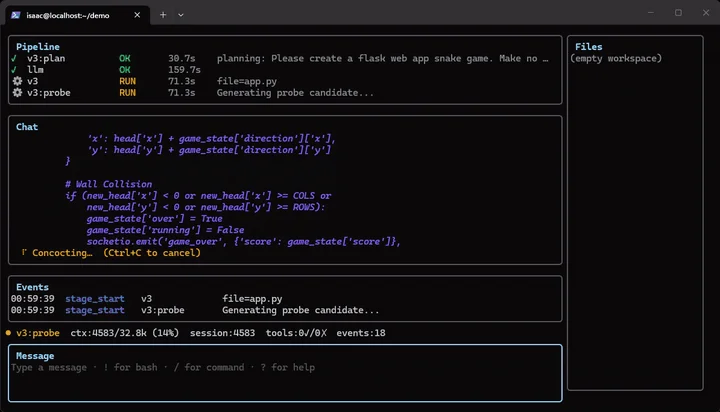
The system is a stack of services. `atlas-tui` is a Bubbletea terminal UI and the main chat client, with live panes for the pipeline, chat, events and workspace files. `atlas-proxy` is a Go agent loop that routes tool calls by complexity tier, constrains model output with GBNF grammars, and enforces turn caps, token budgets and timeouts. Small edits are written directly after the agent reads the relevant files; bigger changes go through the V3 pipeline — structured planning (PlanSearch), diverse candidate sampling, per-phase thinking budgets, self-generated test cases for repair, and sandbox verify-and-correct loops — before anything lands on disk.
Inference runs on a bundled llama-server with quantized GGUF models (Q6_K / Q4_K_M). The README lists NVIDIA CUDA and Apple Silicon (a native macOS hybrid Metal path) as supported, AMD ROCm as community-tested and Vulkan as a preview, with 16 GB or more of VRAM as the baseline. A Geometric Lens component scores candidates from the model's own embeddings, and you can rate passes in the TUI (`/good`, `/bad`) and retrain it on your own workloads with `atlas lens retrain`. ATLAS is AGPL-3.0, written mainly in Python with Go for the proxy and TUI, and its repository moved to inferstep/ATLAS in September 2026.
What it does
- Bubbletea terminal UI launched with `atlas` in any project directory, with live Pipeline, Chat, Events and Files panes, chat / `!bash` / `/slash` input modes and saved sessions (`atlas --continue`, `atlas --resume`)
- Go agent loop (atlas-proxy) with complexity-tiered tool routing, GBNF grammar-constrained output and safety limits on turns, tokens and time
- V3 code pipeline for larger changes: constraint-driven planning, diverse candidates, budget forcing, self-generated-test repair and sandbox refinement loops
- Isolated sandbox that compiles, lints and runs both generated and existing tests across Python, Rust, Go, C, Shell and other languages
- Local inference via llama-server on NVIDIA CUDA, AMD ROCm, Apple Metal or Vulkan, with bring-your-own GGUF models and per-model Lens and ASA training (`atlas lens build`, `atlas asa build`)
- Interactive permission prompts before shell commands and deletions, with default, accept-edits and yolo modes cycled by Ctrl+T
- Operations tooling: `atlas doctor` diagnostics, staged `atlas upgrade` with automatic restore, `atlas rollback`, and signed release tags and container images
Getting started
ATLAS installs as a Docker (or Podman) stack on Linux, or through a native macOS hybrid path on Apple Silicon. The README asks for a GPU with 16 GB or more of VRAM, Python 3.9+, and about 20 GB of disk for model weights and container images. The prebuilt CUDA image targets RTX 50-series (Blackwell) cards; older NVIDIA GPUs need a one-time local rebuild described in the setup guide.
Run the bootstrap installer
The script detects your distro (Ubuntu, Debian, RHEL, Fedora, Rocky, Alma) and GPU vendor, installs the container runtime, downloads the model weights, builds the ASA steering vector and starts the stack. Expect 10–30 minutes; the model download is the slow part.
curl -fsSL https://raw.githubusercontent.com/inferstep/ATLAS/main/scripts/atlas-bootstrap.sh | bashOr pin and review the installer first
The README documents two more careful ways to run the same script: pinned to a signed release tag, or downloaded and read before running.
# Pinned to a release: script, checkout, and images all at the signed tag
curl -fsSL https://raw.githubusercontent.com/inferstep/ATLAS/v3.1.6/scripts/atlas-bootstrap.sh \
  | ATLAS_BOOTSTRAP_REF=v3.1.6 bash

# Review before running
curl -fsSL -o atlas-bootstrap.sh https://raw.githubusercontent.com/inferstep/ATLAS/main/scripts/atlas-bootstrap.sh
less atlas-bootstrap.sh
bash atlas-bootstrap.sh
Verify the install
`atlas doctor` checks the GPU runtime, container health, endpoint reachability and workspace mounts. The getting-started guide says not to proceed while it reports failures.
atlas doctorLaunch the TUI in a project
Start in a version-controlled repository so you can review changes with `git diff`. In the default mode ATLAS asks before shell commands and deletions: `y` allows once, `a` for the session, `n` denies.
cd /path/to/your/project
atlas              # interactive: launches the TUI
atlas --continue   # resume the most recent session in this directory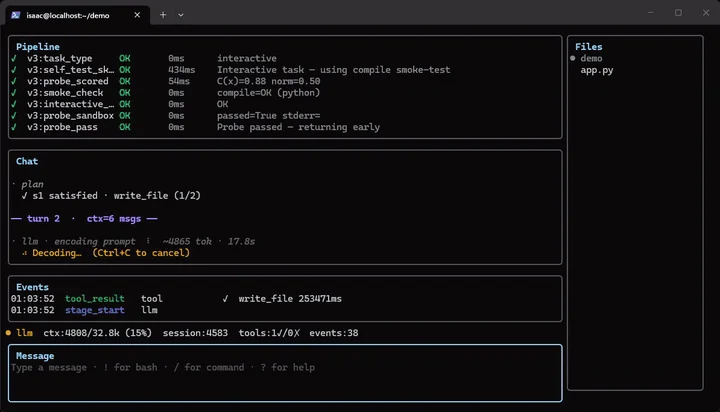
Review, test and rate the result
Give it one bounded, concrete task. Afterwards review with `/diff` (or `git diff`) and run your own tests; `/undo` soft-resets the last commit the agent made. Rating passes with `/good` or `/bad` banks training samples, and `atlas lens retrain` refits the quality scorer to your code once enough accumulate.
/diff
/good
/undo
Upgrade
For an existing install, the release notes say to pull first and then run the staged upgrade, which restores the previous release automatically if any step fails.
git pull
atlas upgrade
Commands and code are distilled from the project's own documentation — always check the official repo for the latest.
When to use it
- Reach for it when you want a coding agent that runs entirely on your own GPU, with no hosted model, provider API key or per-token bill
- Reach for it to experiment with test-time techniques — planning, multi-candidate sampling, sandbox verification and repair — around a compact open model
- Reach for it on small, well-described changes in a version-controlled repo, where you will review the diff and run your own tests before trusting the result
- Reach for it to study or extend a self-hosted agent stack, from grammar-constrained tool calls to per-model scorer training on your own sessions
How ATLAS compares
ATLAS alongside other open-source autonomous coding agents tools AI/TLDR tracks, ranked by GitHub stars.
| Tool | Stars | What it does |
|---|---|---|
| opencode | ★ 213k | OpenCode is an open source AI coding agent that runs in your terminal, with built-in build and plan agents and an optional desktop app. |
| Claude Code | ★ 151k | Anthropic's agentic coding tool for the terminal, IDE and GitHub: it understands your codebase, executes routine tasks, explains code and handles git workflows from natural-language commands. |
| OpenAI Codex | ★ 129k | OpenAI's cloud and CLI coding agent that writes features, fixes bugs, and proposes code changes across a repo, running tasks in parallel. |
| Pi | ★ 115k | Minimal terminal coding agent harness with four built-in tools, extended through TypeScript extensions, skills and prompt templates instead of forks. |
| Gemini CLI | ★ 107k | An open-source command-line AI agent from Google that connects your terminal to Gemini models for reading code, editing files, running shell commands, and searching the web. |
| autoresearch | ★ 97.9k | Karpathy's minimal harness that hands a coding agent a single-GPU LLM training script and lets it run fixed five-minute experiments, keeping or discarding each change on its own. |
| Orca | ★ 92k | Open-source desktop workspace that runs Claude Code, Codex, OpenCode and other CLI coding agents in parallel, each in its own git worktree, with a mobile companion app. |
| ATLAS | ★ 2.1k | A self-hosted coding agent that wraps a compact open model in planning, candidate generation, sandboxed testing and repair |