

What is OpenAI Codex?
OpenAI Codex is OpenAI's coding agent. Its core is Codex CLI, an open-source agent written in Rust that runs locally on your computer and works inside your repository from the terminal. It sits in the Autonomous Coding Agents category of the AI Coding tools and is open-source, written in Rust and licensed Apache-2.0.
Overview
OpenAI Codex is OpenAI's coding agent. Its core is Codex CLI, an open-source agent written in Rust that runs locally on your computer and works inside your repository from the terminal. The same agent is also available as an extension for VS Code, Cursor and Windsurf, as a desktop app (launched with codex app), and as Codex Web, the cloud-based agent at chatgpt.com/codex that runs tasks in parallel.
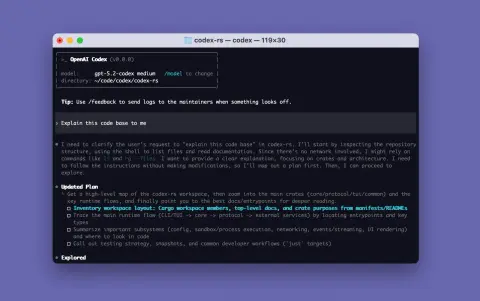
The CLI installs with a one-line script on macOS, Linux and Windows, or through npm and Homebrew; the standalone installers download from OpenAI's release host and fall back to GitHub Releases, where per-platform binaries are also published for manual installs. On first run you sign in with a ChatGPT account (Plus, Pro, Business, Edu or Enterprise plans include Codex), or configure an API key with some additional setup.
The repository is licensed under Apache-2.0 and includes contributing and build documentation plus an open-source fund. Codex in the cloud and in ChatGPT is a commercial service, which is why the catalogue lists the product as open-core: the client is open source, the hosted agent and the models behind it are not.
What it does
- Codex CLI: an open-source (Apache-2.0) coding agent in Rust that runs locally and edits your repository from the terminal
- IDE extension for VS Code, Cursor and Windsurf, and a desktop app started with codex app
- Codex Web: OpenAI's cloud-based agent that runs coding tasks in parallel from chatgpt.com/codex
- One-line installers for macOS/Linux and Windows, plus npm and Homebrew packages and per-platform binaries on GitHub Releases
- Sign in with a ChatGPT plan (Plus, Pro, Business, Edu, Enterprise) or use an API key
- Plugins: install, list and remove plugins from remote marketplaces from the command line
Getting started
Install the CLI, run codex, and sign in with your ChatGPT account. Everything below is from the project README.
Install on macOS or Linux
The install script downloads the right binary for your platform. npm (npm install -g @openai/codex) and Homebrew (brew install --cask codex) are alternatives.
curl -fsSL https://chatgpt.com/codex/install.sh | shInstall on Windows
Run the PowerShell installer.
powershell -ExecutionPolicy ByPass -c "irm https://chatgpt.com/codex/install.ps1 | iex"Start it and sign in
Run codex in a project directory and choose Sign in with ChatGPT; OpenAI recommends this over an API key so Codex runs as part of your plan.
codexOpen the desktop app instead
The same agent as a desktop application.
codex appCommands and code are distilled from the project's own documentation — always check the official repo for the latest.
When to use it
- Run an AI coding agent locally on your own machine with an open-source client you can read and build yourself
- Use the same agent inside VS Code, Cursor or Windsurf, or as a desktop app
- Hand off longer tasks to Codex Web to run in parallel in the cloud
- Extend the CLI with plugins from remote marketplaces
Version history
Every verified update to OpenAI Codex that AI/TLDR tracked, newest first — each links to our coverage and the official changeset.
- 2026-10-29v0.166.0
Transcript text can be selected and searched from the keyboard, and `codex doctor --network-only` runs focused connectivity checks. `codex queue --resume` resumes unloaded threads, and GPT-6.1 Terra joins the Vertex AI and Bedrock catalogs.
- 2026-10-27v0.165.0
Codex gains a built-in Google Cloud Vertex AI provider (model_provider = "gcp") and adds GPT-6.1 Terra to its model catalogs. Memory v2 is on by default for new profiles, and reasoning effort can be changed mid-conversation by default.
- 2026-10-23v0.164.0
Reusable prompts and slash commands can be saved in ten numbered /presets slots, and /model and /permissions take inline arguments. Enterprise MCP connections gain account-grant and OAuth sign-in options, and the fullscreen transcript previews images on Kitty or Sixel terminals.
- 2026-10-15v0.163.0
A follow-up message can now steer Codex while it is still answering, and independent read-only tools run in parallel. /config becomes a searchable preferences panel, and /daemon restarts the managed background server.
- 2026-10-08v0.162.0
Managed Git worktree tools arrive for trusted local projects, and tasks can be pinned in the Command Center. /copy and Ctrl+Insert copy transcript blocks, and apply_patch now keeps CRLF line endings.
- 2026-10-07v0.161.0
GPT-6.1 Sol becomes the default model in the bundled and Amazon Bedrock catalogs, and /mcp login signs in to MCP servers from the terminal. codex exec can pick a Cyber access program per turn.
- 2026-10-01v0.160.0
Sessions can start outside a project with workspace defaults when policy permits, and an opt-in Guardian review can now pull in earlier user instructions and agent-handoff context. Queued messages no longer send twice after a reconnect.
- 2026-09-29v0.159.0
Adds an opt-in instant_interrupt setting so new input can steer Codex during a model response or a long code-mode call, plus a compact welcome screen and richer Mermaid flowcharts. .aws directories are now protected by default under writable roots, and Windows no longer opens stray console windows for MCP servers.
- 2026-09-28v0.158.0
Adds configurable copy-on-select and right-click paste to the fullscreen UI, with copied text keeping its Markdown, and connects to MCP servers that need a pre-registered OAuth client secret. Elevated commands now need approval before reading terminal input, and sandbox bugs on Windows, Linux and macOS are fixed.
- 2026-09-25v0.157.0
Adds GPT-6 Sol and GPT-6 Luna for Amazon Bedrock users, with prompts to move off older models, and makes fullscreen transcripts the default. Network restrictions now hold across redirects and live HTTP and WebSocket traffic, and a policy change that removes access cuts the connection.
- 2026-09-23v0.156.1
Adds GPT-6 Sol and GPT-6 Luna to the model picker, one day after OpenAI launched them, so either can be selected from the menu instead of a config edit. The rate-limit notification was updated to name GPT-6 Luna as the model to switch to when an account is running low.
- 2026-09-22v0.156.0
Adds an optional fullscreen terminal UI, switched on for the next launch with /tui, bringing transcript search, mouse selection and right-click copying, plus six new themes and Mermaid diagrams in responses. Voice conversations and worktree support are on by default, a /usage dashboard reports token totals and plugin and skill activity, and three sandbox isolation gaps are closed.
- 2026-09-17v0.155.0
Adds experimental /voice conversations over WebRTC with live transcripts and microphone controls, enabled through /experimental on supported builds. macOS builds can require Touch ID before an MCP request proceeds, and the agents overview gains task hiding, archiving and deletion plus worktree ownership details.
- 2026-09-09v0.154.0
GPT-6 Astra is added to the model picker and to Amazon Bedrock catalogs. Experimental worktree support (`--worktree` or `/worktree`) gives a new or forked session its own isolated checkout, and Windows sessions can share one background Codex server.
- 2026-09-03v0.153.0
Adds a plugin command line that lists, installs and removes plugins from remote marketplaces; Vim mode gains undo and redo, and TUI sessions reconnect after an app-server drop without losing the draft.
OpenAI Codex in the news
- 2026-10-31NOTABLEGPT-5.6 Sol beats Factorio — a rocket launch on peaceful mode
- 2026-10-29NOTABLECodex CLI 0.166.0 — keyboard transcript selection and codex doctor
- 2026-10-27NOTABLECodex CLI 0.165.0 — built-in Vertex AI provider and GPT-6.1 Terra
- 2026-10-23NOTABLECodex CLI 0.164.0 — saved prompt presets and inline /model settings
- 2026-10-15NOTABLECodex CLI 0.163.0 — steer mid-response and run read-only tools in parallel
- 2026-10-08NOTABLECodex CLI 0.162.0 — managed Git worktrees and pinned tasks
- 2026-10-07NOTABLECodex CLI 0.161.0 — GPT-6.1 Sol becomes the default model
- 2026-10-01NOTABLECodex CLI 0.160.0 — projectless sessions and Guardian review context
From the AI/TLDR release feed — every item is source-verified when it ships.
How OpenAI Codex compares
OpenAI Codex alongside other open-source autonomous coding agents tools AI/TLDR tracks, ranked by GitHub stars.
| Tool | Stars | What it does |
|---|---|---|
| opencode | ★ 224k | OpenCode is an open source AI coding agent that runs in your terminal, with built-in build and plan agents and an optional desktop app. |
| Claude Code | ★ 154k | Anthropic's agentic coding tool for the terminal, IDE and GitHub: it understands your codebase, executes routine tasks, explains code and handles git workflows from natural-language commands. |
| OpenAI Codex | ★ 133k | OpenAI's coding agent: an open-source CLI that runs locally, plus IDE, desktop-app and cloud (Codex Web) surfaces |
| Pi | ★ 120k | Minimal terminal coding agent harness with four built-in tools, extended through TypeScript extensions, skills and prompt templates instead of forks. |
| Orca | ★ 113k | Open-source desktop workspace that runs Claude Code, Codex, OpenCode and other CLI coding agents in parallel, each in its own git worktree, with a mobile companion app. |
| Gemini CLI | ★ 109k | An open-source command-line AI agent from Google that connects your terminal to Gemini models for reading code, editing files, running shell commands, and searching the web. |
| autoresearch | ★ 99.1k | Karpathy's minimal harness that hands a coding agent a single-GPU LLM training script and lets it run fixed five-minute experiments, keeping or discarding each change on its own. |
| OpenHands | ★ 92.5k | An open-source AI software-development agent that plans tasks, edits files, runs commands, and tests code, usable from a terminal CLI, a local web GUI, or a Python SDK. |