Overview
Backburner turns an iPhone into a helper for a Mac that runs a large language model locally. You plug the phone into an Apple Silicon Mac with a 10 Gb/s USB-C cable, open the Backburner app on it, and start an OpenAI-compatible server on the Mac. The model it is built around is Qwen3.8-27B. While the Mac reads a long prompt, it runs the first layers of each batch and streams the result to the phone, which runs the remaining layers on its GPU while the Mac moves on to the next batch. The engine is a fork of llama.cpp with its own Mac kernels (SME2 on the CPU, Metal fusions and DFlash2 speculative decoding).
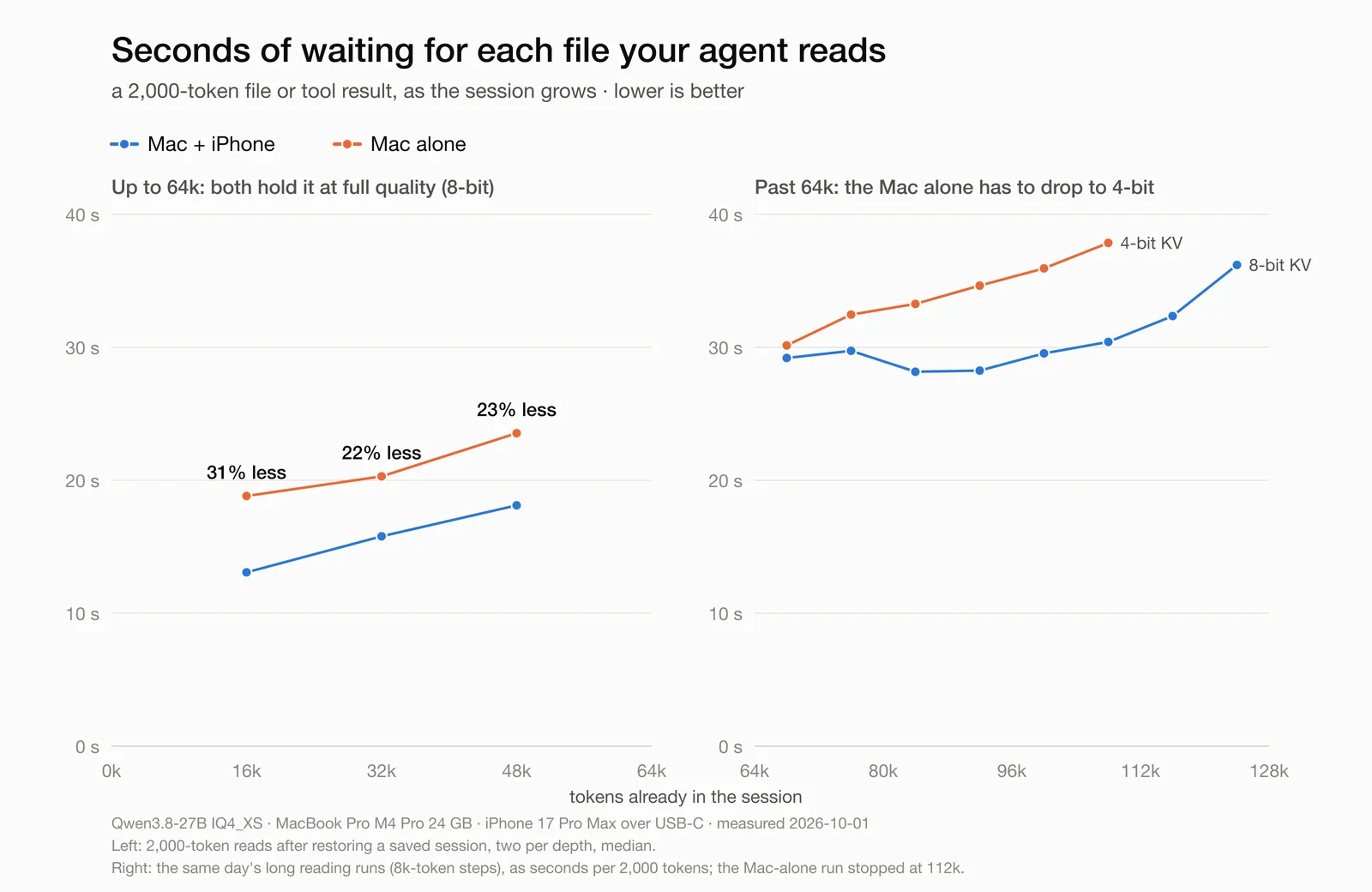
The project makes two claims, with its own measurements from 2026-10-01 on a MacBook Pro M4 Pro (24 GB) and an iPhone 17 Pro Max. The first is faster prompt reading: 29–44% faster prefill at 16k–48k tokens of context, so a coding agent waits less each time it reads a file or a tool result longer than about 512 tokens. The second is more context: a 24 GB Mac holds 64k tokens of 8-bit context next to the model, and past that the phone keeps the oldest part of the conversation and computes attention over it. The README says the total is sized from the phone's free memory at startup (196k–229k tokens at 8-bit on an iPhone 17 Pro Max) and was tested end to end to 128k at 8-bit and 140k at 4-bit. It also reports that greedy output is token-identical with and without the phone.
The project calls itself pre-release, and its GitHub releases (v0.0.1 to v0.0.4, all published on 2026-10-03) are marked as pre-releases. It needs no jailbreak: the iPhone app installs through AltStore with a free Apple ID, or you can build it with Xcode. The README is open about the limits. Prompts shorter than about 512 tokens stay on the Mac, and below 64k context the phone does not change writing speed. The server handles one request at a time. Past 64k the app must stay open in front, because iOS does not let an app use the GPU in the background. The project says it aims to pool every device a person owns, including other Macs, iPads, Linux and Windows PCs and Android phones, into one inference machine (docs/ROADMAP.md).
What it does
- Split prefill: the Mac runs layers 1–40 of each 256-token batch while the iPhone runs layers 41–64 on its GPU, pipelined over the USB-C cable
- Phone-held context: past the Mac's 64k cells, the oldest KV pages move to the phone, whose GPU and Neural Engine compute attention over them
- OpenAI-compatible server at http://127.0.0.1:8080/v1, so existing agents and clients can point at it
- llama.cpp fork with Mac-side speedups that also help without the phone: SME2 matmul offload on M4-class CPUs, Metal fusions and DFlash2 speculative decoding
- SSD prompt cache (scripts/proxy.py) that restores a known system prompt from disk instead of reading it again
- Every change is checked for identical output: greedy output with the phone matches the Mac-alone run token for token
Getting started
You need an Apple Silicon Mac (the maintainer tested an M4 Pro with 24 GB), an iPhone 15 Pro or newer or an M-series iPad, and a 10 Gb/s USB-C cable. The cable that comes in the iPhone box is USB 2, which the README says is too slow. The installer downloads about 24 GB of engine and models.
Install the Mac engine and models
One command downloads the Mac engine and the models and prepares the phone's half of the model. It is safe to run again. The README notes that install.sh needs FORCE=1 on Macs with less than 24 GB.
curl -fsSL https://raw.githubusercontent.com/StayLameBro/backburner/main/install.sh | bashInstall the iPhone app
Install Backburner.ipa from the GitHub release with AltStore 2.2+ and a free Apple ID: in AltStore, go to Sources → + and add the project's source URL. The release notes say SideStore will not work because it drops the memory entitlement. You can also build the app with Xcode using scripts/build-iphone.sh.
https://raw.githubusercontent.com/StayLameBro/backburner/main/altstore/source.jsonCopy the phone's half of the model
Plug the phone in, open Backburner on it, then run this once per phone. It copies the phone's layers over the cable.
backburner phoneStart the server
This starts an OpenAI-compatible server at http://127.0.0.1:8080/v1. It uses the iPhone when the phone is plugged in with Backburner open. The startup line should read "split prefill on", "remote KV on" and "ANE pages on".
backburnerOr build it step by step
From a recursive clone, build the llama.cpp fork with CMake, split the GGUF to create the phone's tail (layers 41–64, ~5.1 GB), push it to the phone and serve. The README also covers downloading the models and the draft model. Run the sysctl line after every reboot, because macOS resets the GPU wired-memory limit. PHONE=0 runs the Mac alone.
git clone --recursive https://github.com/StayLameBro/backburner && cd backburner
cmake -S llama.cpp -B llama.cpp/build-metal -DCMAKE_BUILD_TYPE=Release
cmake --build llama.cpp/build-metal --target llama-server llama-quantize -j
python3 scripts/split-gguf.py ~/Models/Qwen3.8-27B-IQ4_XS.gguf ~/Models/tail-iq4xs-L40-nohead.gguf -L 40 --no-head
scripts/phone-tail.sh L40
sudo sysctl iogpu.wired_limit_mb=20480
scripts/serve.sh
PHONE=0 scripts/serve.sh
Commands and code are distilled from the project's own documentation — always check the official repo for the latest.
When to use it
- Cut the time a local coding agent spends reading files and tool results into a long session on a 24 GB Mac
- Keep a 27B model's context at 8-bit well past 64k tokens by lending the conversation's oldest part to an iPhone
- Put a recent Pro iPhone or M-series iPad to work as extra GPU and Neural Engine capacity for local inference
- Benchmark split inference across Apple devices with the bundled bench/ scripts and share the results with the project
Version history
Every verified update to Backburner that AI/TLDR tracked, newest first — each links to our coverage and the official changeset.
- 2026-10-03v0.0.4
Pre-release that makes phone-held context sturdier: a phone that stops answering no longer hangs the server, quitting no longer crashes, and sessions can be saved while the phone holds part of the context.
- 2026-10-03v0.0.3
Security fix: over USB the app answers only the connected Mac, Wi-Fi is off unless paired through an encrypted, authenticated tunnel, and the app no longer announces itself on the network.
- 2026-10-03v0.0.1
First public pre-release: the Mac engine, the unsigned iPhone app for AltStore and the iPhone Neural Engine page template.
How Backburner compares
Backburner alongside other open-source local runtimes tools AI/TLDR tracks, ranked by GitHub stars.
| Tool | Stars | What it does |
|---|---|---|
| Ollama | ★ 183k | A developer-friendly tool that downloads and runs local LLMs from the terminal with a built-in OpenAI-compatible API. |
| llama.cpp | ★ 131k | A C/C++ inference engine that runs LLMs in the GGUF format on CPUs, Apple Silicon, and GPUs with low memory use. |
| GPT4All | ★ 77.4k | GPT4All is a free desktop app and Python client that runs large language models locally on your own computer, with no API calls or GPU required. |
| LocalAI | ★ 49.6k | A self-hosted server that exposes an OpenAI-compatible API for running text, vision, voice, and image models on local hardware. |
| Jan | ★ 45k | An open-source desktop app that runs LLMs fully offline as a ChatGPT-style assistant on your own computer. |
| Colibrì | ★ 42.4k | A pure-C inference engine that keeps a Mixture-of-Experts model's dense trunk resident in RAM and streams its routed experts from disk, so 744B-2.8T models run on consumer hardware. |
| AirLLM | ★ 39k | A Python inference library that keeps only one transformer layer on the GPU at a time, so a 70B model runs on a single 4GB card and a 671B MoE model on about 12GB, without quantization. |
| Backburner | ★ 1k | A llama.cpp fork that lets an iPhone plugged into a Mac over USB-C share the work of running a 27B model locally: faster prompt reading and more context |