
What is OpenMausBot?
OpenMausBot (also called MausBot, and formerly OpenGrokBot) is an open-source alternative to xAI's Grok Bot. It sits in the Assistants & Chatbots category of the Agents & Automation tools and is open-source, written in TypeScript and licensed Apache-2.0. To get started: download the desktop app.
Overview
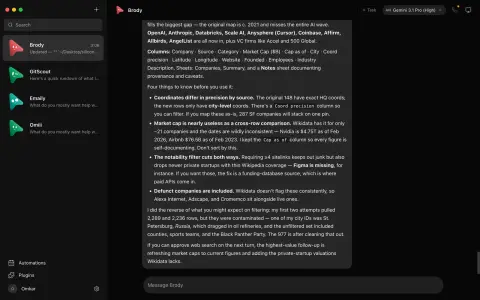
OpenMausBot (also called MausBot, and formerly OpenGrokBot) is an open-source alternative to xAI's Grok Bot. It is a chat app for your own team of AI bots: each bot has its own personality, model, connected apps and computer, and you talk to it like a coworker in a messaging app. The bots are real coding agents — Claude or Codex running on your machine — rather than a plain chat model, and the project states that it is local-first and not affiliated with xAI, Meta, OpenAI or Manus.
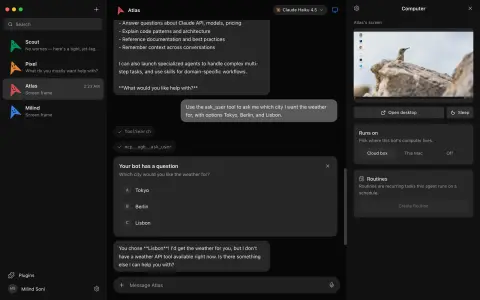
Under the hood a local harness server on 127.0.0.1:8799 owns every agent process and turns each provider's output into one event stream, with one driver per provider (Claude, Codex and Grok Build) plus a cloud-computer agent. A bot's computer can be a cloud Linux desktop through Boat, an isolated local VM, or, after you opt in, your own computer on macOS or Ubuntu Xorg. Transcripts, keys and events stay in ~/.openmausbot.
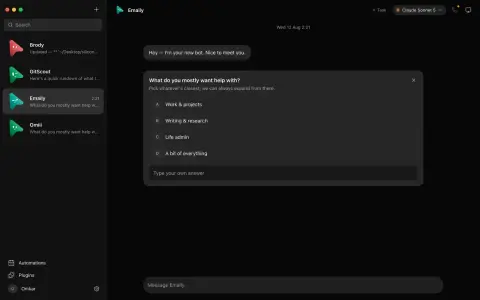
Shell commands, file edits and questions from a bot appear in the chat as Allow/Deny cards. Apps such as Gmail, Slack, GitHub, Notion and Linear connect through a Composio-based marketplace, and bots can be started by schedules, webhooks or app events. The desktop app ships for macOS, Windows and Ubuntu; there is also a headless openmausbot CLI and an MCP server. The code is Apache-2.0, except an enterprise/ folder that is source-available under its own licence.
What it does
- Each bot is a real agent (Claude, Codex or Grok Build) with its own model, personality and connected apps; the model can be switched mid-conversation
- Per-bot computers: a cloud Linux desktop, an isolated local VM, or your own computer after opt-in
- Inline Allow/Deny approval cards for shell commands, file edits and bot questions
- Connected-apps marketplace over Composio for Gmail, Slack, GitHub, Notion, Linear and more
- Channels with separate transcripts and bot rosters, and teams you can install or share as a Markdown file
- Spoken replies through ElevenLabs, Fish Audio, Grok, built-in Mac voices or a local Chatterbox server
- Schedules, webhooks and app-event triggers
- Headless openmausbot CLI and an MCP server for external clients
Getting started
Released desktop builds need no separate server setup. From source or a terminal you need Node 24+ and at least one agent CLI (claude, codex or grok) installed and logged in.
Download the desktop app
Get the signed .dmg for macOS, the Windows x64 installer, or the Ubuntu 24.04 .deb / AppImage (beta) from the latest release.
https://github.com/milind-soni/OpenMausBot/releases/latestOr run it from a terminal or server
Install the CLI globally, or run it once with npx.
npm install -g openmausbot
openmausbot

# or, without a global install
npx openmausbot
Build from source (optional)
Start the harness server and the app, then the Electron shell while the first two keep running.
git clone https://github.com/milind-soni/OpenMausBot && cd OpenMausBot
pnpm install

pnpm dev:server    # harness server → 127.0.0.1:8799
pnpm dev           # app → http://127.0.0.1:5199
pnpm dev:desktop   # Electron shell
Add optional keys
A Composio key unlocks connected apps, a Boat API key gives bots cloud desktops, and ElevenLabs or Fish Audio keys enable spoken replies.
Commands and code are distilled from the project's own documentation — always check the official repo for the latest.
When to use it
- Run a small team of specialist AI bots (research, email, code) from one chat window
- Give a Claude Code or Codex agent its own sandboxed desktop instead of your laptop
- Self-host a Grok Bot-style setup while keeping transcripts and keys on your own machine
- Trigger bots on a schedule, a webhook or an event in Gmail, Slack or GitHub
How OpenMausBot compares
OpenMausBot alongside other open-source assistants & chatbots tools AI/TLDR tracks, ranked by GitHub stars.
| Tool | Stars | What it does |
|---|---|---|
| OpenClaw | ★ 394k | OpenClaw is a self-hosted personal AI assistant that answers you on WhatsApp, Telegram, Slack, Discord, and many other channels, with voice and a live visual canvas. |
| Hermes Agent | ★ 259k | A self-improving personal AI agent from Nous Research that builds skills from experience, remembers across sessions, and reaches you on Telegram, Discord, Slack, and more. |
| Odysseus | ★ 94.9k | A self-hosted AI workspace that puts chat, agents, deep research, documents, email, notes, tasks and calendar behind one Docker Compose stack, over local or API models. |
| CowAgent | ★ 47.7k | A self-hosted assistant that plans and executes tasks with built-in file, terminal, browser and search tools, and answers across a web console plus a dozen messaging platforms. |
| AstrBot | ★ 45.5k | An all-in-one agent chatbot platform that puts LLM conversations, tools, knowledge bases and a plugin marketplace inside messaging apps like Telegram, Slack, Discord, QQ and Feishu. |
| OpenHuman | ★ 42.5k | A local-first desktop personal AI for macOS, Windows and Linux that keeps a compressed memory tree on your machine and orchestrates checkpointed research and automation workflows. |
| MindsHub | ★ 39.8k | An agent workspace for knowledge work and software development that runs swappable open-source agent harnesses against your choice of frontier or open models. |
| OpenMausBot | ★ 10.1k | An open-source chat app for your own team of AI bots, each a real Claude, Codex or Grok Build agent with its own computer |