
What is openset-llm?
openset-llm is an LLM inference engine for ordinary CPUs from Open Set Labs. It sits in the Local Runtimes category of the Models & Inference tools and is open-source, written in C++ and licensed MIT. To get started: clone and start.
Overview
openset-llm is an LLM inference engine for ordinary CPUs from Open Set Labs. Its first model is Qwen3.8-27B in PrismML's ternary Bonsai-2-27B packing (a 5.95 GB file), and it runs it entirely in 8 GB of system memory with no GPU, no unified memory and nothing offloaded. On an 8 vCPU / 8 GB Intel Ice Lake cloud VM the project reports 17–20 tokens per second for one user, which it measured at about 4.2–4.3× ik_llama.cpp and 5.9–6.1× PrismML's own llama.cpp fork on the same box, same model file and same prompts, each engine in its fastest setting.
Technically it is a patch set on PrismML's llama.cpp fork, applied by the installer: new AVX-512 kernels for the ternary weights (for both generating and reading prompts), speculative decoding with the model's own multi-token-prediction head grafted on at install, a fused attention kernel for long contexts, a mode that serves several requests in one pass over the weights, and an agent-loop resume that continues from the point where a resent prompt diverges instead of reading it all again. The server speaks the OpenAI API at http://127.0.0.1:8080/v1 and also opens a simple chat page, so existing clients and agents work unchanged.
The fast path needs Linux (or WSL2) on an x86-64 CPU with AVX-512 VNNI and VBMI — Intel Xeon Ice Lake or newer, or AMD Zen 4 or newer. Other x86 CPUs, including most laptops with AVX2 only, fall back to the fork's own kernel and decode about 5× slower; Apple Silicon is not supported by the installer, and the README points Mac users to PrismML's Metal build instead. It is C++ under the MIT licence; version 0.1.0 was published on 2026-11-25.
What it does
- Runs a 27B model (Qwen3.8-27B as ternary Bonsai-2-27B) on CPU only, inside 8 GB of RAM, at a reported 17–20 tok/s on an 8 vCPU Ice Lake VM
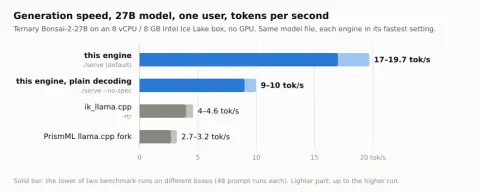
- Speculative decoding with the model's multi-token-prediction head, on by default; ./serve --no-spec switches to plain decoding
- OpenAI-compatible API at /v1 plus a built-in chat page on http://127.0.0.1:8080
- ./serve --multi N serves N requests together, with each stream's greedy output byte-identical to the same request served alone
- Agent-loop resume: when a client resends a long prompt with a changed ending, the server continues from where the two diverge
- Experimental compact attention caches (--kv8, --kv6, --kv5) for longer context on an 8 GB machine, and GGUF LoRA adapters passed through to llama-server
Getting started
You need Linux or Windows with WSL2, at least 8 GB of RAM free for the engine, about 15 GB of free disk while the model is prepared, and git, cmake and a C++ compiler. The fast path needs a CPU with AVX-512 VNNI + VBMI; others run a much slower fallback.
Clone and start
The first run checks the machine, builds the engine, downloads the model (~7.3 GB) and opens a chat page at http://127.0.0.1:8080. Later runs go straight to the page; Ctrl+C stops it. On Ubuntu or Debian, install the build tools first with sudo apt install -y build-essential cmake git.
git clone https://github.com/opensetlabs/openset-llm && cd openset-llm
./start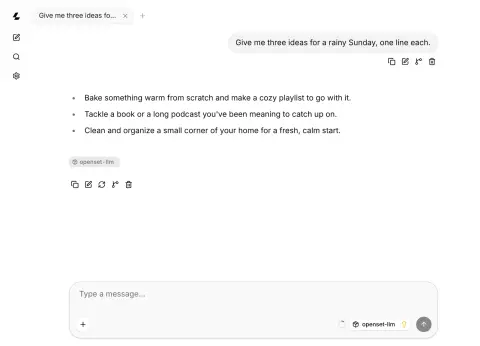
Check your CPU and RAM before downloading
The installer can report which kernel path your machine will get (full AVX-512, partial, or fallback) and whether there is enough free memory, without building or downloading anything.
./install.sh --checkRun it as an API server
For developers, install once and then start the server. The default is one user with speculative decoding; --multi serves several requests at once, --no-webui serves the API only.
./install.sh        # checks CPU and RAM, builds, downloads the model
./serve             # chat at http://127.0.0.1:8080, API at /v1
./serve --multi 4   # 4 requests at once
./serve --no-webui  # API only
Call it from Python
The server speaks the OpenAI chat completions API, so the official openai package works with a changed base_url; the API key is not checked.
from openai import OpenAI   # pip install openai
client = OpenAI(base_url="http://127.0.0.1:8080/v1", api_key="unused")
print(client.chat.completions.create(model="openset-llm",
      messages=[{"role": "user", "content": "Write a haiku about cache misses."}]).choices[0].message.content)
Or run it in Docker
The Docker image is a portable build that picks the best kernel for whatever CPU it lands on. Give Docker at least 8 GB of memory; the first run downloads the model into a named volume. The server has no authentication, so bind it to this machine only.
git clone https://github.com/opensetlabs/openset-llm && cd openset-llm && docker build -t openset-llm .
docker run --rm -p 127.0.0.1:8080:8080 -v openset-llm-models:/data/models openset-llm
Commands and code are distilled from the project's own documentation — always check the official repo for the latest.
When to use it
- Run a 27B-class model on an existing CPU server or cloud VM where no GPU is available, with no per-token API fee
- Point an OpenAI-compatible coding agent at a local endpoint, where agent-loop resume cuts the time spent re-reading long prompts each step
- Serve a few users or parallel agents from one 8 GB box with ./serve --multi N
- Benchmark CPU inference on your own hardware with the project's bench/ harness and compare against ik_llama.cpp and PrismML's fork
How openset-llm compares
openset-llm alongside other open-source local runtimes tools AI/TLDR tracks, ranked by GitHub stars.
| Tool | Stars | What it does |
|---|---|---|
| Ollama | ★ 188k | A developer-friendly tool that downloads and runs local LLMs from the terminal with a built-in OpenAI-compatible API. |
| llama.cpp | ★ 136k | A C/C++ inference engine that runs LLMs in the GGUF format on CPUs, Apple Silicon, and GPUs with low memory use. |
| GPT4All | ★ 77.3k | GPT4All is a free desktop app and Python client that runs large language models locally on your own computer, with no API calls or GPU required. |
| Colibrì | ★ 53.6k | A pure-C inference engine that keeps a Mixture-of-Experts model's dense trunk resident in RAM and streams its routed experts from disk, so 744B-2.8T models run on consumer hardware. |
| LocalAI | ★ 50.6k | A self-hosted server that exposes an OpenAI-compatible API for running text, vision, voice, and image models on local hardware. |
| Strata | ★ 48.4k | A one-click Windows and Linux engine that splits the 125B Qwen3.8-Flash-Next across GPU, RAM, CPU and SSD so it runs on a 12 GB gaming card, with OpenAI and Anthropic APIs on localhost. |
| Jan | ★ 46.2k | An open-source desktop app that runs LLMs fully offline as a ChatGPT-style assistant on your own computer. |
| openset-llm | ★ 1.7k | A CPU-only inference engine that serves a 27B ternary LLM in 8 GB of RAM, with no GPU |