Overview
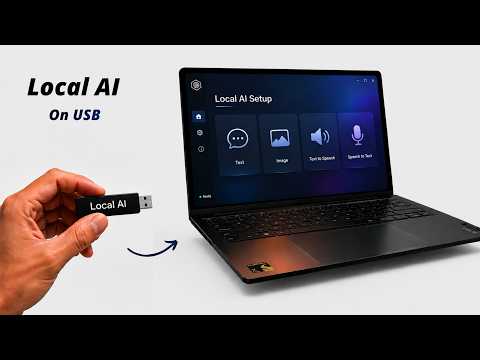
Portable AI Studio (repository name Portable-Local-Studio) is a self-contained desktop AI workbench that runs entirely on your own hardware. One launcher script per platform starts a local web interface that brings four workspaces together: image generation with stable-diffusion.cpp, text chat with GGUF models on a llama.cpp server, speech-to-text with whisper.cpp, and text-to-speech with the Kokoro-82M model via kokoro-js. It needs no account, API key or internet connection once models are on disk, and it is released under the MIT licence.
The project's emphasis is portability. The first run downloads a portable Node.js runtime and prebuilt backend binaries into the project folder rather than installing anything system-wide, so the whole studio, models included, lives in one directory. The launcher detects the machine's hardware and picks a backend: CUDA for NVIDIA, Vulkan for AMD and Intel GPUs, ROCm for AMD on Linux, Metal on Apple Silicon, OpenVINO for Intel Core Ultra NPUs, and a CPU fallback. To avoid exhausting RAM or VRAM, the image and text engines are mutually exclusive by default and you switch between workspaces in the UI.
Models are single files dropped into folders (`app/models/` for Stable Diffusion 1.5 and SDXL checkpoints, `app/llm-models/` for GGUF chat models, `app/speech-models/` for whisper.cpp weights) or fetched through the built-in Model Manager by pasting a Hugging Face URL. Multi-file pipelines such as Flux or Wan, and companion files like LoRA or ControlNet, are listed in the README as unsupported. A live monitor shows CPU, RAM, GPU and VRAM use, and generated images are saved alongside their prompt parameters as JSON.
What it does
- Four offline workspaces in one UI: Stable Diffusion image generation, GGUF chat, Whisper speech-to-text and Kokoro text-to-speech
- Zero-install portability: a portable Node.js runtime, backends and models all live inside the project folder with no global system changes
- Automatic hardware acceleration across CUDA, Vulkan, ROCm, Metal and Intel NPU (OpenVINO), with a CPU fallback
- Model Manager that downloads weights from a pasted Hugging Face URL or imports local files by drag and drop
- Live CPU, RAM, GPU and VRAM monitor inside the web interface
- Local output gallery that stores each image next to its prompt parameters and metadata JSON
Getting started
Download or clone the repository and run the launcher for your platform. The web UI opens on port 1420. Windows needs 64-bit Windows 10 or 11; the prebuilt Linux backends need glibc 2.38 or newer (for example Ubuntu 24.04); the macOS build supports Apple Silicon only.
Windows: run the launcher
Double-click `windows.bat`. On the first run it downloads a portable Node.js runtime and configures prebuilt GPU/CPU backend binaries.
Linux: make the script executable and launch
NVIDIA users are prompted to set up the CUDA backend. Optional flags add the ROCm backend for AMD Radeon (about 1.3 GB) or Intel Core Ultra NPU support (requires the Intel Linux NPU driver).
chmod +x linux.sh
./linux.sh

# optional
./linux.sh --max-perf        # add the ROCm backend (AMD)
./linux.sh --setup-openvino  # Intel Core Ultra NPU
macOS (Apple Silicon): launch
The prebuilt macOS backend uses Metal on M1 or newer; Intel Macs are not supported.
chmod +x mac.sh
./mac.sh
Add models and generate
Drop `.safetensors`, `.gguf` or `.ckpt` image weights into `app/models/` and GGUF chat models into `app/llm-models/`, or download them from the Model Manager tab. Then open the UI, pick a model and write a prompt. If setup breaks, `scripts/reset/reset.sh` (or `reset.ps1` on Windows) clears caches while keeping models and outputs.
http://localhost:1420Commands and code are distilled from the project's own documentation — always check the official repo for the latest.
When to use it
- Run image generation, chat and speech tools on a machine with no internet access or where data must not leave the device
- Carry a complete local AI setup, models included, in one folder that can move between computers without installing anything
- Try local Stable Diffusion, GGUF chat and speech models on consumer NVIDIA, AMD, Intel or Apple hardware without configuring each backend by hand
How Portable AI Studio compares
Portable AI Studio alongside other open-source local runtimes tools AI/TLDR tracks, ranked by GitHub stars.
| Tool | Stars | What it does |
|---|---|---|
| Ollama | ★ 182k | A developer-friendly tool that downloads and runs local LLMs from the terminal with a built-in OpenAI-compatible API. |
| llama.cpp | ★ 130k | A C/C++ inference engine that runs LLMs in the GGUF format on CPUs, Apple Silicon, and GPUs with low memory use. |
| GPT4All | ★ 77.4k | GPT4All is a free desktop app and Python client that runs large language models locally on your own computer, with no API calls or GPU required. |
| LocalAI | ★ 49.4k | A self-hosted server that exposes an OpenAI-compatible API for running text, vision, voice, and image models on local hardware. |
| Jan | ★ 44.7k | An open-source desktop app that runs LLMs fully offline as a ChatGPT-style assistant on your own computer. |
| Colibrì | ★ 38.9k | A pure-C inference engine that keeps a Mixture-of-Experts model's dense trunk resident in RAM and streams its routed experts from disk, so 744B-2.8T models run on consumer hardware. |
| llmfit | ★ 37.4k | A Rust terminal tool that inspects your CPU, RAM, GPUs and VRAM and scores which open-weight models and quantizations will actually run well on that machine, with a TUI, CLI, REST API and local-runtime integrations. |
| Portable AI Studio | ★ 1.4k | A self-contained, offline local AI studio for Windows, Linux and macOS that puts image generation, GGUF chat, Whisper speech-to-text and Kokoro text-to-speech in one browser UI |