In plain English
Runway is an online studio that turns a text prompt or a still image into a short video clip. You type something like "a red kayak drifting down a misty river at dawn," or you upload a photo and describe how it should move, and the model generates a few seconds of footage. No camera, no actors, no editing timeline — just a description and a generated result.
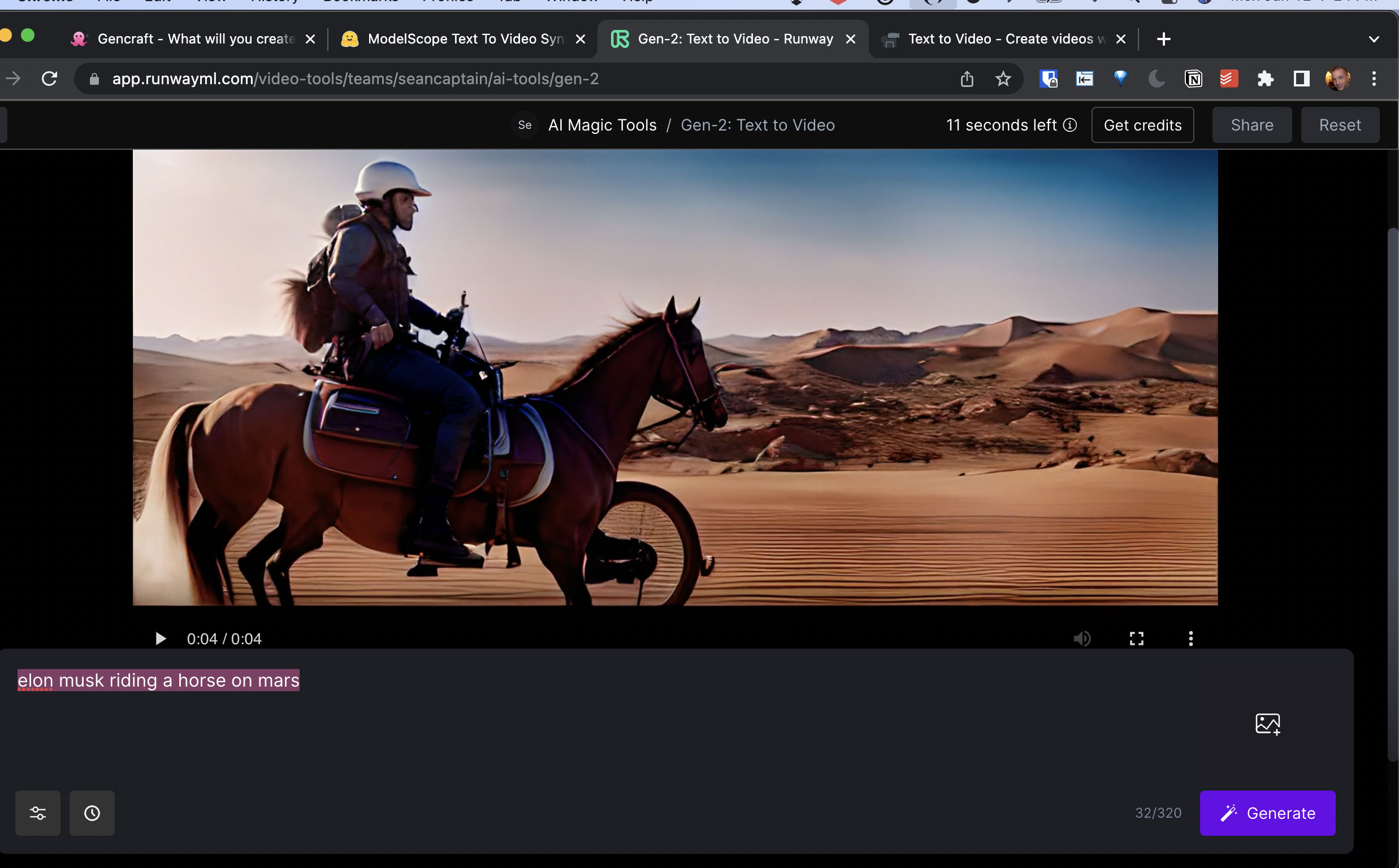
The closest everyday analogy is the jump from writing a sentence to describing a scene to a film crew that shoots it instantly. A regular image generator is like asking a photographer for one still photo. Runway is closer to asking a tiny film crew: give me the photographer, the camera operator who decides how the shot moves, and a few seconds of action — all from one prompt.
Runway is best understood as a studio, not just a single model. The underlying generation engine is the Gen-4 family of models, but around it sits a set of creative tools — image-to-video, controls for camera motion, ways to keep the same character looking the same across shots, and editing features. That "studio around the model" framing is the whole point: Runway was built for people making things, not just running a one-off demo.
Why it matters
Generating a single believable image is hard. Generating video is much harder, because video adds a brutal new requirement: everything has to stay consistent from one frame to the next. A face can't subtly morph, a red jacket can't drift to orange, and a coffee cup can't slide across the table on its own. Humans notice these glitches instantly — our eyes are very good at spotting things that flicker or warp over time.
Runway matters because it was one of the early movers that made generative video actually usable, and because it leans hard into solving that consistency problem rather than just producing one pretty clip in isolation.
The real problems it solves
- Temporal consistency. Keeping objects, lighting, and motion coherent across every frame so the clip reads as real footage, not a melting slideshow.
- Character and world consistency. Reusing the same character or setting across multiple shots — essential if you are telling a story rather than making one disconnected clip.
- Production controls. Camera-move controls, image-to-video, and editing tools that fit how creators actually work, instead of a single "prompt in, video out" box.
- Speed and cost. A creator can prototype a scene in minutes instead of booking a shoot, which changes what small teams and solo creators can attempt at all.
Who cares? Filmmakers and ad agencies prototyping shots, social and marketing creators producing short clips at volume, game and concept artists exploring motion, and product teams building video features on top of Runway's API. If you need moving images and you don't have a film budget, a tool like this is the difference between possible and not possible.
How it works
Under the hood, Runway is a generative video model: a system trained on huge amounts of video that learns how scenes, motion, and physics tend to look, then produces new frames that match your prompt. Conceptually it works like a video version of a diffusion model — it starts from noise and gradually refines it into coherent frames — except it must also make those frames flow smoothly over time, not just look good individually. (For the fuller mechanism, see how AI video generation works.)
From a creator's point of view, you don't touch any of that. You give the model conditioning inputs — what should the video contain, and how should it move — and the studio produces a clip you can then refine. The two most common starting points are a pure text prompt and an image you want brought to life.
Text-to-video vs image-to-video
Text-to-video means the model invents the whole scene from your words — fast, but you give up precise control over exactly what appears. Image-to-video means you supply a starting frame (a photo or a generated image) and describe how it should move, so the look of the scene is locked and only the motion is generated. Image-to-video usually gives more predictable, on-brand results, which is why production work leans on it heavily. (This trade-off has its own deep dive: text-to-video vs image-to-video.)
Keeping things consistent
The feature Runway emphasizes most is consistency across shots. By giving the model reference inputs — a specific character's appearance, or the look of a world — the studio can generate several different shots that still feel like the same person in the same place. That is what lets you build a sequence (close-up, wide shot, reaction shot) instead of a single isolated clip, and it is the hard part that separates a studio from a novelty generator. This idea is closely related to a world model: a system with an internal sense of how a coherent scene holds together.
Runway vs other AI video models
Runway is one of several serious text-to-video systems. The big names get compared constantly, so it helps to know what each one is known for — at a high level, since specific capabilities change often.
| System | Maker | Known for | Access |
|---|---|---|---|
| Runway (Gen-4) | Runway | Consistency + production controls | Proprietary, hosted + API |
| Sora | OpenAI | High-fidelity, prompt-driven clips | Proprietary, hosted |
| Veo | Google DeepMind | Native synchronized audio | Proprietary, via Google products + API |
| Kling | Kuaishou | Strong motion and physics | Proprietary, hosted |
The honest takeaway: there is no single "best" — they trade blows, and the leader on raw quality shifts as new versions ship. Runway vs Sora is the comparison people search for most. The fair, evergreen framing is that Sora is often praised for sheer visual fidelity, while Runway's pitch is the surrounding creative workflow — character/world consistency and controls aimed at people producing real projects, not just one impressive clip. Pick based on which controls and look fit your work, and re-check, because this race moves fast.
A worked example: from idea to clip
Suppose you want a five-second shot of an astronaut walking across a desert at sunset, and you want it to look intentional rather than random. Here is the realistic flow.
- Lock the look first. Generate or upload a still of the astronaut in the desert so the appearance is fixed. Now only the motion is left to chance — image-to-video, not text-to-video.
- Write the motion as a shot. Something like: "astronaut walks slowly left to right across red sand, low golden sunset light, slow handheld camera following." Name the subject, the action, the light, and the camera move.
- Generate, then judge one thing at a time. Is the walk natural? Does the light stay consistent? Does anything warp? Fix the worst problem, regenerate, repeat.
- Build the sequence. Once one shot works, reuse the same character reference to make a wide shot and a close-up that match — that is the consistency feature doing the heavy lifting.
- Assemble outside the model. Trim, order, and add sound in an editor. The model gives you clips; you still direct the edit.
Builders can drive this same flow programmatically through Runway's API instead of the web app. The shape of a request is simple: you send a prompt plus optional image and control settings, and you get back a job you poll until the video is ready.
POST /generate
{
  "model": "gen-4",
  "prompt": "astronaut walks left to right, golden sunset, slow follow",
  "init_image": "https://.../astronaut-desert.png",
  "duration_seconds": 5
}

# -> returns a job id; poll it until status = "succeeded",
# then download the resulting video URL.Common pitfalls and practical tips
AI video is easy to demo and easy to do badly. Most disappointing results trace back to a few predictable mistakes.
- Vague prompts. "A cool city" gives the model no structure. Describe subject, setting, lighting, and camera movement, and quality jumps immediately.
- Expecting long clips. These models shine on short shots (a handful of seconds). Plan a sequence of short clips, not one long continuous take, and stitch them in an editor.
- Ignoring image-to-video. Starting from a locked image removes most randomness. If consistency matters, don't generate the whole scene from text.
- Fighting fine details. Hands, text on signs, and complex crowds are the classic weak spots across all video models. Frame your shot to avoid leaning on them.
- Regenerating randomly. Change one variable at a time (prompt, start image, or camera move) so you actually learn what fixed the problem.
- Forgetting provenance and rights. AI-generated footage raises questions about usage rights and disclosure; some outputs also carry detectable markers. See detecting AI-generated content.
Going deeper
Once the basics click, a few deeper themes are worth understanding — they explain both what Runway can do today and where the whole field is heading.
Consistency is the real frontier. Generating one beautiful clip was the 2023-era problem; it is largely solved. The hard, still-open problem is coherence across many shots and longer durations — the same character, the same world, believable physics, no drift. Runway's emphasis on character and world consistency is a bet that this, not single-clip prettiness, is what unlocks actual filmmaking. Progress here connects directly to world models, where the system maintains an internal model of a scene rather than guessing frame by frame.
Control vs creativity is a permanent tension. More control (locked start images, camera rigs, references) means more predictable, on-brand output but less spontaneity; pure text-to-video is the opposite. Mature workflows mix both — lock what must stay fixed, let the model improvise the rest. Understanding text-to-video vs image-to-video is the foundation for that balance.
Convergence toward multimodal studios. Video, audio, and image generation are merging. Increasingly you'll see one platform that generates the picture, the motion, and the sound together, often alongside AI avatars and music. The longer-term direction is any-to-any models that move freely between text, image, audio, and video — which is why "studio" is the right mental model for where products like Runway are going.
The honest open challenges remain real: long-form coherence is unsolved, fine detail (hands, text, faces in motion) still breaks, generation costs compute and time, and provenance, rights, and misuse are active legal and ethical questions. The durable lesson is the same one that has held since generative video began: the easy win is one nice clip; the hard, valuable work is making many clips that hold together as a single coherent story.
FAQ
What is Runway used for?
Runway is used to generate and edit short video clips from text prompts or images, plus related creative tasks. Filmmakers use it for previz and shots, marketers and social creators make short clips at volume, and developers build video features on top of its API. The focus is on producing usable footage with controls, not just one-off demos.
What is Runway Gen-4?
Gen-4 is the generation of Runway's video models that powers the current studio. Its headline strength is consistency — keeping the same characters and world coherent across multiple shots — alongside production controls like camera motion and image-to-video. Runway iterates its model generations over time, so treat Gen-4 as the current family rather than a fixed final version.
Is Runway better than Sora?
Neither is universally "better" — they trade strengths and the lead shifts with each new version. Sora is often praised for raw visual fidelity, while Runway leans on creative workflow: character and world consistency plus controls aimed at real production. Pick based on which controls and look fit your project, and re-check, because this area moves quickly.
Is Runway free, and can I run it locally?
Runway is a proprietary, hosted service accessed through its website or API, not an open-weight model you download and run on your own machine. It typically offers limited free usage with paid plans for more, but exact pricing and limits change, so check the official site. If self-hosting matters to you, you would look at open-weight tools instead.
Does Runway generate sound with the video?
Audio support varies by model and feature and changes over time, so verify it for the specific tool you're using before relying on it. Historically, much AI video has been silent video that you score separately in an editor or with a dedicated audio tool. Some newer video models from other makers generate synchronized audio natively.
How long can a Runway clip be?
Like most current AI video models, Runway is built for short clips — a handful of seconds per generation rather than full scenes. The standard approach is to generate several short, consistent shots and stitch them together in an editor, rather than expecting one long continuous take.