In Plain English
Classic OCR tools — Tesseract being the most famous — work like a typewriter repairman who can identify individual letter shapes but has never actually read a sentence. Feed them a clean printed page and they do a fine job. Feed them a crumpled receipt, a handwritten form, or a table inside a scanned contract, and accuracy falls off a cliff.
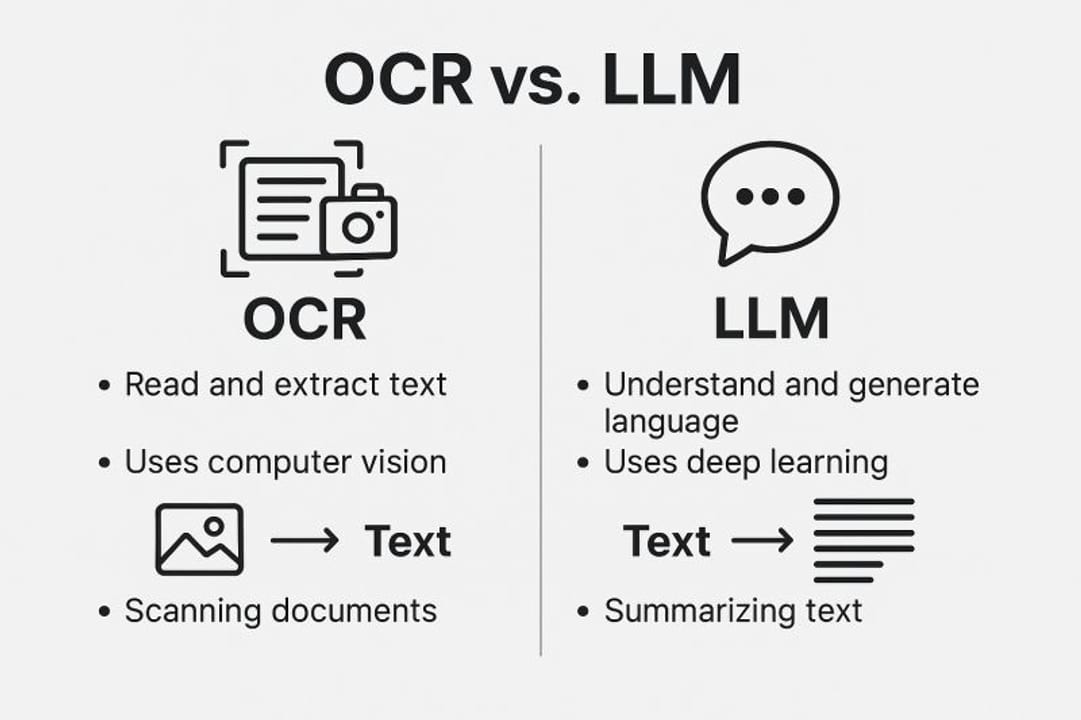
Vision LLMs like GPT-5, Claude, and Gemini approach the same task the way a person does: they look at the whole image at once, understand context, infer what a word probably says even when the ink is smeared, and can simultaneously answer the question "what does this say?" and "what does this mean?" They don't just transcribe — they comprehend.
The analogy that clicks for most engineers: Tesseract is a scanner — fast, cheap, reliable on clean input, completely literal. A vision LLM is a knowledgeable colleague who reads the document for you — slower, more expensive per page, but capable of handling mess, ambiguity, and structure that a scanner simply cannot.
Why It Matters for Builders
Most real-world documents are not clean PDFs with embedded text. They are photos of receipts taken at odd angles, scanned lease agreements with coffee stains, invoices that use custom fonts, handwritten lab notes, and bank statements with multi-column tables. Traditional OCR pipelines break on all of these in different ways.
What breaks with Tesseract on messy documents
| Document type | Tesseract accuracy (typical) | Common failure mode |
|---|---|---|
| Clean printed text (300 DPI scan) | 98–99% | Rarely fails |
| Scanned PDF with slight skew | 90–95% | Character boundary errors |
| Phone-camera photo of a document | 80–90% | Needs preprocessing or accuracy tanks |
| Complex multi-column layout | 70–85% | Reads across columns instead of down |
| Table with merged cells | 50–75% | Cell content merged or reordered |
| Handwritten text (printed style) | 50–80% | Discrete letters only; cursive = gibberish |
A 2025 benchmark using olmOCR-Bench (1,403 real-world documents covering math, tables, handwriting, and multi-column layouts) found Tesseract scored 34.4% overall — essentially zero on math equations and near-zero on complex tables. Vision-language models trained for OCR scored 77–83% on the same set.
For a builder, this matters in two practical situations. First, if you are automating a document workflow — invoice processing, form digitisation, contract review — and your documents are anything other than pristine printed PDFs, a Tesseract pipeline will produce errors that cascade into bad database writes or failed validations. Second, if you need structured output ("give me the total, the vendor name, and each line item as JSON"), traditional OCR only solves the transcription step — you still need a separate parsing layer. Vision LLMs collapse both into one API call.
How Vision LLMs Read Documents
Understanding how a vision LLM processes a document page helps you design better pipelines and debug failures. There are three distinct phases: image encoding, cross-modal fusion, and language-model decoding.
Step 1: Patch-based image encoding
The image is divided into a grid of fixed-size patches (typically 14×14 or 16×16 pixels). A Vision Transformer (ViT) converts each patch into a dense embedding that captures both the pixel content and positional information. For a full A4 page at 300 DPI, this produces hundreds of patch tokens — each one encoding a small region of the document.
Step 2: Cross-modal projection
The visual embeddings live in the ViT's representation space, which is different from the LLM's text-token space. A learned adapter — usually a small MLP or linear projection — maps them across. After projection, image patches and text tokens look the same to the LLM's attention layers; the model can attend from a word in your prompt to a patch containing a number on the invoice without any special logic.
Step 3: Joint autoregressive decoding
The LLM decoder receives the concatenated sequence: image tokens (from the patch projection) followed by your text prompt. Self-attention operates over the entire sequence, so every generated token is informed by both what you asked and what the image contains. This is why a vision LLM can answer "what is the total on this receipt?" without a separate OCR step — it reasons over the visual and textual context simultaneously.
Why context matters for accuracy
Traditional OCR works character-by-character: it identifies each glyph from its pixel shape without knowing what word it belongs to. Vision LLMs use bidirectional attention over the entire image, so they can use context to disambiguate ambiguous characters. An ink smear that makes "8" look like "B" will be correctly read as "8" if surrounding tokens indicate a price column — something Tesseract cannot do.
When to Use a Vision LLM vs Tesseract
Neither tool dominates across the board. The right call depends on your document mix, volume, latency tolerance, and accuracy requirements.
- Clean, high-DPI printed text
- Very high volume (millions of pages/month)
- Near-zero per-page cost
- No API dependency or data privacy concern
- Sub-100ms latency per page
- Simple text extraction, no structure needed
- Handwriting, cursive, mixed print+handwriting
- Tables, forms, multi-column layouts
- Phone-camera photos with tilt or glare
- Structured output (JSON, key-value pairs) in one step
- Receipts, invoices, lab notes, filled forms
- Semantic understanding ("what is the due date?")
The hybrid pipeline
The most cost-effective production approach is a two-tier pipeline: run Tesseract first; if confidence scores are above a threshold and the document matches a known clean-print template, use the Tesseract output. Route everything else — low confidence, unknown layout, handwriting detected — to a vision LLM. This hybrid approach is roughly 16x cheaper than routing all pages to a cloud vision API, while still catching the long tail of hard documents where Tesseract fails.
Cost reality check
At 10 million pages per month, a cloud vision API at roughly $1.50 per 1,000 pages costs about $15,000/month. Self-hosted Tesseract on a CPU costs a fraction of that — under $1,000 on equivalent hardware for the same volume. A self-hosted OCR-specialized VLM like olmOCR-2 or LightOnOCR on a GPU instance sits between the two: far better accuracy than Tesseract on hard documents, far cheaper than a frontier vision LLM at scale.
Extracting Structured Data in Practice
The most common use case is not "transcribe this image" but "give me the fields from this invoice as JSON". Vision LLMs handle this in a single API call when you combine a structured prompt with the document image.
import base64, json
from pathlib import Path
from openai import OpenAI
from pydantic import BaseModel
from typing import Optional

client = OpenAI()

class InvoiceFields(BaseModel):
    vendor_name: Optional[str]
    invoice_number: Optional[str]
    invoice_date: Optional[str]
    due_date: Optional[str]
    subtotal: Optional[str]
    tax: Optional[str]
    total: Optional[str]

def extract_invoice(image_path: str) -> InvoiceFields:
    image_data = base64.b64encode(Path(image_path).read_bytes()).decode()
    response = client.beta.chat.completions.parse(
        model="gpt-5.5",
        messages=[
            {
                "role": "user",
                "content": [
                    {
                        "type": "image_url",
                        "image_url": {
                            "url": f"data:image/jpeg;base64,{image_data}",
                            "detail": "high"
                        }
                    },
                    {
                        "type": "text",
                        "text": "Extract the invoice fields. Return null for any field not present."
                    }
                ]
            }
        ],
        response_format=InvoiceFields,
    )
    return response.choices[0].message.parsed

result = extract_invoice("invoice.jpg")
print(json.dumps(result.model_dump(), indent=2))
Using structured outputs (OpenAI's response_format parameter or Anthropic's tools with a JSON schema) gives you machine-parseable results without fragile regex over a text response. The model fills the schema or returns null — you get type-safe extraction with a single API call and no separate OCR step.
Prompting tips for cleaner results
- Specify the exact fields you want. "Extract vendor name, total, and line items" outperforms a generic "describe this invoice."
- Ask for null on uncertainty. "If a field is missing or unreadable, return null." This suppresses hallucinated guesses.
- Use
detail: highfor dense documents. Low-detail mode tiles the image more aggressively and can miss small text or sub-tables. - Send one page at a time for multi-page PDFs. Converting each page to an image individually gives the model the spatial context it needs to understand layout boundaries.
- Add a schema description. Telling the model "invoice_date should be in YYYY-MM-DD format" reduces post-processing normalization.
Specialized document VLMs vs general-purpose LLMs
For teams processing high volumes of documents, purpose-built vision-language models offer a middle path. olmOCR-2 (Allen Institute for AI, Oct 2025, based on Qwen2.5-VL-7B) scored 82.4 on the olmOCR-Bench versus Tesseract's 34.4 — and can be self-hosted. LightOnOCR (1B parameters) scored 76.1 on the same benchmark while being small enough to run cheaply on a single GPU. Both were released open-weight and are designed specifically for document text extraction, not general multimodal chat.
Going Deeper
Once you are comfortable with basic image-to-JSON extraction, the interesting engineering problems are about reliability, cost, and document complexity at scale.
Document layout analysis as a pre-step
For long, structured documents — annual reports, legal contracts, research papers — sending the whole page as a single image can cause the model to miss fine detail. A layout analysis step first (tools like Docling or unstructured.io) segments the page into logical regions: title, body paragraphs, tables, figures, headers/footers. You then send each region to the vision LLM with a targeted prompt. This dramatically reduces hallucination on complex layouts.
Confidence scoring and human-in-the-loop
Production document pipelines need an escape hatch. Common patterns: ask the model to rate its own confidence per field (0–1), or use two-model consensus (extract with two different frontier models, such as GPT-5.5 and Gemini 3, and flag fields where they disagree for human review). Fields like amounts and ID numbers in financial documents should always have a rule-based validation layer — check that a total approximately equals sum of line items, that a date is within a plausible range, and so on.
Token cost management for PDFs
A 10-page scanned PDF converted to high-resolution images can consume 10,000–20,000 image tokens before your prompt. At typical frontier-model input pricing, that can be cents per document — fine for an occasional expense report, expensive at 100,000 documents per month. Always check current per-token pricing for the specific model you choose, since rates change. Strategies to reduce cost: downsample images to 150 DPI for clean documents (often no accuracy loss), use detail: low for quick passes to detect document type before routing to high-detail extraction, or route to a smaller self-hosted VLM for the bulk and reserve frontier models for ambiguous cases.
Emerging benchmarks and model landscape
The olmOCR-Bench (1,403 diverse document pages) has become the de-facto open evaluation for document OCR models. As of mid-2026, strong performers include the OCR-specialized open models olmOCR-2-7B (~82%) and LightOnOCR-1B (~76%), alongside general-purpose frontier models such as the GPT-5 series and Gemini 3, which are competitive depending on document type. Tesseract sits at 34% on this benchmark — a useful reminder that "good enough for clean text" does not generalise to the messy document tail.
When not to use a vision LLM
Vision LLMs are not always the answer. If your documents are digitally-created PDFs with embedded text (not scans), parse the text layer directly with a library like pdfplumber or pypdf — no OCR needed at all, zero cost, perfect fidelity. If your volume exceeds tens of millions of pages per month and the documents are all clean printed text, Tesseract with preprocessing is both fast and accurate enough. Reserve vision LLMs for the genuinely hard cases, and build a routing layer that detects document type and quality before deciding which tool to invoke.
FAQ
Can I use GPT-5.5 or Claude as a drop-in replacement for Tesseract?
Functionally yes — both can transcribe text from images — but they are not drop-in replacements architecturally. Vision LLMs are 10–100x more expensive per page, 10–50x slower, and require an internet call to an API. For clean printed text at high volume, Tesseract is still the right tool. Use a vision LLM when document quality or complexity is the bottleneck, not as a blanket replacement.
Do vision LLMs work on handwritten documents?
Much better than Tesseract, yes. Current frontier models such as the GPT-5 series, Claude, and Gemini 3 are substantially more accurate on both printed handwriting and cursive — versus Tesseract's near-zero on cursive. Performance still degrades on very idiosyncratic handwriting or extremely low contrast. Dedicated handwriting models like TrOCR can also be a cost-efficient middle ground for handwriting-only workflows.
How do I extract a table from a scanned PDF using a vision LLM?
Convert the PDF page to a high-resolution image (300 DPI is standard), then send it to the vision API with a prompt that specifies the desired output format — for example, "Extract the table as a JSON array of objects, one per row, using the column headers as keys." Use detail: high in the OpenAI API or equivalent high-resolution mode in other providers. For tables spanning multiple pages, send each page separately and merge the results.
Will a vision LLM hallucinate text that isn't on the page?
Yes, this is a real risk, especially on low-quality scans or blank fields. Mitigate it by always specifying in your prompt that the model should return null for missing or unreadable fields rather than guessing. For critical fields (amounts, IDs, dates), add a validation layer that cross-checks extracted values against business rules — e.g., the total should approximately equal the sum of line items.
What is the difference between OCR and document understanding?
OCR (Optical Character Recognition) is specifically about converting pixels into characters — transcribing what is written. Document understanding is the broader task of also extracting meaning: recognising that a string of digits is an invoice number (not a phone number), that a column of values is a price table, or that one section of a form is an address block. Vision LLMs perform both simultaneously; traditional OCR tools only do the transcription step.
Which open-source model should I use for self-hosted document OCR?
As of mid-2026, olmOCR-2 (7B parameters, from Allen Institute for AI) and LightOnOCR (1B parameters, from LightOn) are the strongest open-weight options specifically trained for document text extraction. olmOCR-2 scores higher in benchmarks; LightOnOCR is much smaller and cheaper to run. Both are built on Qwen2.5-VL checkpoints and are available on Hugging Face.