
What is DSH Go?
DSH Go is a community-built Android client for DeepSeek Harness (DSH), DeepSeek's open-source agent harness. It sits in the Coding-Agent Harnesses & Runtimes category of the AI Coding tools and is open-source, written in Dart and licensed AGPL-3.0. To get started: download and install the APK.
Overview
DSH Go is a community-built Android client for DeepSeek Harness (DSH), DeepSeek's open-source agent harness. It gives the harness a native chat interface on the phone and can work in two ways: it installs a Linux environment inside the app and runs the DSH engine on the phone itself, or it connects to DSH running on your computer or a server over SSH or DSH Remote and lets you carry on the same sessions from your pocket. Model requests still go to whichever model provider you configure, billed to your own account.
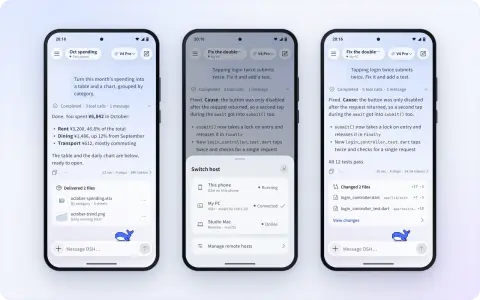
The local mode needs neither root nor Termux: the app installs Ubuntu, Node.js and the DSH runtime itself, taking about 1 GB of storage, and starts it under PRoot by default. In a chat you switch models, send images, use voice input, approve tool calls and answer the agent's questions, interrupt or queue messages while it is still replying, and flip between the native interface and DSH's own web UI on the same conversation. Plugins adapted for DSH Go render as native tool cards, forms and panels, and the repository ships an SDK, tutorials and examples for plugin authors.
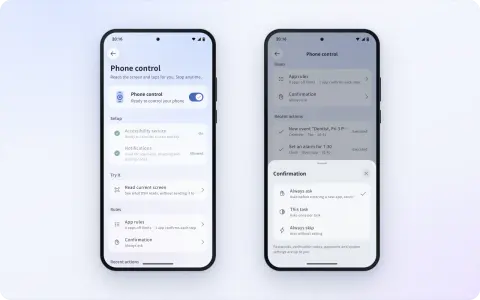
With permission, the on-phone engine can also operate the phone: read the screen, tap and type, with three confirmation levels to choose from, while payments, passwords, verification codes and system settings are always handed back to you. DSH Go is not affiliated with DeepSeek. It is released under AGPL-3.0 (the SDK and examples are MIT), version 1.0.0 was its first public release on October 30, 2026, and builds are sideloaded APKs for Android 8 and later rather than a Google Play listing.
What it does
- Runs the DeepSeek Harness engine on the phone in a built-in Ubuntu and Node.js environment, with no root or Termux
- Connects to DSH on a computer or server over SSH or DSH Remote, and switches between hosts from the chat header
- Native chat with model switching, images, voice input, in-chat tool approvals, and messages you can queue or send mid-reply
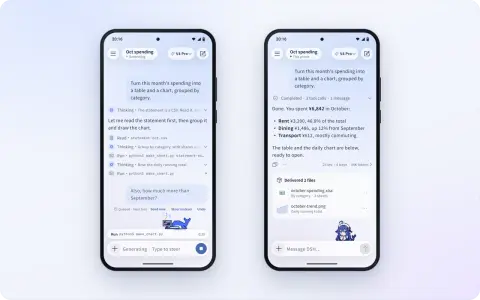
- One-tap switch to DSH's web UI on the same conversation, plus share cards, end-to-end-encrypted replay links and exports
- Phone control: the agent reads the screen, taps and types under per-app rules and three confirmation levels
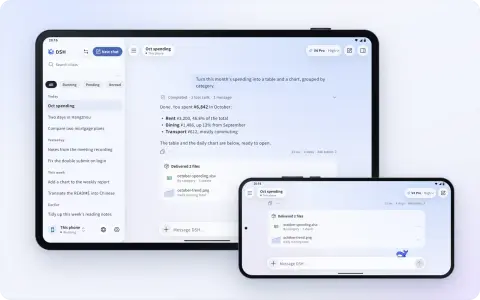
- Native plugin UI (tool cards, forms, panels) with a plugin SDK and examples, tablet and landscape layouts, themes and English or Chinese interface
Getting started
DSH Go needs Android 8.0 (API 26) or later. Most phones take the arm64 APK; x86_64 builds for emulators are listed at the end of each release's notes. The steps follow the project's README and user guide.
Download and install the APK
Get the latest arm64 APK from the GitHub Releases page or the download page at go.dshtui.com, and allow installs from that source when Android asks. If you installed an early test build signed with a different key, uninstall it first; uninstalling clears chats, the Linux environment and settings.
Choose where DSH runs
On first launch, either install the local runtime on the phone (reserve about 1 GB) or connect to a remote host running DSH over SSH or DSH Remote. A remote-only setup does not need the local runtime.
Configure a model and start chatting
Set up the model provider and credentials for the host you picked, then start a conversation. Some remote channels have to be configured on the host side.
Optional: turn on phone control
Phone control works only with the local engine in normal mode and needs the accessibility and related permissions the app walks you through. The do-not-disturb mode additionally requires Android 14 or later and Shizuku or self-connected ADB.
Or build it from source
On Linux x86_64, the repository's scripts install JDK 17, Flutter and the Android SDK/NDK, build the bundled runtime and produce the APK at app/build/app/outputs/flutter-apk/app-arm64-release.apk.
git clone https://github.com/ccch1mneyyy/dsh-go.git
cd dsh-go

bash tooling/setup-toolchain.sh
source tooling/env.sh

bash runtime/build-runtime.sh arm64-v8a
DSH_BETA_TOKEN_FILE= bash tooling/build-apk.sh -f arm64 --keep-daemon
Commands and code are distilled from the project's own documentation — always check the official repo for the latest.
When to use it
- Running a DeepSeek Harness agent on an Android phone when no laptop is at hand
- Checking on and steering a long DSH session on your PC or server from the phone
- Letting an agent carry out tasks on the phone itself, such as adding calendar events or setting alarms, with confirmations you control
- Using DSH on an Android tablet with a persistent sidebar of chats
How DSH Go compares
DSH Go alongside other open-source coding-agent harnesses & runtimes tools AI/TLDR tracks, ranked by GitHub stars.
| Tool | Stars | What it does |
|---|---|---|
| CC Switch | ★ 154k | A cross-platform desktop app that manages provider configuration for eight coding-agent CLIs from one place, with a local failover proxy, MCP and skill management, and spend tracking. |
| Oh My OpenAgent | ★ 70.8k | Opinionated agent bundle for OpenCode and Codex CLI that ships preconfigured sub-agents, lifecycle hooks and built-in MCP servers behind a single ultrawork command. |
| herdr | ★ 50.3k | A single-binary terminal multiplexer built for coding agents: persistent sessions across local and SSH machines, per-pane working/blocked/idle status, and a socket API agents drive themselves. |
| oh-my-claudecode | ★ 40.8k | A plugin and CLI that adds multi-agent orchestration to Claude Code: staged autopilot workflows, parallel tmux workers, and advisors that route a second opinion to Codex, Gemini, Grok or Cursor. |
| AionUi | ★ 34.2k | An open-source desktop workspace that pairs a built-in agent engine with dozens of external CLI agents, adding scheduled runs, MCP tools and remote access from a WebUI or chat apps. |
| DSH Go | ★ 19.6k | An Android app that runs DeepSeek Harness on the phone itself or remote-controls the copy on your computer |
| cc-connect | ★ 16.3k | A Go daemon that bridges local coding agents — Claude Code, Codex, Cursor Agent, Gemini CLI, OpenCode, Kimi CLI and more — to Feishu, DingTalk, Slack, Telegram, Discord, LINE and WeCom, so you drive them from chat. |
| Claudian | ★ 16k | An Obsidian plugin that runs Claude Code, Codex, Grok Build, OpenCode, Pi or DeepSeek Harness inside your vault, with the vault as the agent's working directory, inline edits, tabs and cross-session messaging. |