
Overview
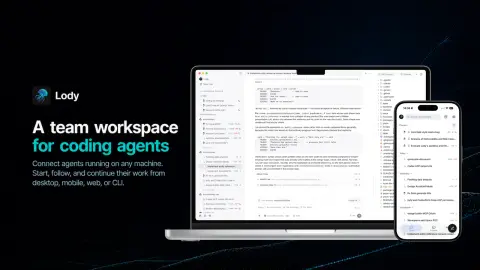
Lody is an Apache-2.0 TypeScript project that describes itself as a shared workspace for the coding agents a team already uses. It is not a new agent: you connect machines (laptops, workstations, servers or cloud VMs) by running a daemon on them, and bring any agent that speaks the Agent Client Protocol (ACP), such as Claude Code, Codex, Kimi or OpenCode. Each agent keeps the subscriptions, logins, models and permission modes already configured on that machine, and a machine stays private until its owner shares it with the workspace.
The point is that the work becomes shared. Teammates can open the same agent conversation and see its full transcript, runtime status, files and code changes, then add their own instructions. Work can be dispatched to any connected machine from the desktop app (macOS, Windows, Linux), the iOS and Android apps, the web or the CLI, and permission requests, progress and diffs follow you across those surfaces, including approval from an iPhone Live Activity.
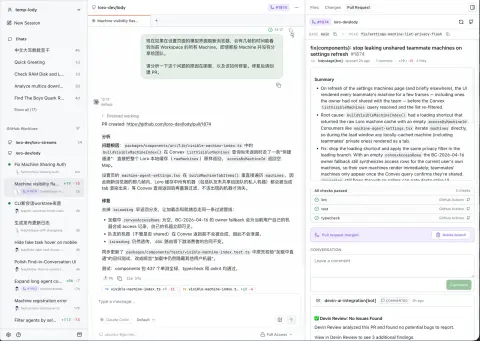
Inside a session Lody gives each piece of work its own Git worktree, tabs for chats, files, diffs, terminals and previews, per-turn and full-session diffs with line comments, and pull-request and CI status beside the conversation. Agents get tools to create other conversations, read their status, send follow-ups and collect results, so one conversation can coordinate parallel investigation, implementation and testing. The README says collaborative state is synchronised with the Loro CRDT stack and that the project is still moving toward full local-first support; using the apps and daemon requires signing in to a Lody account.
What it does
- Connect any machine with one command and bring Claude Code, Codex, Kimi, OpenCode or any other ACP-compatible agent, using that machine's existing logins and models
- Shared agent conversations: teammates see the transcript, runtime status, files and code changes and can add instructions
- Dispatch work to any connected machine from desktop, iOS, Android, web or the CLI, with permission requests and progress on every surface
- Agent-to-agent coordination: a conversation can spawn, message, cancel and collect results from child conversations running in parallel
- Per-session Git worktrees, forking, file browser, per-turn diffs with line comments, and pull-request and CI status beside the agent
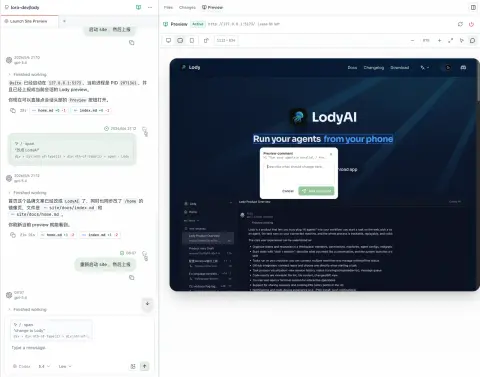
- In-session web app preview with responsive viewports and element-level visual annotations sent back to the agent
- Shared Agent Roles (agent, model, permission and instruction presets), attachments, a built-in terminal and token, quota and resource usage views
Getting started
Lody's quickstart offers two routes: the desktop app, which also starts the local daemon that runs the agents, or the CLI daemon on its own for servers and headless machines. Both sign in to a Lody account through the browser.
Install the desktop app
Download the installer for macOS, Windows or Linux from lody.ai/download, or use Homebrew on macOS or Linux. On first launch, sign up or sign in in your browser; the app starts Lody's local CLI daemon for you. Mobile apps are on the App Store and Google Play.
brew install --cask lodyOr connect a machine from the terminal
On a workstation, server or cloud VM (Node.js 22.14 to 22.x, or 23.6 or later), start the daemon. It opens a sign-in page, or prints a link on a headless machine, then keeps the machine available for work dispatched from any surface. Without a browser, pass the CLI token from Settings > Account > CLI Token.
npx lody daemon start

# headless, with a token from the desktop app
npx lody daemon start --auth <cli_token>
Add a project and configure agents
Register a local project from the CLI (or in Settings > Projects in the apps), connect GitHub repositories from the web app's GitHub Integration settings, and choose agents such as Claude Code, Codex or a custom ACP agent in Settings > Agents.
npx lody project add <path>Dispatch and follow work from the CLI
Create a session on a workspace with an agent config and a repository, then list sessions. Commands that support `--json` can feed workspace data into your own tools.
npx lody session create --workspace my-team --agent-config codex \
  --repo owner/repo "Fix the failing test"

npx lody session list --workspace my-team
Commands and code are distilled from the project's own documentation — always check the official repo for the latest.
When to use it
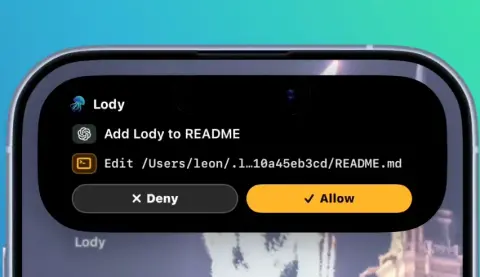
- Approve an agent's permission request or check its progress from a phone while it keeps running on a workstation
- Let a teammate pick up or steer an agent conversation without pasting screenshots and logs
- Have one coordinating conversation split a bug into parallel investigation, implementation and testing sessions in separate worktrees
- Review an agent's pull request, CI status and diffs next to the conversation that produced them
- Give front-end feedback by annotating elements in a running preview and sending them straight to the agent
How Lody compares
Lody alongside other open-source coding-agent harnesses & runtimes tools AI/TLDR tracks, ranked by GitHub stars.
| Tool | Stars | What it does |
|---|---|---|
| CC Switch | ★ 150k | A cross-platform desktop app that manages provider configuration for eight coding-agent CLIs from one place, with a local failover proxy, MCP and skill management, and spend tracking. |
| Oh My OpenAgent | ★ 70.5k | Opinionated agent bundle for OpenCode and Codex CLI that ships preconfigured sub-agents, lifecycle hooks and built-in MCP servers behind a single ultrawork command. |
| herdr | ★ 47k | A single-binary terminal multiplexer built for coding agents: persistent sessions across local and SSH machines, per-pane working/blocked/idle status, and a socket API agents drive themselves. |
| oh-my-claudecode | ★ 40.4k | A plugin and CLI that adds multi-agent orchestration to Claude Code: staged autopilot workflows, parallel tmux workers, and advisors that route a second opinion to Codex, Gemini, Grok or Cursor. |
| AionUi | ★ 33.9k | An open-source desktop workspace that pairs a built-in agent engine with dozens of external CLI agents, adding scheduled runs, MCP tools and remote access from a WebUI or chat apps. |
| cmux | ★ 28.6k | A Ghostty-based macOS terminal built around coding agents: vertical tabs that show git branch, PR status and ports, attention notifications when an agent needs you, and a scriptable built-in browser. |
| cc-connect | ★ 16.2k | A Go daemon that bridges local coding agents — Claude Code, Codex, Cursor Agent, Gemini CLI, OpenCode, Kimi CLI and more — to Feishu, DingTalk, Slack, Telegram, Discord, LINE and WeCom, so you drive them from chat. |
| Lody | ★ 1.6k | A shared team workspace for Claude Code, Codex and other ACP coding agents, reachable from desktop, phone, web and CLI |