
Overview
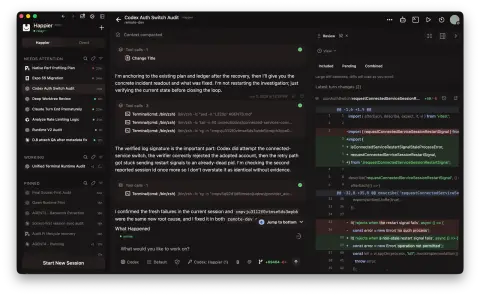
Happier is a web, desktop and mobile client and orchestrator for terminal coding agents such as Claude Code, Codex, OpenCode, Pi, Gemini CLI, Cursor, Grok, Qwen Code and Kimi, and any other agent that speaks ACP can be added from its settings. It is not a new agent: the agents keep running on your own machines under your existing subscriptions, and Happier lets you start, follow, approve, steer and review their sessions from any device. The project is written in TypeScript and released under the MIT licence.
It has three parts. A daemon on each of your machines (laptop, desktop, VPS or dev box) starts and manages the agent processes where your code lives. A relay — the hosted one or your own — syncs sessions between your devices and machines. The apps on phone, desktop and browser show those sessions. Session content (code, prompts, messages and transcripts) is encrypted on your devices before it reaches the relay; the server only sees routing metadata such as session ids, timestamps, turn status and usage, and each agent keeps talking to its own model provider directly.
Beyond remote control, Happier coordinates agents. Any session can launch review, plan or delegate runs on a different agent — Claude handing work to Codex subagents, or the reverse — and you can switch the engine mid-session while the same session keeps going. Sessions can run in their own Git worktree, be handed to another machine, and wait out a provider usage limit before resuming on their own. The project began with contributors to Happy (slopus/happy) and grew into a separate codebase.
What it does
- Parallel sessions across every machine you own, each with its own machine, folder, agent and model, and optionally its own Git worktree
- Mirrors Claude Code, Codex and OpenCode terminal sessions — including ones already running — to every device, so you can switch between terminal and app
- Cross-agent subagents and mid-session agent switching, for example Claude asking Codex for a review
- Line-by-line diff review comments, Git staging, commits, pushes and pull requests, a file editor and an embedded terminal from any device
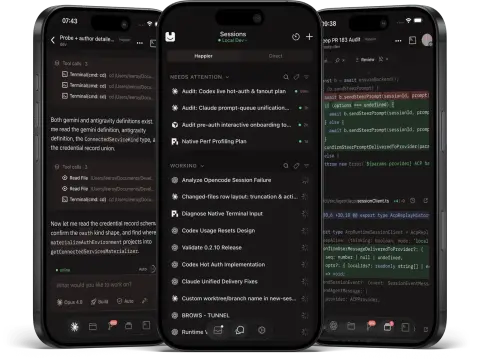
- An inbox for permission requests and agent questions with push notifications, plus a voice assistant and session sharing
- End-to-end encrypted sync through a hosted or self-hosted relay, and an MCP server mode so any MCP host can drive Happier
Getting started
The README recommends the desktop app (from happier.dev/download for macOS, Windows and Linux), which sets up the CLI and the daemon for you. You can also install the CLI and daemon from the terminal, then add your phone and start sessions from either side.
Install the CLI and daemon from the terminal
Use the install script on macOS or Linux, the PowerShell one-liner on Windows, or the npm package. You sign in from the app or on first run.
# macOS / Linux
curl -fsSL https://happier.dev/install | bash

# Windows (PowerShell)
iwr https://happier.dev/install.ps1 -useb | iex

# or via npm
npm install -g @happier-dev/cli
Add a remote machine or dev box over SSH
One command installs the CLI and daemon on the remote host and registers it as one of your machines; the second signs it in from a machine where you are already signed in.
happier machine setup --ssh user@host
happier auth pair-remote --ssh user@host
Add your phone
Install the iOS app from the App Store or the Android app from Google Play (or the direct APK), sign in with the same account, and your sessions, machines and settings are already there. A web app is available at cloud.happier.dev.
Start a session
In the app, press New session and pick the machine, folder and agent. Or run Happier from any project folder; the session then shows up on every device. `happier --help` lists the other agents and commands.
happier            # Claude Code
happier codex      # Codex
happier opencode   # OpenCode
Script it or self-host the relay
Drive Happier from an MCP host or the CLI, and install your own managed relay service when you do not want to use the hosted one (Docker and Proxmox guides are in the self-hosting docs).
happier mcp serve
happier session list
happier session send <id> "rerun the failing test"

happier relay host install --mode system
Commands and code are distilled from the project's own documentation — always check the official repo for the latest.
When to use it
- Keep several Claude Code, Codex or OpenCode sessions running on a desktop or VPS and approve, steer and review them from your phone
- Have one agent review or take over another's work — Claude delegating to Codex subagents, or switching engines mid-session
- Keep a long task alive through provider usage limits, with the session waiting for the reset and resuming on its own
- Run the whole stack on your own infrastructure with a self-hosted, end-to-end encrypted relay
How Happier compares
Happier alongside other open-source coding-agent harnesses & runtimes tools AI/TLDR tracks, ranked by GitHub stars.
| Tool | Stars | What it does |
|---|---|---|
| CC Switch | ★ 150k | A cross-platform desktop app that manages provider configuration for eight coding-agent CLIs from one place, with a local failover proxy, MCP and skill management, and spend tracking. |
| Oh My OpenAgent | ★ 70.5k | Opinionated agent bundle for OpenCode and Codex CLI that ships preconfigured sub-agents, lifecycle hooks and built-in MCP servers behind a single ultrawork command. |
| herdr | ★ 47k | A single-binary terminal multiplexer built for coding agents: persistent sessions across local and SSH machines, per-pane working/blocked/idle status, and a socket API agents drive themselves. |
| oh-my-claudecode | ★ 40.4k | A plugin and CLI that adds multi-agent orchestration to Claude Code: staged autopilot workflows, parallel tmux workers, and advisors that route a second opinion to Codex, Gemini, Grok or Cursor. |
| AionUi | ★ 33.9k | An open-source desktop workspace that pairs a built-in agent engine with dozens of external CLI agents, adding scheduled runs, MCP tools and remote access from a WebUI or chat apps. |
| cmux | ★ 28.6k | A Ghostty-based macOS terminal built around coding agents: vertical tabs that show git branch, PR status and ports, attention notifications when an agent needs you, and a scriptable built-in browser. |
| cc-connect | ★ 16.2k | A Go daemon that bridges local coding agents — Claude Code, Codex, Cursor Agent, Gemini CLI, OpenCode, Kimi CLI and more — to Feishu, DingTalk, Slack, Telegram, Discord, LINE and WeCom, so you drive them from chat. |
| Happier | ★ 2.1k | An open-source, end-to-end encrypted control room for running Claude Code, Codex, OpenCode, Pi and other coding agents in parallel from your phone, desktop and browser |