Overview
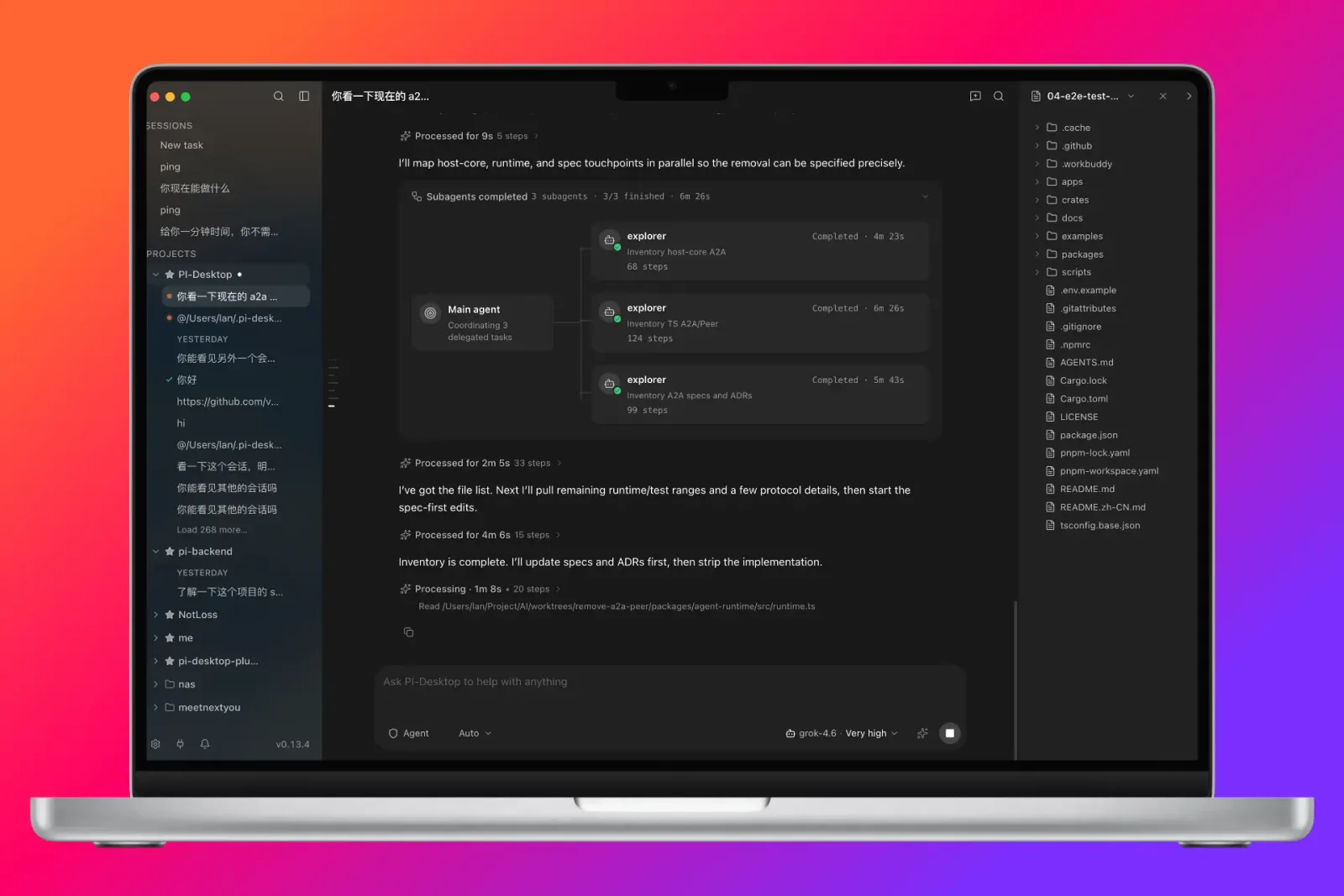
PI-Desktop is a cross-platform desktop application that gives a coding agent somewhere to live other than a terminal tab or an editor sidebar. Projects, sessions and settings are stored locally and survive restarts, so a long task can be left running, closed and picked up the next day. The app is built from an Electron front end, a Rust host core that owns the native runtime, and the pi Agent Harness that actually drives the model.
Model choice is deliberately not fixed: OpenAI, Anthropic, OpenAI-compatible gateways, Ollama and LM Studio are all first-class, and a session can switch provider mid-conversation. Work is organised through three modes — Agent, which executes directly; Plan, which drafts the change for review before touching anything; and Goal, which runs towards stated acceptance criteria — and a permission layer that stops privileged operations until they are approved.
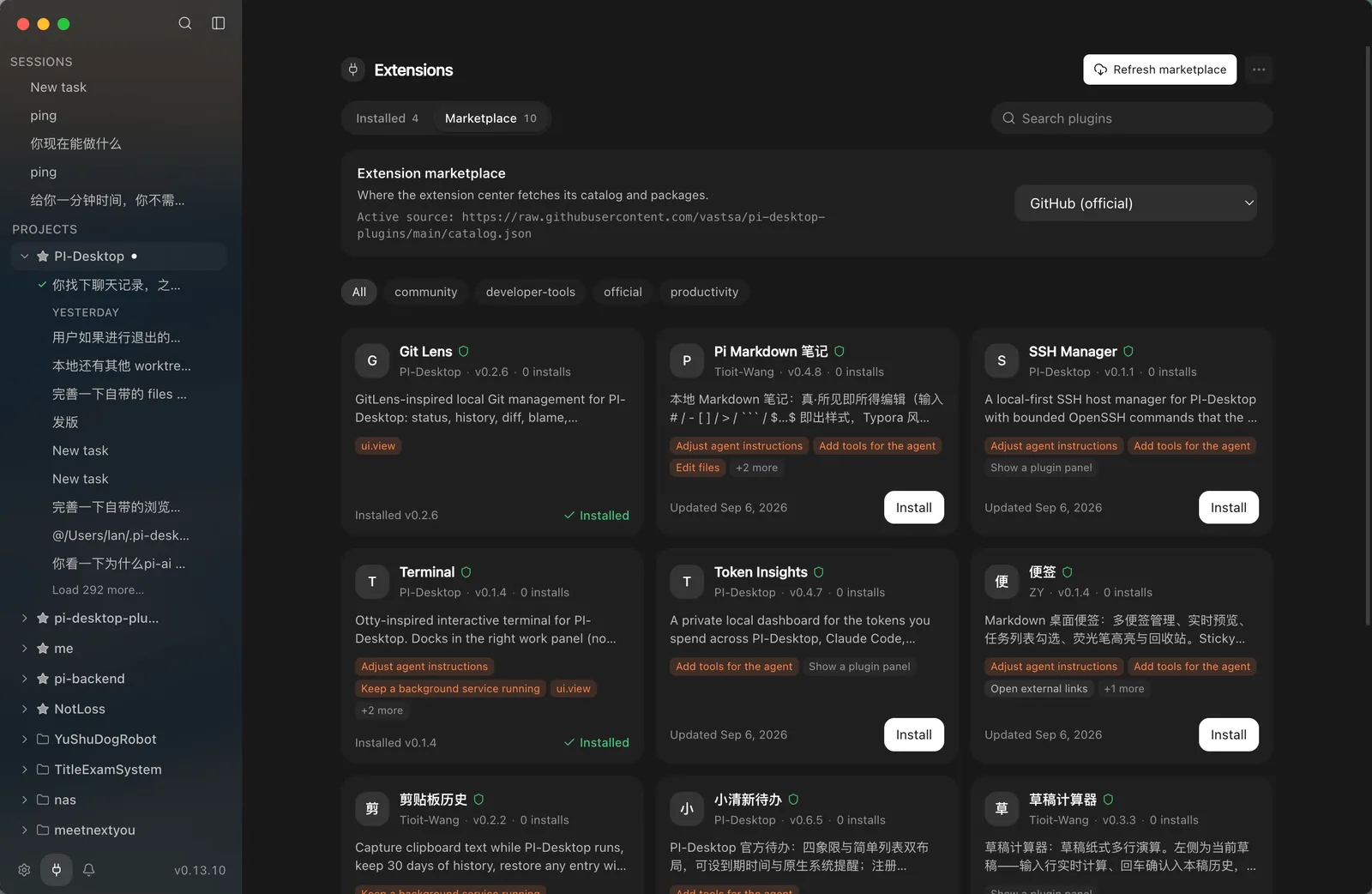
The part that makes it a workspace rather than a chat window is orchestration and extensibility. A main session can delegate to subagents and run parallel worker sessions, with a session view that shows which of them are running, idle or finished. Plugins go beyond tools: an extension can add a panel, a widget, a slash command, an MCP server, a theme or a background service, installed from an extension marketplace inside the app. It is licensed LGPL-3.0 and ships as a .dmg, a Windows installer and AppImage, .deb and .rpm builds.
What it does
- Persistent local projects and sessions that resume after the app is closed, with no account or cloud relay required
- Provider-agnostic: OpenAI, Anthropic, OpenAI-compatible gateways, Ollama and LM Studio, switchable inside a running session
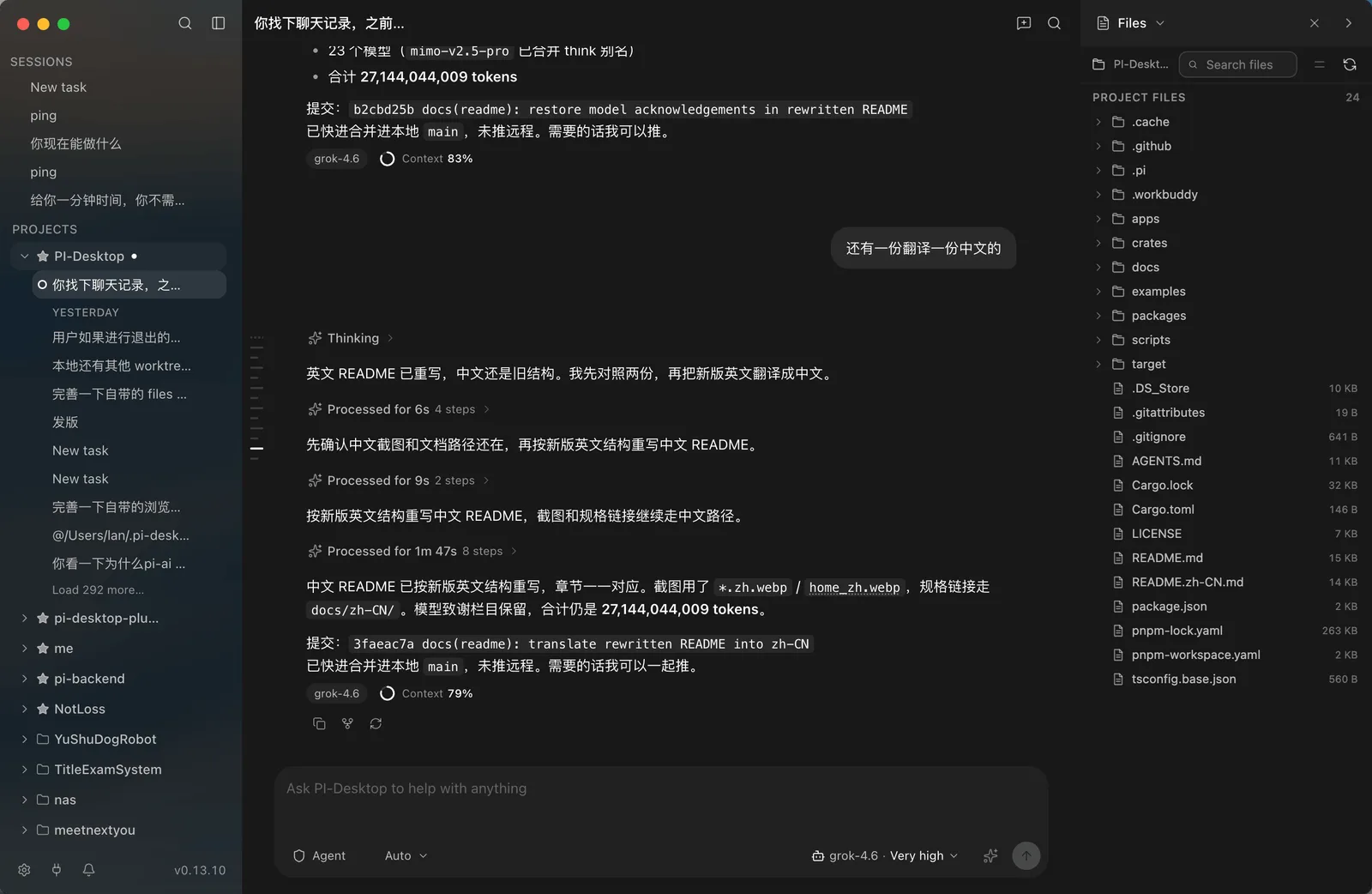
- Agent, Plan and Goal modes, plus a permission layer that gates privileged operations behind explicit approval
- Subagent delegation and parallel worker sessions, with a session orchestrator view over all of them
- A plugin system that can add panels, widgets, commands, MCP servers, themes and background services, installed from an in-app marketplace
- Packaged for macOS (Apple Silicon and Intel), Windows x64 and Linux as AppImage, .deb and .rpm
Getting started
Packaged builds are published on the releases page for macOS, Windows and Linux. To build from source you need Node.js 22.19 or newer, pnpm 10 or newer and a stable Rust toolchain; Linux needs glibc 2.35 or later (Ubuntu 22.04, Debian 12, Fedora 36 and newer).
Clone and install
The repository is a pnpm workspace containing the Electron app, the Rust host core and the agent runtime.
git clone https://github.com/vastsa/PI-Desktop.git
cd PI-Desktop
pnpm install
Build the host core and the front end
The Rust crate is built with Cargo, the JavaScript side with the workspace script.
cargo build -p host-core
pnpm build:js
Run it in development
This launches the Electron shell against the local build.
pnpm devAdd a provider and open a project
In the app, configure a provider — an API key, an OpenAI-compatible gateway, or a local Ollama or LM Studio endpoint — then open a folder as a project and start a session in Agent, Plan or Goal mode.
Check your changes
The repository's own validation scripts, useful if you are writing a plugin against it.
pnpm typecheck
pnpm lint
pnpm test
Commands and code are distilled from the project's own documentation — always check the official repo for the latest.
When to use it
- Running long, multi-hour agent tasks that need to survive closing the laptop lid
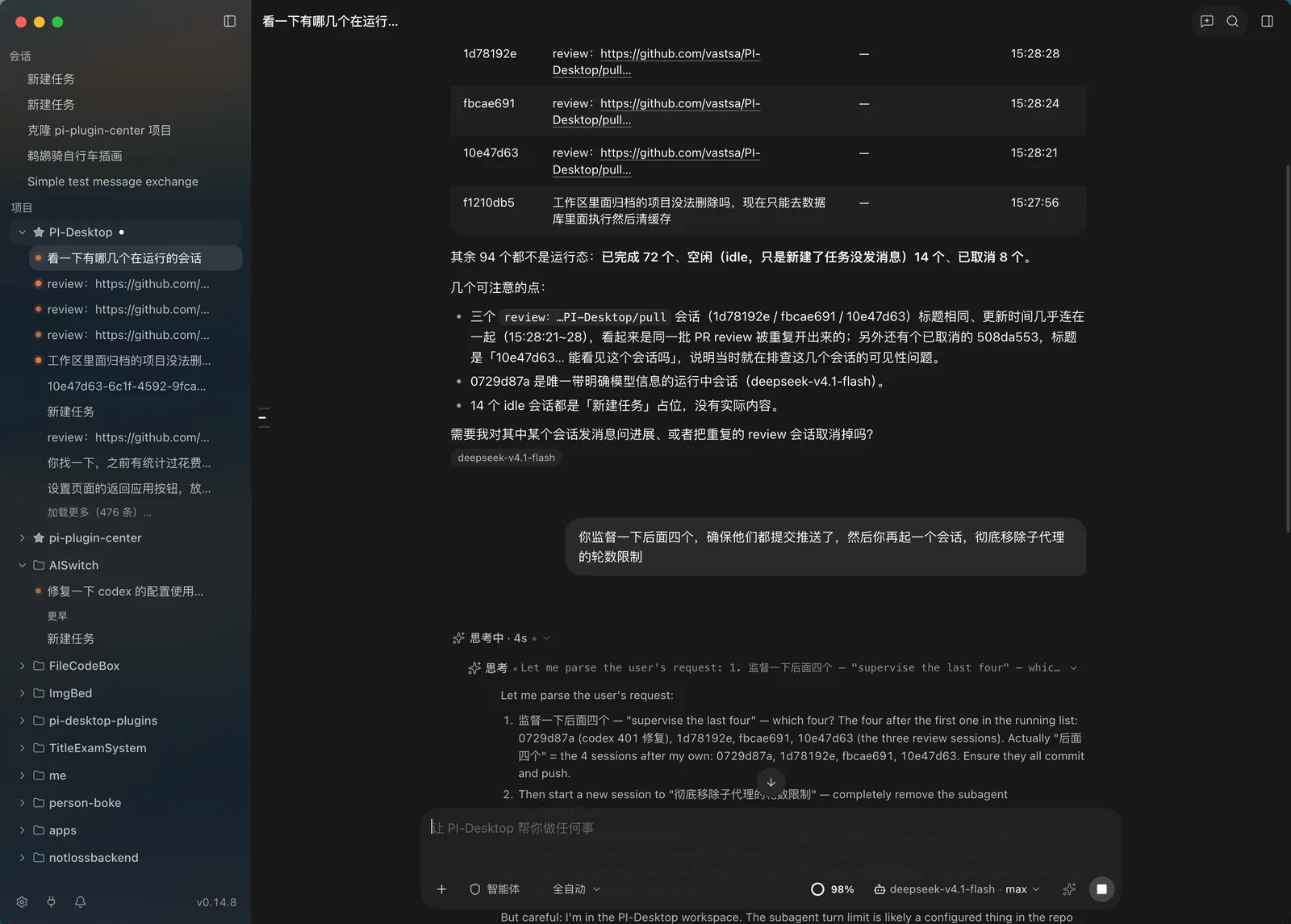
- Fanning a large refactor out to parallel worker sessions and watching them from one orchestrator view
- Keeping agent work off a hosted service entirely by pointing it at Ollama or LM Studio
- Extending an agent's environment with your own panels, commands or MCP servers instead of forking a CLI
How PI-Desktop compares
PI-Desktop alongside other open-source coding-agent harnesses & runtimes tools AI/TLDR tracks, ranked by GitHub stars.
| Tool | Stars | What it does |
|---|---|---|
| CC Switch | ★ 134k | A cross-platform desktop app that manages provider configuration for eight coding-agent CLIs from one place, with a local failover proxy, MCP and skill management, and spend tracking. |
| Oh My OpenAgent | ★ 69.3k | Opinionated agent bundle for OpenCode and Codex CLI that ships preconfigured sub-agents, lifecycle hooks and built-in MCP servers behind a single ultrawork command. |
| herdr | ★ 40.2k | A single-binary terminal multiplexer built for coding agents: persistent sessions across local and SSH machines, per-pane working/blocked/idle status, and a socket API agents drive themselves. |
| oh-my-claudecode | ★ 39.3k | A plugin and CLI that adds multi-agent orchestration to Claude Code: staged autopilot workflows, parallel tmux workers, and advisors that route a second opinion to Codex, Gemini, Grok or Cursor. |
| AionUi | ★ 33k | An open-source desktop workspace that pairs a built-in agent engine with dozens of external CLI agents, adding scheduled runs, MCP tools and remote access from a WebUI or chat apps. |
| cmux | ★ 27.3k | A Ghostty-based macOS terminal built around coding agents: vertical tabs that show git branch, PR status and ports, attention notifications when an agent needs you, and a scriptable built-in browser. |
| cc-connect | ★ 15.6k | A Go daemon that bridges local coding agents — Claude Code, Codex, Cursor Agent, Gemini CLI, OpenCode, Kimi CLI and more — to Feishu, DingTalk, Slack, Telegram, Discord, LINE and WeCom, so you drive them from chat. |
| PI-Desktop | ★ 5.2k | A desktop workspace where coding agents keep their projects, sessions and plugins |