
Overview
Magnitude is an open-source inference engine for running open-weight models locally, built for AI agents rather than chat. Its makers describe the problem it solves this way: engines like vLLM and SGLang are built for batched datacenter serving, while llama.cpp and Ollama trade peak speed for broad compatibility. Magnitude aims at long, concurrent agent sessions on one personal machine, on macOS, Linux and Windows with Apple Silicon, NVIDIA, AMD or CPU-only hardware.
The engine is written in Rust with a custom GPU kernel runtime and autotuner. Kernels are written with flexible parameters that are tuned on your actual device before the model runs, and they are hand-optimised for the most popular open-weight model families. Memory is reserved only for the model weights up front; the heap grows as agent sessions grow and is freed when agents stop. A hybrid paged attention design lets concurrent sessions share prefix caches without slowing a single session down.
Magnitude ships as a desktop app that includes the magnitude CLI. It downloads models from a built-in catalog, starts them on demand when a connected agent needs them, and shuts them down after inactivity. The local API speaks both the OpenAI and the Anthropic formats, and one-click connections exist for Pi, OpenCode, Hermes, OpenClaw, Codex, Claude Code, Oh My Pi and Cline. The project is licensed Apache-2.0 and is backed by Y Combinator (S25 batch).
What it does
- On-device kernel compilation and tuning for Apple Silicon (Metal), NVIDIA (CUDA), AMD and CPU
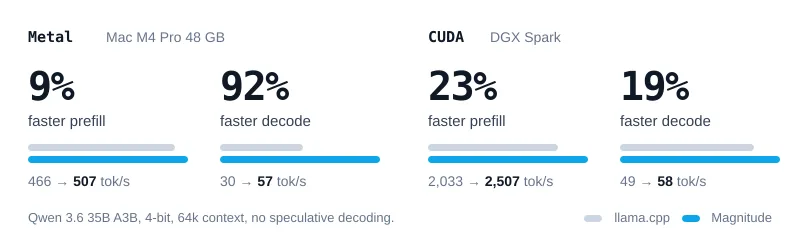
- Measured by the makers against llama.cpp on Qwen 3.6 35B A3B: 92% faster decode on an M4 Pro and 19% faster decode on a DGX Spark
- Dynamic memory that grows with agent sessions and is freed when agents stop, with 27% less memory per agent in the makers' tests
- Hybrid paged attention so concurrent agent sessions share prefix caches
- OpenAI-compatible and Anthropic-compatible local API on port 10100
- One-click connections for Pi, OpenCode, Hermes, OpenClaw, Codex, Claude Code, Oh My Pi and Cline
- Desktop app plus a CLI with a headless magnitude serve mode for macOS, Windows and Linux
- Speculative decoding support (DFlash, DSpark and DFlash2)
Getting started
Magnitude is installed from the desktop app download at magnitude.dev/download; the app includes the magnitude CLI. In the app you pick a model under Discover and connect your agent under Connections. The same steps work from the terminal.
Install on Linux
Download the package for your distribution from magnitude.dev/download, then install it. Ubuntu 22.04, Debian 12 and Fedora/RHEL 9+ with glibc 2.35 or later are supported.
sudo apt install ./magnitude-desktop.deb
# or on Fedora
sudo dnf install ./magnitude-desktop.rpm
Check your hardware and pick a model
Magnitude ranks catalog models that fit your machine, then downloads the one you choose.
magnitude hardware
magnitude catalog recommendations
magnitude catalog pull <model-id>
Run it without the desktop window
magnitude serve runs the service in the foreground; magnitude status shows service and model state.
magnitude serve
magnitude status
Connect an agent or call the API
Configure a supported agent, or point any OpenAI-compatible client at the local endpoint.
magnitude connections add <harness>
curl http://127.0.0.1:10100/inference/v1/models
Commands and code are distilled from the project's own documentation — always check the official repo for the latest.
When to use it
- Running local coding agents such as Pi, OpenCode or Codex on open-weight models with no token costs
- Running several agent sessions at once on one laptop or workstation while still using the machine for other work
- Getting faster local decode than llama.cpp on Apple Silicon for long-context agent work
- Serving an OpenAI- or Anthropic-compatible endpoint from a headless Linux box with magnitude serve
How Magnitude compares
Magnitude alongside other open-source local runtimes tools AI/TLDR tracks, ranked by GitHub stars.
| Tool | Stars | What it does |
|---|---|---|
| Ollama | ★ 182k | A developer-friendly tool that downloads and runs local LLMs from the terminal with a built-in OpenAI-compatible API. |
| llama.cpp | ★ 130k | A C/C++ inference engine that runs LLMs in the GGUF format on CPUs, Apple Silicon, and GPUs with low memory use. |
| GPT4All | ★ 77.4k | GPT4All is a free desktop app and Python client that runs large language models locally on your own computer, with no API calls or GPU required. |
| LocalAI | ★ 49.4k | A self-hosted server that exposes an OpenAI-compatible API for running text, vision, voice, and image models on local hardware. |
| Jan | ★ 44.7k | An open-source desktop app that runs LLMs fully offline as a ChatGPT-style assistant on your own computer. |
| Colibrì | ★ 38.7k | A pure-C inference engine that keeps a Mixture-of-Experts model's dense trunk resident in RAM and streams its routed experts from disk, so 744B-2.8T models run on consumer hardware. |
| llmfit | ★ 37.4k | A Rust terminal tool that inspects your CPU, RAM, GPUs and VRAM and scores which open-weight models and quantizations will actually run well on that machine, with a TUI, CLI, REST API and local-runtime integrations. |
| Magnitude | — | A local inference engine that tunes its kernels to your hardware and serves open models to coding agents |