Overview
Munder Difflin is an Electron desktop app that wraps real terminal-agent CLIs as agents and coordinates them. Each agent — claude, codex, grok, kimi, gemini, qwen, opencode, crush, pi, copilot, cursor-agent, or any custom command — runs as a genuine process in its own pseudo-terminal via node-pty and is rendered with xterm.js, so nothing is simulated: you are watching the same CLI you would run by hand, on the subscription and hourly limits you already have. Bring-your-own keys and local models through Ollama, LM Studio or vLLM are supported too.
The coordination layer is a local git repository of plain files the project calls the hive. Agents write to their own outbox/ and the harness's router delivers into recipients' inbox/; no agent ever touches git itself, a single-committer design chosen to avoid index.lock corruption. A supervising orchestrator agent ("Michael") reads every request, resolves routine ones on its own, and escalates only critical items — spend, destructive operations, scope changes — into an approvals queue. Each agent keeps markdown memory that is mined into a shared, searchable index so recall survives across sessions.
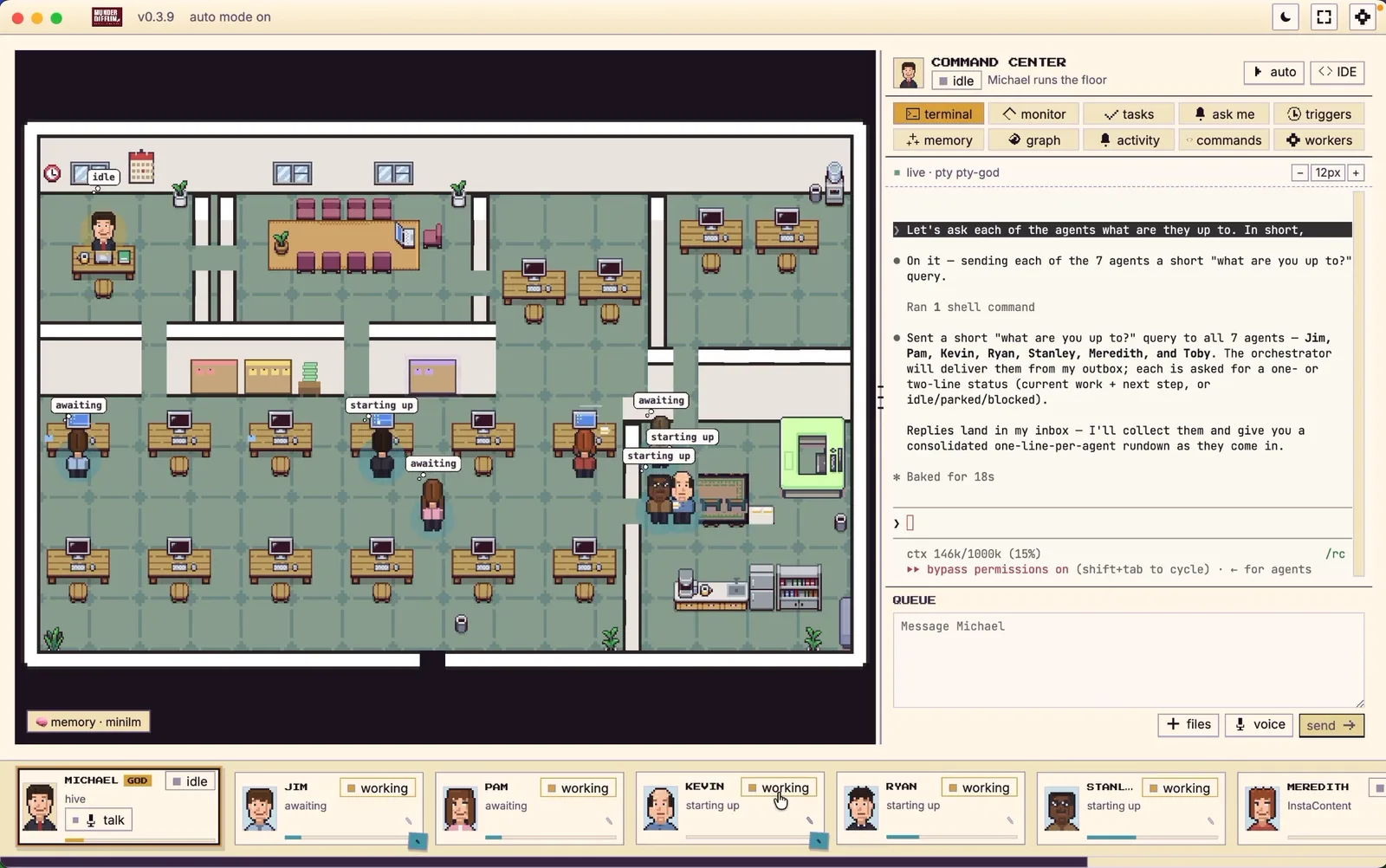
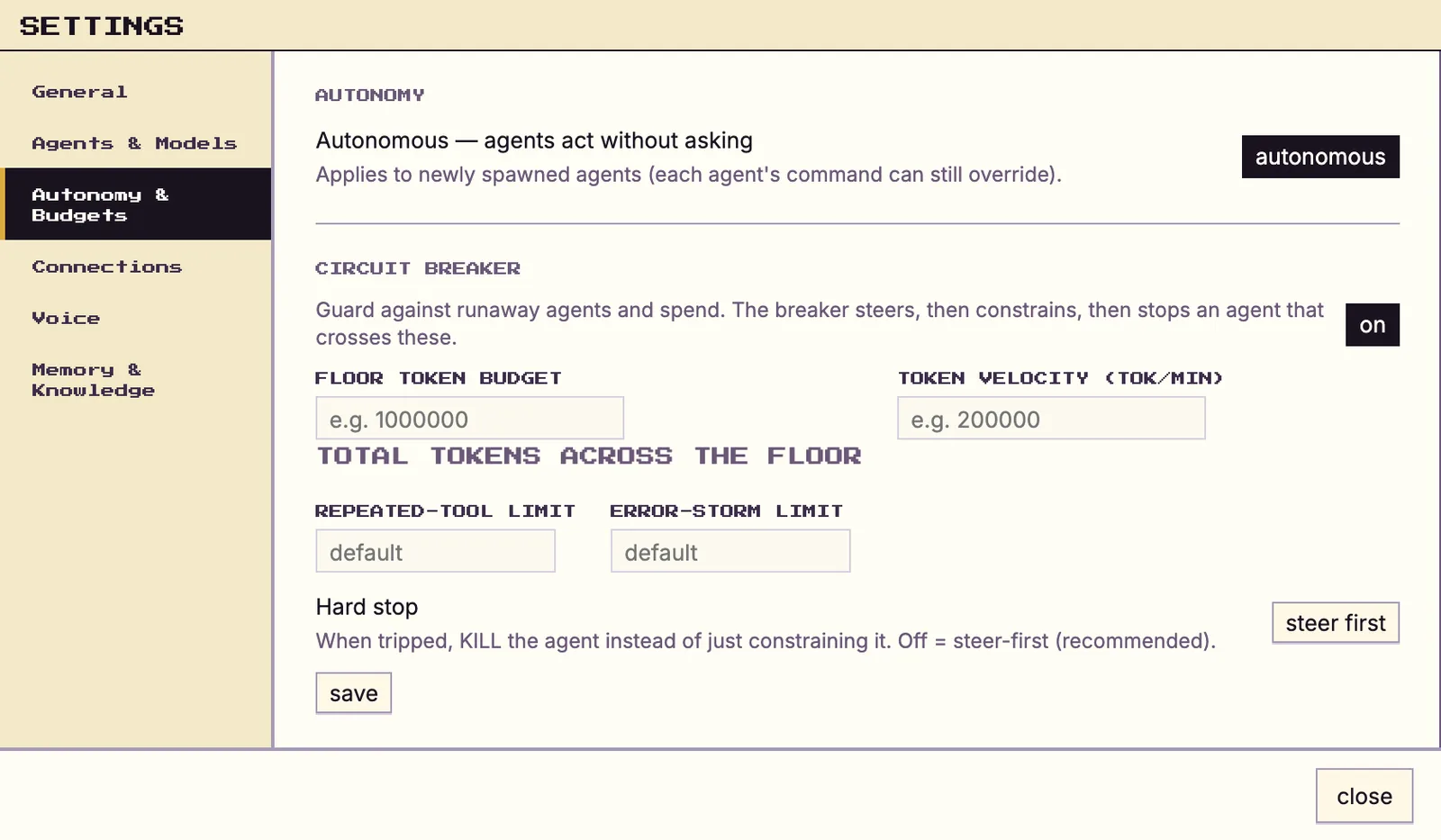
The interface is a 2D Pixi.js office floor: agents appear as avatars that walk to stations as they work and envelopes fly desk to desk when they message each other; clicking a desk opens that live terminal, and you can type straight back into it. Around the floor sits a Command Center with kanban tasks, scheduled missions, per-agent token budgets and a cost ledger, a skills catalog, a built-in Monaco editor with git rails, Slack and webhook entry points, and per-agent autonomy settings backed by a steer → constrain → stop circuit breaker. It is MIT-licensed and marked pre-release.
What it does
- Wraps real agent CLIs (Claude Code, Codex, Grok, Kimi Code, Gemini CLI, Qwen, OpenCode, Crush, pi.dev, Copilot CLI, Cursor, or any custom command) as first-class agents in their own PTYs
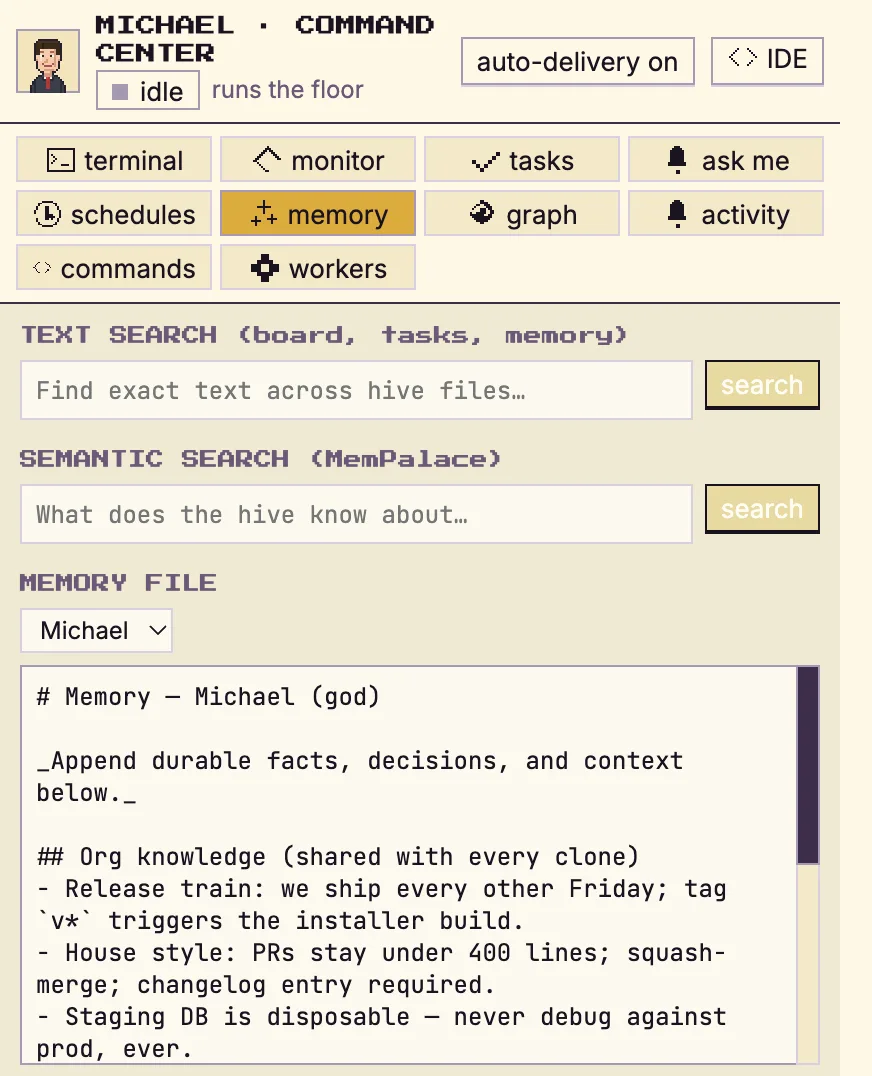
- A hive of plain files in a local git repo: per-agent memory, atomic-file mailboxes, a shared blackboard and an append-only event log, with a single-committer design
- An orchestrator agent that routes and adjudicates work and escalates only spend, scope and destructive operations to a human approvals queue
- A live Pixi.js office floor where every agent is an avatar you can click into, read and type back to
- Per-agent autonomy levels plus a steer → constrain → stop circuit breaker for agents that loop, storm errors or blow their budget
- Command Center with kanban tasks, scheduled missions, token budgets and a real cost ledger, memory search, a Monaco IDE with git rails, and Slack/webhook triggers
- Optional per-agent git worktrees so parallel agents never collide on branches
Getting started
Most people should install the packaged app — signed and notarized macOS builds plus Windows and Linux builds are on the project's download page, and the onboarding wizard handles the rest. Building from source is for contributors. Either way you need at least one supported agent CLI on your machine; the app can install a missing one for you.
Download the app
Grab the signed and notarized macOS build, or the Windows or Linux build, from the project's download page; the open source build is on the GitHub releases page. Install it and open it. You do not need Node, a toolchain or the repository.
https://harnessmd.com/download
https://github.com/chaitanyagiri/munder-difflin/releases
Make sure an agent CLI is available
Claude Code (claude) is the default; Antigravity (agy), Codex, Grok, Kimi Code, Gemini CLI, Qwen, OpenCode, Crush, pi.dev, GitHub Copilot (copilot) and Cursor (cursor-agent) are also supported. A missing CLI shows up as a card in the agent's terminal: Install runs the command and you sign in inside the app. Settings → Prerequisites lists the other supporting tools.
Or build from source
Requires Node.js 18+ and a C/C++ toolchain for node-pty's native addon (on macOS, xcode-select --install). The postinstall hook rebuilds node-pty against Electron's ABI.
git clone https://github.com/chaitanyagiri/munder-difflin.git
cd munder-difflin
npm install
npm run dev
Hire your first agent
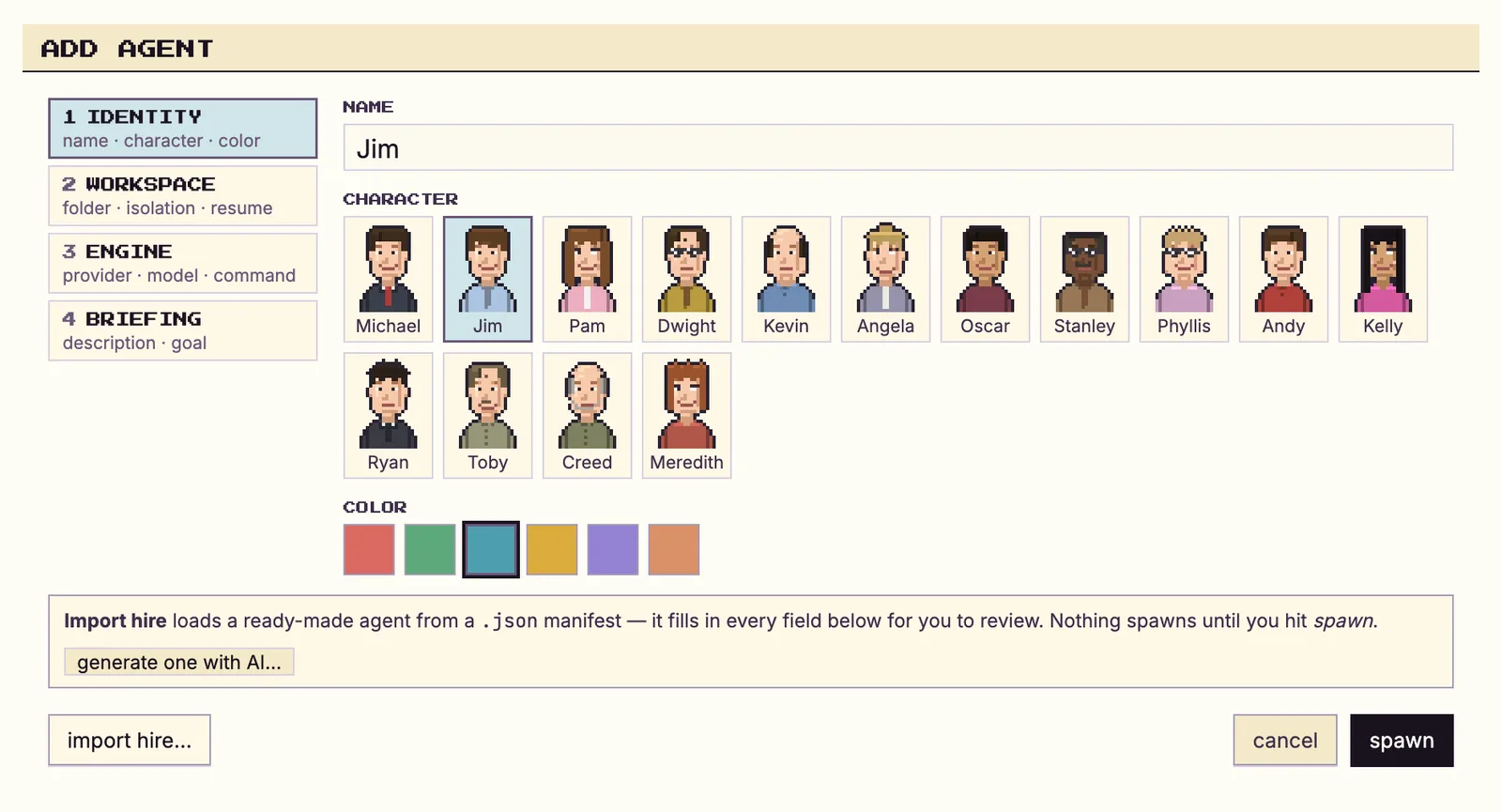
On first launch you go through the onboarding wizard and land on the floor. Use Add agent to pick a CLI, a model and an autonomy level and give it a desk; the orchestrator (Michael) seats itself automatically. Ready-made roles can be imported from the Agent Gallery at munderdiffl.in/hires.
Commands and code are distilled from the project's own documentation — always check the official repo for the latest.
When to use it
- Run several coding agents in parallel on one machine without opening a dozen terminals and remembering which is doing what
- Keep using the CLI subscriptions you already pay for, on their own hourly limits, instead of routing everything through one API key
- Give agents memory and a mailbox so work started yesterday continues today and one agent can hand off to another
- Put a human gate on spend, scope changes and destructive operations while letting routine work run unattended
How Munder Difflin compares
Munder Difflin alongside other open-source multi-agent systems tools AI/TLDR tracks, ranked by GitHub stars.
| Tool | Stars | What it does |
|---|---|---|
| Paperclip | ★ 106k | A self-hosted control plane that runs a team of AI agents like a company, with an org chart, tasks, budgets and approvals. |
| Ruflo | ★ 78.5k | Agent meta-harness that wraps Claude Code and Codex with 100+ specialized agents, swarm coordination, vector memory, background workers and cross-machine agent federation. |
| MetaGPT | ★ 71k | A multi-agent framework that models a software company, assigning roles like product manager, architect, and engineer to generate code from a single prompt. |
| AutoGen | ★ 61.5k | Microsoft Research's framework for building applications where multiple agents converse with each other and with tools to solve tasks. |
| CrewAI | ★ 60k | A framework for assembling teams ('crews') of role-playing agents that divide tasks and collaborate to complete a goal. |
| AgentScope | ★ 33.7k | A framework for building multi-agent applications with message passing, visual debugging tools, and distributed execution. |
| OpenAI Agents SDK | ★ 30.2k | OpenAI's lightweight Python SDK for building multi-agent workflows using explicit handoffs, tools, and guardrails. |
| Munder Difflin | ★ 9k | A desktop harness that turns the terminal agent CLIs you already pay for into a coordinated office of agents |