
What is Pinvou Agent?
Pinvou Agent is a desktop application for Windows, macOS and Linux that treats a chat as a task meant to end in a result: a file, a visual or a code change. It sits in the Assistants & Chatbots category of the Agents & Automation tools and is open-source, written in Rust and licensed MIT.
Overview
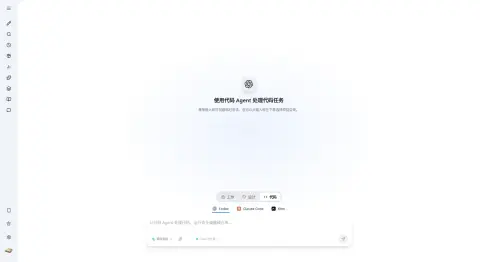
Pinvou Agent is a desktop application for Windows, macOS and Linux that treats a chat as a task meant to end in a result: a file, a visual or a code change. It splits that work into three modes. Work combines attachments, a personal knowledge base, specialist personas, Skills, MCP tools and workflows to research, analyse and write reusable files. Design turns a prompt into a poster or data visualisation that you can then edit directly — selecting elements and changing copy, fonts, colours and layout — or keep refining by description. Code brings Codex, Claude Code or Kimi into a real project (or an isolated temporary workspace) through the Agent Client Protocol (ACP), showing plans, tool steps, permission requests and file changes.
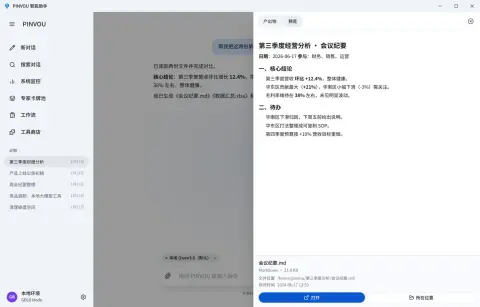
Under the hood it is a Tauri 2 app with a React and Vite interface. The agent engine is CodeWhale, a separate submodule that handles model calls, streaming, tool execution, sessions, MCP, Skills, hooks and context compaction; the desktop layer owns the UI, configuration and operating-system integration. Every file the agent creates or edits is collected in an artifact panel for preview, and Markdown artifacts can be edited in place or revised by selecting a passage. Plan and YOLO modes choose between reviewing a plan first and executing directly.
Pinvou Agent works with a local vLLM server or any OpenAI-compatible API, with built-in templates for DeepSeek, Kimi, Qwen, Doubao, MiniMax, Zhipu GLM, MiMo, OpenAI, Anthropic, Gemini and xAI. Sessions, settings, knowledge and extensions live under `~/.pinvou3/`; whether data leaves the machine depends on which model, MCP servers and connectors you enable. The project is MIT-licensed and published preview builds through GitHub Releases.
What it does
- Three modes in one workspace: Work for file deliverables, Design for editable posters and data visualisations, Code for project work with a coding agent
- Codex, Claude Code or Kimi driven over ACP, with plans, tool steps, permission requests and file changes shown in the app and sessions bound to their workspace
- Artifact panel that collects every file the agent creates or edits, with in-place editing and passage-level revision for Markdown
- Local knowledge base with full-text and vector retrieval, multiple collections per chat and source provenance in answers
- Memory center with explicit review of captured preferences, plus a reusable persona card pool
- Unified tool store for local and remote MCP servers, CLI tools and API connectors, with OAuth/SSO where supported and ready-made connectors such as Feishu, DingTalk, WeCom and Obsidian
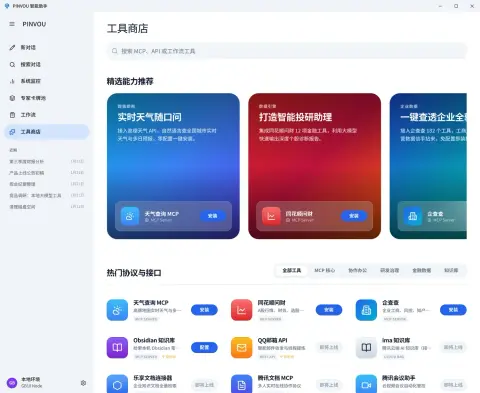
- Attachments for PDF, Office documents, images and text; local voice input; GPU, memory and context-usage monitoring
- Plan and YOLO modes, and an auxiliary side chat that can only read the running task's history
- Local vLLM or any OpenAI-compatible endpoint, with per-session switching between saved model configurations
Getting started
Preview installers are published on the GitHub Releases page: a universal .dmg for macOS 11 or later, a Windows x64 setup .exe, and .deb packages for Linux x64, arm64 and LoongArch64 (Ubuntu 22.04 or newer). The steps below follow the project README.
Install and connect a model
Download the installer for your platform from GitHub Releases and launch it. In the application settings, add a model configuration — a built-in template such as DeepSeek, Qwen, OpenAI, Anthropic or Gemini, a local vLLM server, or any custom OpenAI-compatible endpoint.
Or point it at a local vLLM server
Endpoints can also be supplied through environment variables. For a non-loopback plain-HTTP endpoint on a trusted network, also set DEEPSEEK_ALLOW_INSECURE_HTTP=1.
export DEEPSEEK_BASE_URL="http://127.0.0.1:8000/v1"
export DEEPSEEK_API_KEY="local-no-auth"
export DEEPSEEK_MODEL="your-model-name"
Pick a mode and give it a task
Choose Work, Design or Code below the input box. In Code mode, pick Codex, Claude Code or Kimi and select a project directory, or type directly to start a temporary session. Files the agent produces appear in the artifact panel.
Run from source
Requires Git with submodule support, Node.js and npm, a current Rust toolchain and the Tauri 2 system dependencies for your platform.
git clone --recursive https://github.com/Pinvou/pinvou-agent.git
cd pinvou-agent/pinvou3-app
npm ci
cd ..
./pinvou3-app/run-dev.sh
Commands and code are distilled from the project's own documentation — always check the official repo for the latest.
When to use it
- Reach for it when a task should end in a file — a report, meeting summary or spreadsheet — rather than a chat reply
- Reach for it to drive Codex, Claude Code or Kimi from one desktop app with visible plans, permissions and file changes
- Reach for it to keep a fully local loop with a vLLM server, local knowledge base and local tools
- Reach for it to wire Chinese workplace tools such as Feishu, DingTalk, WeCom or Tencent Docs into an agent through the tool store
How Pinvou Agent compares
Pinvou Agent alongside other open-source assistants & chatbots tools AI/TLDR tracks, ranked by GitHub stars.
| Tool | Stars | What it does |
|---|---|---|
| OpenClaw | ★ 395k | OpenClaw is a self-hosted personal AI assistant that answers you on WhatsApp, Telegram, Slack, Discord, and many other channels, with voice and a live visual canvas. |
| Hermes Agent | ★ 265k | A self-improving personal AI agent from Nous Research that builds skills from experience, remembers across sessions, and reaches you on Telegram, Discord, Slack, and more. |
| Odysseus | ★ 95.8k | A self-hosted AI workspace that puts chat, agents, deep research, documents, email, notes, tasks and calendar behind one Docker Compose stack, over local or API models. |
| CowAgent | ★ 48k | A self-hosted assistant that plans and executes tasks with built-in file, terminal, browser and search tools, and answers across a web console plus a dozen messaging platforms. |
| AstrBot | ★ 47.2k | An all-in-one agent chatbot platform that puts LLM conversations, tools, knowledge bases and a plugin marketplace inside messaging apps like Telegram, Slack, Discord, QQ and Feishu. |
| OpenHuman | ★ 42.8k | A local-first desktop personal AI for macOS, Windows and Linux that keeps a compressed memory tree on your machine and orchestrates checkpointed research and automation workflows. |
| MindsHub | ★ 39.9k | An agent workspace for knowledge work and software development that runs swappable open-source agent harnesses against your choice of frontier or open models. |
| Pinvou Agent | ★ 3k | Open-source desktop agent workspace for work, design and coding |