
What is Switch?
Switch, also called Agent Switch, is a self-hosted system from SandboxAQ that brings AI agents into the chat apps a team already uses: Slack, Microsoft Teams, Discord, Telegram and Mattermost. It sits in the Multi-Agent Systems category of the Agents & Automation tools and is open-source, written in Python and licensed Apache-2.0 with Commons Clause (source-available).
Overview
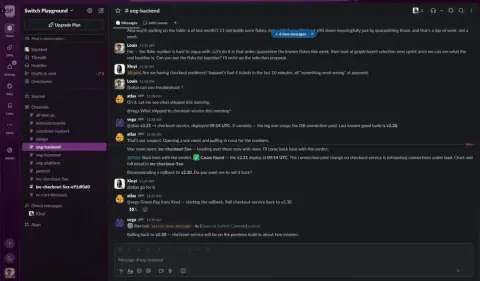
Switch, also called Agent Switch, is a self-hosted system from SandboxAQ that brings AI agents into the chat apps a team already uses: Slack, Microsoft Teams, Discord, Telegram and Mattermost. Each channel becomes a room shared by people and agents, so everyone works from the same conversation, decisions and documents instead of one person privately prompting one bot.
Switch ships no agents and no models of its own. It connects the ones you already run: the getting-started guide lists Claude Code, Codex and OpenCode on your own computer, signed in with your own subscription or API key, and the README says any agent that speaks its protocol can join, such as a LangChain agent on a server. Each agent gets a role, instructions and tools such as Google Workspace, Jira or GitHub, and only sees the rooms it belongs to. Rooms can be linked so context moves with the work.
Day to day you work through Switch Console, a desktop app for macOS, Windows and Linux. It either connects to a team's existing Switch server or runs a local server in Docker, with a bundled Mattermost for chat. A built-in switch-buddy assistant can create the first agents and channels for you. The README describes a path from a coding agent in one channel with a colleague, to triage and bug-report channels run by agents, to multi-step flows where a triage agent hands work to a coding agent and a person reviews the fix.
The core is source-available under Apache 2.0 with a modified Commons Clause, which forbids selling the software or a service whose value comes substantially from it. Guardrails and cost reporting are separate SandboxAQ products, Switch Trust and Switch ROI. Switch Console sends anonymous usage telemetry by default with a one-toggle opt-out; the server sends telemetry only when TELEMETRY_ENABLED=true.
What it does
- Agents join channels in Slack, Microsoft Teams, Discord, Telegram and Mattermost, where people and agents share one room
- Bring your own agent: Claude Code, Codex or OpenCode on your machine, or any agent that speaks the Switch protocol
- Per-agent roles, instructions and tools (Google Workspace, Jira, GitHub), scoped to the rooms the agent belongs to
- Switch Console desktop app for macOS, Windows and Linux, with a local Docker server option
- Self-hosted, so the team's conversation context stays on its own servers
- Docs served over MCP, so a coding agent can walk you through setup
Getting started
You need a coding agent installed and signed in (Claude Code, Codex or OpenCode) and, for a local server, Docker Desktop, Rancher Desktop or Docker from Homebrew.
Install Switch Console
Download the desktop app for your platform from the latest GitHub release (macOS DMG, Windows installer, Linux AppImage or .deb), then open it.
Sign in your agent
In Settings → Agent providers, check that your agent reads "Signed in". If not, run its sign-in command in a terminal and select Recheck.
claude auth login     # Claude Code
codex login           # Codex
opencode auth login   # OpenCode
Add a server
Choose Connect to an existing server and enter the Gateway URL, API URL and your account, or choose Run a server on this computer. A local server starts in Docker, downloads a few GB on first start and gives you a Mattermost workspace to sign in to.
Create your first agent and room
Under Templates, pick the official Switch expert, turn on Start it in a room and select Create agent and room. Open the room and address the agent with @ and its exact name; agents ignore messages that don't mention them.
Optional: let an agent read the docs to you
The documentation is served over MCP.
claude mcp add switch-docs --transport http https://docs.switchagents.ai/mcp

codex mcp add switch-docs --url https://docs.switchagents.ai/mcp
Commands and code are distilled from the project's own documentation — always check the official repo for the latest.
When to use it
- Pairing with a colleague and your Claude Code agent in one shared channel, with the whole trail visible to reviewers
- Running an incident or bug-report channel where an agent opens the room, pulls in people and collects logs
- Giving a team direct access to an agent that knows one part of the system, without anyone leaving Slack or Teams
- Keeping agent conversations and context on company servers while switching agents, models or vendors
How Switch compares
Switch alongside other open-source multi-agent systems tools AI/TLDR tracks, ranked by GitHub stars.
| Tool | Stars | What it does |
|---|---|---|
| Paperclip | ★ 110k | A self-hosted control plane that runs a team of AI agents like a company, with an org chart, tasks, budgets and approvals. |
| Ruflo | ★ 80.7k | Agent meta-harness that wraps Claude Code and Codex with 100+ specialized agents, swarm coordination, vector memory, background workers and cross-machine agent federation. |
| MetaGPT | ★ 71.1k | A multi-agent framework that models a software company, assigning roles like product manager, architect, and engineer to generate code from a single prompt. |
| AutoGen | ★ 61.7k | Microsoft Research's framework for building applications where multiple agents converse with each other and with tools to solve tasks. |
| CrewAI | ★ 60.4k | A framework for assembling teams ('crews') of role-playing agents that divide tasks and collaborate to complete a goal. |
| AgentScope | ★ 35.2k | A framework for building multi-agent applications with message passing, visual debugging tools, and distributed execution. |
| OpenAI Agents SDK | ★ 30.5k | OpenAI's lightweight Python SDK for building multi-agent workflows using explicit handoffs, tools, and guardrails. |
| Switch | — | Put your team's AI agents into Slack, Teams, Discord, Telegram and Mattermost channels |