
Overview
ThinkRail is an open-source IDE from JetBrains, published as a JetBrains incubator project, that wraps a full editing environment around the pi coding agent. Instead of driving an agent from a terminal, you open a git repository as a project, give each task its own workspace, and watch the agent's conversation, tool steps and resulting diff side by side. It ships as a native desktop app for macOS, Windows and Linux and as a self-contained `thinkrail` CLI that opens the same app in a browser.
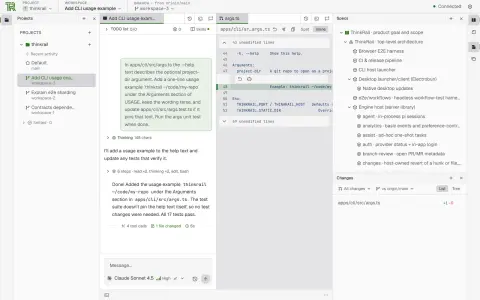
Isolation is the default. Every workspace ThinkRail creates is a `git worktree` with its own branch and working directory, so several agents can work in parallel without touching your checkout; you merge the branch that worked and delete the rest. Around that sits a real IDE — Monaco editor tabs, a Files tree with live git marks, terminals and anchored review comments you can send back to the chat as structured context — plus GitHub pull-request handling: publish, push, open a PR described from the plan and commits, see CI checks and review state, and merge from the topbar.
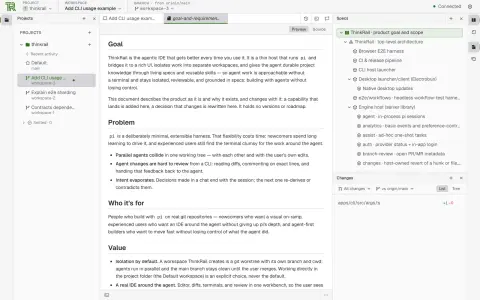
The other idea is durable project knowledge. A connected graph of `SPEC.md` files lives beside the code, and the agent reads, searches and maintains it through dedicated `spec_*` tools so that decisions survive the session. Portable Agent Skills you already keep for other coding agents are read in place, MCP servers from your pi `mcp.json` can be connected with per-call approval, and model access comes from JetBrains AI sign-in or any provider configured through pi's own auth. ThinkRail itself is a thin host: pi owns models, skills, compaction, cost and session state, and the app owns the workspace, editor and UI. It is licensed Apache-2.0.
What it does
- Workspaces cut as git worktrees, each with its own branch, so parallel agents never collide with each other or with your own edits; finished ones settle onto a per-project shelf
- A splittable workbench of Monaco editor tabs, a Files tree with live git change marks, terminals and anchored review comments that can be sent to the agent as structured context
- Several concurrent pi chats per workspace, each with its own model and a live token and cost readout, plus subagent delegation and a shared plan whose steps can be committed one by one
- Living specs: a graph of SPEC.md files that the agent maintains through dedicated spec tools, rendered as a tree in the workbench
- MCP servers from your pi configuration, with approval prompts for calls that are not marked read-only and repository-defined servers kept off until approved
- GitHub pull-request flow in the topbar: publish, push, open a PR from the plan and commits, follow CI checks and review decisions, and merge
Getting started
ThinkRail needs `git` on your PATH and a model provider: sign in with JetBrains AI from the app, or use provider credentials you have already set up for pi. It reads your existing pi configuration from `~/.pi/agent`.
Install the CLI (macOS / Linux)
The installer downloads the right binary, verifies its SHA-256 checksum and puts `thinkrail` on your PATH. The same command works under Git Bash on Windows.
curl -fsSL https://raw.githubusercontent.com/JetBrains/thinkrail/main/install.sh | bashOr install on Windows
This works from both cmd and PowerShell. Native desktop installers (a DMG for macOS 14+, a Windows setup ZIP and a Linux tarball) are on the GitHub releases page instead.
powershell -c "irm https://raw.githubusercontent.com/JetBrains/thinkrail/main/install.ps1 | iex"Open a repository
Run `thinkrail`, optionally with a git repo to open as a project; the app opens in your browser. `thinkrail --help` lists the flags.
thinkrail ~/code/my-repoCut a workspace and start a chat
Create a workspace from the project (a new git worktree on its own branch), pick a model and give the pi agent a task. Review the diff it produces, leave comments on lines that need changes, then push and open a pull request from the topbar.
Pin a channel or version
The installer takes `--channel stable|nightly` and `--version`; `thinkrail update` re-runs it for the installed channel.
curl -fsSL https://raw.githubusercontent.com/JetBrains/thinkrail/main/install.sh | bash -s -- --channel nightlyCommands and code are distilled from the project's own documentation — always check the official repo for the latest.
When to use it
- Running several coding-agent tasks on one repository in parallel without their edits colliding
- Reviewing an agent's changes like a pull request — line comments, diffs and CI status — instead of scrolling terminal output
- Keeping design intent in versioned SPEC.md files that the agent reads and updates across sessions
- Giving newcomers to the pi agent a visual IDE while keeping their existing pi configuration, skills and MCP servers
How ThinkRail compares
ThinkRail alongside other open-source coding-agent harnesses & runtimes tools AI/TLDR tracks, ranked by GitHub stars.
| Tool | Stars | What it does |
|---|---|---|
| CC Switch | ★ 150k | A cross-platform desktop app that manages provider configuration for eight coding-agent CLIs from one place, with a local failover proxy, MCP and skill management, and spend tracking. |
| Oh My OpenAgent | ★ 70.5k | Opinionated agent bundle for OpenCode and Codex CLI that ships preconfigured sub-agents, lifecycle hooks and built-in MCP servers behind a single ultrawork command. |
| herdr | ★ 47k | A single-binary terminal multiplexer built for coding agents: persistent sessions across local and SSH machines, per-pane working/blocked/idle status, and a socket API agents drive themselves. |
| oh-my-claudecode | ★ 40.4k | A plugin and CLI that adds multi-agent orchestration to Claude Code: staged autopilot workflows, parallel tmux workers, and advisors that route a second opinion to Codex, Gemini, Grok or Cursor. |
| AionUi | ★ 33.9k | An open-source desktop workspace that pairs a built-in agent engine with dozens of external CLI agents, adding scheduled runs, MCP tools and remote access from a WebUI or chat apps. |
| cmux | ★ 28.6k | A Ghostty-based macOS terminal built around coding agents: vertical tabs that show git branch, PR status and ports, attention notifications when an agent needs you, and a scriptable built-in browser. |
| cc-connect | ★ 16.2k | A Go daemon that bridges local coding agents — Claude Code, Codex, Cursor Agent, Gemini CLI, OpenCode, Kimi CLI and more — to Feishu, DingTalk, Slack, Telegram, Discord, LINE and WeCom, so you drive them from chat. |
| ThinkRail | ★ 6.7k | JetBrains' open-source agentic IDE around the pi coding agent, with isolated worktrees and living specs |