In plain English
When you fine-tune a model, you want it to learn the pattern in your examples — the style, the format, the way you answer a class of questions. Overfitting is when it learns the wrong lesson: instead of the pattern, it memorizes your specific training examples and parrots them back. It aces every question that looks exactly like training data and falls apart on anything slightly different.
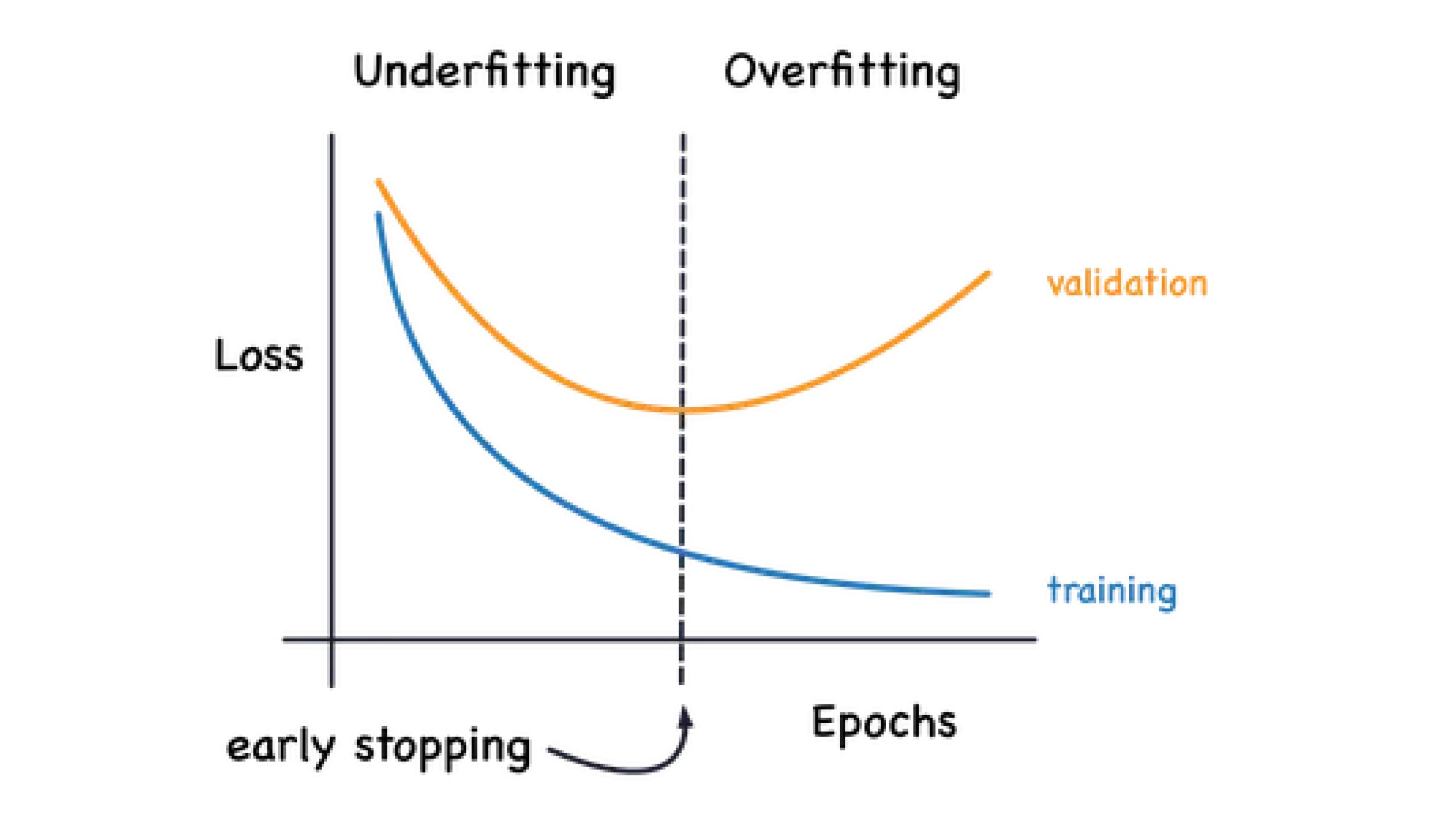
Think of a student cramming for an exam by memorizing last year's answer key word for word. If this year's questions are identical, they score 100%. Change a single number or reword a question, and they're lost — they never learned the method, only the answers. An overfit fine-tune is that student: confident and perfect on the cram sheet, brittle and wrong the moment reality differs.
The tricky part is that overfitting looks like success during training. Your loss number keeps dropping, the model keeps getting "better" on the data it sees, and it's tempting to celebrate. The whole skill of diagnosing overfitting is learning to ignore that number and watch the other one — how the model does on examples it was never trained on.
Why it matters
An overfit model is worse than useless — it's deceptively useless. It passes your hand-written test cases (because those resemble training data) while quietly failing on the real, varied inputs your users actually send. You ship it thinking it works, and the failures show up in production where they cost the most.
Concretely, overfitting hurts you in a few specific ways:
- Lost generalization. The entire point of fine-tuning is to handle new inputs in your domain. An overfit model handles only inputs that look like its training set, which defeats the purpose.
- Verbatim leakage. A badly overfit model can reproduce training examples word for word. If your data contained anything sensitive — customer names, internal notes, proprietary text — the model may now emit it on demand.
- Brittleness. Reword a prompt, change a date, swap a name, and the answer breaks. Real users never phrase things the way your training set did.
- Wasted budget. Compute, data-labeling effort, and engineering time all go into a model you can't safely deploy — see the real cost of fine-tuning.
The good news: overfitting is one of the most diagnosable problems in machine learning. It leaves clear fingerprints in both your training metrics and your model's outputs, and the fixes are well understood. The rest of this article is the symptom checklist and the fix toolkit.
How it works: reading the loss curves
Every fine-tuning run produces two numbers over time. Training loss measures how well the model fits the examples it's actively learning from. Validation loss measures how well it does on a held-out set it never trains on — examples you set aside specifically to test generalization. Comparing these two curves is the single most reliable way to catch overfitting.
In a healthy run, both curves fall together and then flatten. The model is genuinely learning the pattern, so it improves on data it has never seen, not just data it has memorized.
- Train loss falls
- Validation loss falls with it
- Both flatten out together
- Small, stable gap between them
- Stop near the flat point
- Train loss keeps falling
- Validation loss flattens, then rises
- Gap between them widens
- Model is memorizing, not learning
- Best checkpoint was earlier
The classic overfitting signature is unmistakable once you know it: training loss keeps dropping while validation loss stops improving and then turns upward. The point where validation loss bottoms out is the moment of maximum generalization — everything after that is the model trading away real skill for memorization.
The shape of an overfitting run
In this run, epoch 3 is your best checkpoint, even though training continued to look better afterward. This is exactly why you save a checkpoint at the end of each epoch and pick the one with the lowest validation loss — not the last one, and never the one with the lowest training loss.
Symptoms you can see in the outputs
Loss curves are the early-warning system, but you don't always have them — and even when you do, you should confirm with your own eyes. Overfitting shows up in the model's behavior in three telltale ways. You can catch all three with a handful of manual test prompts.
1. Verbatim regurgitation
Pick a training example, feed the model the input portion, and watch the output. A healthy model produces an answer in the right style. A badly overfit model reproduces the training output word for word — sometimes including quirks that only made sense in that one example. If your model can recite training data, it has memorized rather than generalized.
2. Brittleness to small changes
Take a prompt the model handles well, then change something tiny — swap a name, change a number, rephrase the question, add a polite "please." An overfit model's quality collapses on these near-misses, because it matched the surface form of training examples instead of the underlying task. A well-generalized model barely notices the change.
3. Lost general ability
Ask the model something outside your fine-tuning domain — a basic reasoning question, a general-knowledge fact, a simple instruction unrelated to your task. If a model that was perfectly capable before fine-tuning now gives garbled or weirdly narrow answers, it has overfit so hard that it damaged the general skills it came with. This is sometimes called catastrophic forgetting, and it's a severe form of overfitting to your narrow dataset.
The fix toolkit
Once you've confirmed overfitting, the fixes fall into two buckets: train less (stop the model before it memorizes) and give it more to learn from (make memorization harder than generalizing). You'll usually reach for several together. Here's the toolkit, roughly in order of how often you'll use each.
| Fix | What it does | Reach for it when |
|---|---|---|
| Early stopping | Stop training at the lowest validation loss, not the end | Validation loss bottoms out then rises — the most common case |
| Fewer epochs | Re-run from the base model with a lower epoch count | Even your best checkpoint shows overfitting; 1–3 epochs is often plenty |
| More / more-diverse data | Give the model more patterns so memorizing is harder than learning | Small dataset (a few hundred examples or fewer) |
| Lower learning rate | Take smaller steps so the model adapts gently instead of latching on | Loss spikes or overfits within the first epoch |
| LoRA over full fine-tuning | Train a small adapter instead of all weights — fewer params to overfit | Full fine-tuning memorizes fast on limited data |
| Regularization | Penalize large weights or randomly drop activations during training | You've tuned the above and still see a widening gap |
Early stopping: the first and easiest fix
Early stopping is exactly what it sounds like: you keep an eye on validation loss and stop training the moment it stops improving (often after a small "patience" buffer of a few steps to avoid stopping on noise). You then keep the checkpoint from the bottom of the validation curve. Most fine-tuning libraries do this automatically if you point them at a validation set and ask them to load the best checkpoint at the end.
from transformers import Trainer, TrainingArguments, EarlyStoppingCallback

args = TrainingArguments(
    output_dir="out",
    num_train_epochs=5,                 # an upper bound; we may stop sooner
    eval_strategy="epoch",              # measure validation loss each epoch
    save_strategy="epoch",
    load_best_model_at_end=True,        # keep the lowest-val-loss checkpoint
    metric_for_best_model="eval_loss",
    greater_is_better=False,            # lower loss is better
    learning_rate=1e-4,                 # a gentler rate also fights overfitting
)

trainer = Trainer(
    model=model,
    args=args,
    train_dataset=train_ds,
    eval_dataset=val_ds,               # the held-out split — never trained on
    callbacks=[EarlyStoppingCallback(early_stopping_patience=2)],
)
trainer.train()  # stops when eval_loss hasn't improved for 2 evals, keeps the best
Why LoRA helps
Full fine-tuning updates every weight in the model, which gives it enormous freedom to memorize a small dataset. LoRA and other parameter-efficient methods freeze the base model and train only a tiny set of added parameters. With far fewer knobs to turn, the model can't memorize as easily — so it's pushed toward learning the general pattern. This is a big reason LoRA is the default choice for small-data fine-tunes, on top of its cost and memory savings.
Going deeper
Once the basics click, a few subtleties separate a clean diagnosis from a misleading one.
Overfitting vs underfitting. Overfitting's opposite is underfitting — the model hasn't learned enough yet. The signature is different: both training and validation loss stay high and flat, and outputs ignore your fine-tuning entirely. The fix is the reverse: train longer, raise the learning rate, or use a bigger adapter. Don't confuse a stuck, underfit run for an overfit one — the loss-curve shapes are opposite.
A leaky validation split is the silent killer. If examples in your validation set are duplicates or near-duplicates of training examples, validation loss will look healthy while the model is quietly memorizing — because the "held-out" data isn't really held out. Deduplicate across splits and make sure they come from genuinely separate sources. A suspiciously low validation loss can be a red flag, not a trophy.
Validation loss isn't your final judge. Loss measures token-level prediction, which doesn't always track the quality you care about. A model can have a slightly higher loss but produce better answers for your task, or vice versa. Use loss curves to catch overfitting, but make the final ship/no-ship call with a real task evaluation — see how to evaluate a fine-tuned model.
Regularization, briefly. Weight decay gently penalizes large weight values, nudging the model toward simpler, more generalizable solutions; a small value (around 0.01) is a safe default. Dropout randomly ignores some activations during training so the model can't lean on any single pathway. Both are standard knobs, but for fine-tuning they're usually a last resort after early stopping, fewer epochs, and more data — those address the root cause more directly.
Sometimes the answer is not to fine-tune at all. If your dataset is tiny and keeps overfitting no matter what, that's a signal. Few-shot prompting or retrieval-augmented generation may serve you better than a fine-tune that can only memorize. Revisit when fine-tuning is actually the right tool before pouring more data at the problem.
FAQ
How do I know if my fine-tuned model is overfitting?
Watch your two loss curves. If training loss keeps falling while validation loss flattens or rises, the model is memorizing rather than learning. Confirm it by feeding the model training inputs (does it recite outputs word for word?) and slightly reworded prompts (does quality collapse?). Either symptom means overfitting.
Why is my validation loss going up during fine-tuning?
Rising validation loss while training loss falls is the textbook overfitting signature: the model is fitting noise and specifics in your training set that don't generalize. The fix is almost always to stop earlier — use the checkpoint from where validation loss bottomed out (early stopping), and consider fewer epochs or a lower learning rate on the next run.
How many epochs should I fine-tune to avoid overfitting?
There's no universal number, but for most fine-tunes 1–3 epochs is plenty, and overfitting risk climbs sharply beyond about 5. Rather than guessing, set a higher upper bound, watch validation loss each epoch, and let early stopping keep the best checkpoint. Larger and more diverse datasets tolerate more epochs.
My fine-tuned model memorized my training data — how do I fix it?
Verbatim regurgitation means severe overfitting. Re-run with fewer epochs and a lower learning rate, add early stopping, and if your dataset is small, add more diverse examples. Switching from full fine-tuning to LoRA also helps, since it gives the model far fewer parameters to memorize with.
What is early stopping in fine-tuning?
Early stopping means halting training when validation loss stops improving, then keeping the checkpoint from that low point instead of the final one. It's the simplest and most common defense against overfitting. Most libraries do it automatically when you provide a validation set and ask them to load the best checkpoint at the end.
Is overfitting the same as catastrophic forgetting?
They're related but not identical. Overfitting means the model memorizes your training set and fails on new in-domain inputs. Catastrophic forgetting is when fine-tuning damages the general abilities the base model already had. A model overfit hard to a narrow dataset often shows both — it parrots training data and loses unrelated skills.