In plain English
When you generate an image with a model like Stable Diffusion, your main prompt describes what you want to see: a golden retriever puppy sitting in a sunny garden. A negative prompt is a second, separate prompt that lists what you don't want: blurry, extra legs, watermark, text. The model uses the first list as a target to move toward and the second list as a target to move away from.
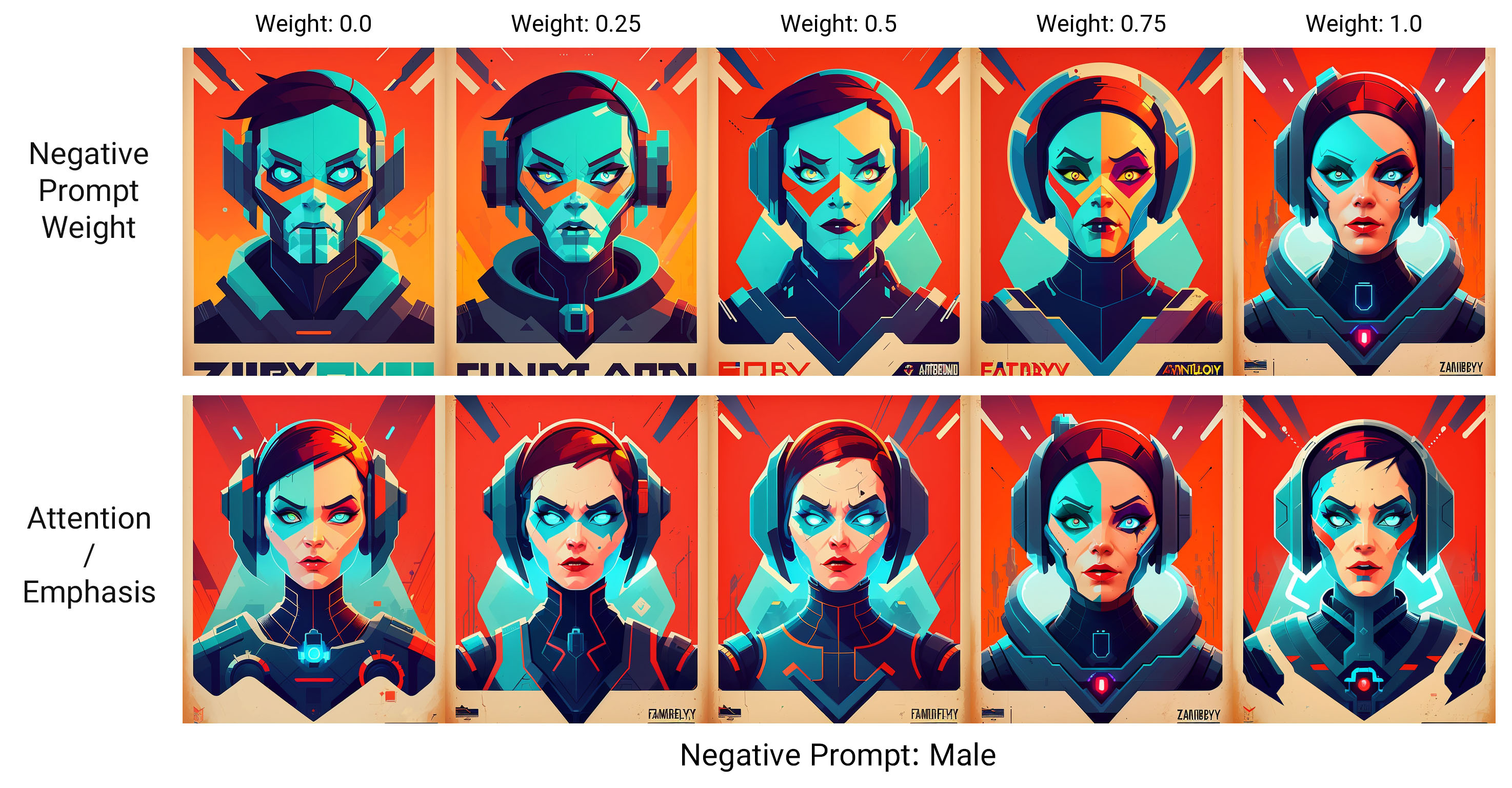
Think of it like giving directions to a sketch artist. The positive prompt is "draw me a puppy in a garden." The negative prompt is the artist's pre-flight checklist of mistakes to avoid: don't make it blurry, don't give it five legs, don't add a signature in the corner. The artist still draws the puppy from your description — the negative list just nudges their hand away from common screw-ups.
The key thing to understand up front: a negative prompt is not a filter applied after the image is made, and it is not the same as just deleting words from your positive prompt. It is a real, parallel input that actively pushes the generation away from the concepts you name — every step of the way.
Why it matters
Image models are great at the big picture and famously clumsy at details. Left alone, they sprinkle in artifacts that no amount of positive prompting reliably removes: smeared backgrounds, hands with six fingers, an extra limb, a phantom watermark, blocky JPEG-style compression, or a stray caption baked into the pixels. Negative prompts are the most direct lever you have to suppress these.
Why not just not mention the bad stuff in your positive prompt? Because the model never needed you to ask for it. Watermarks, blur, and bad anatomy show up because they were common in the training data. Stock-photo scrapes are full of watermarks; phone snapshots are full of blur; messy web images are full of mangled hands. The model learned that these things are normal parts of pictures. Staying silent doesn't remove them — you have to actively steer away from them, and that is exactly what a negative prompt does.
- Cleaner output without re-rolling. Instead of generating ten images hoping one avoids the watermark, you push watermark into the negative prompt and cut the odds dramatically.
- Fixing anatomy and quality. Terms like deformed, extra fingers, mutated hands, low quality, blurry are the classic toolkit for tidying up people and faces.
- Removing unwanted content categories. Don't want text, frames, borders, or a specific color cast? Name them in the negative prompt rather than fighting them in the positive one.
- Control without a bigger positive prompt. Your positive prompt stays focused on what you want; the cleanup lives separately, so neither list gets bloated and confusing.
For anyone doing real work with image models — product mockups, concept art, marketing visuals — negative prompts are the difference between "usable on the first try" and "re-roll until something clean appears." They are one of the highest-leverage habits in image-generation prompting.
How it works
To see why negative prompts work, you need one idea from how diffusion models generate: classifier-free guidance (CFG). It sounds technical, but the core is simple, and it is the entire mechanism behind the feature.
A diffusion model builds an image by starting from pure noise and removing a little bit of it over many steps, slowly revealing a picture. At every single step, the model predicts which direction to nudge the noisy image to make it look more like your prompt. Guidance is the trick that makes it follow the prompt strongly instead of drifting into something generic.
Two predictions, then steer between them
At each denoising step, the model actually makes two predictions of "where to go next":
- A prediction conditioned on your positive prompt — the direction toward puppy in a garden.
- A prediction conditioned on your negative prompt — the direction toward blurry, extra legs, watermark.
The model then computes the final move as: start from the negative direction, and step away from it, toward the positive direction — and exaggerate that gap. So the negative prompt isn't ignored; it defines the anchor the image is being pushed away from. With no negative prompt, that second prediction is just the model's "unconditioned" guess (an average, generic image), and steering away from average is what guidance does by default. Naming specific bad concepts replaces "generic" with "generic plus the junk you hate," so the model flees those too.
That loop repeats for every denoising step (often 20–50 of them), so the push away from your negative concepts is applied continuously, not just once at the end. By the time the noise is gone, the image has been steadily nudged away from blur, extra limbs, watermark the whole way.
The guidance scale (CFG) controls the strength
How hard the model steers is set by the guidance scale (often labeled CFG scale), usually a number around 5–9. Higher values mean follow the positive prompt harder and flee the negative prompt harder. Crank it too high and images turn oversaturated, crispy, and warped; too low and the prompt (positive and negative) barely registers. Negative prompts and CFG scale work together: the scale decides how forcefully your "do not draw" list is enforced.
Negative prompts in practice
Here is what a real prompt pair looks like in a typical Stable Diffusion / SDXL workflow. The positive prompt describes the subject; the negative prompt is a short, targeted cleanup list.
POSITIVE:
portrait photo of an older fisherman, weathered face,
natural daylight, sharp focus, 50mm lens, high detail

NEGATIVE:
blurry, low quality, deformed hands, extra fingers,
watermark, text, signature, cartoon, plastic skin
Notice the negative prompt targets specific, likely failure modes for this image: a portrait risks bad hands and over-smoothed "plastic" skin, and any photo scrape risks watermarks and captions. Each term earns its place.
If you call a model through an API, the negative prompt is usually just another field. The exact name varies by provider, but the shape is the same:
# Field names differ by provider; the concept is identical.
result = client.images.generate(
    prompt="portrait photo of an older fisherman, sharp focus, 50mm lens",
    negative_prompt="blurry, deformed hands, extra fingers, watermark, text",
    guidance_scale=7.0,   # how hard to follow + / flee -
    num_inference_steps=30,
)
A starter set of useful negatives
| Goal | Negative prompt terms |
|---|---|
| Sharper, cleaner image | blurry, out of focus, low quality, jpeg artifacts, noise |
| Better human anatomy | deformed, extra fingers, extra limbs, mutated hands, bad anatomy |
| No baked-in markings | watermark, signature, text, logo, frame, border |
| Avoid an unwanted style | cartoon, 3d render, painting (when you want a photo) |
Pitfalls and limits
Negative prompts are easy to over-trust. A few traps catch almost everyone.
The giant copy-pasted negative list
Browse any prompt-sharing site and you'll find 60-word negative prompts pasted onto every image: worst quality, low quality, normal quality, lowres, bad anatomy, bad hands, error, missing fingers, extra digit, fewer digits, cropped, jpeg artifacts, ... People copy these like a lucky charm. The problem: most of those words don't match what you're making, and a bloated negative prompt dilutes the steering — the model spreads its "avoid" budget across dozens of vague concepts instead of forcefully fleeing the two or three that matter. A short, targeted negative prompt usually beats a long generic one.
You can't negate what the model can't name
A negative prompt only works on concepts the model has a strong internal handle on. Blurry and watermark are well-learned, so they steer reliably. A weird, specific artifact you can't put a clean word to may not respond at all — the model has no clear direction to flee. Negative prompts nudge probabilities; they are not hard guarantees.
Not every model supports them
Negative prompts are native to classifier-free-guidance diffusion models. Some popular generators — especially certain hosted and newer models — either don't expose a negative-prompt field, ignore it, or expect you to phrase exclusions in plain language inside the main prompt instead ("...with no text and no watermark"). Always check whether your specific model actually honors a negative prompt before you lean on one; on a model that ignores it, you're just adding dead text.
- Over-negating real subject matter. Put red in the negative prompt and you may strip red from things you wanted red. The push is broad, not surgical.
- Expecting it to fix composition. Negatives are good at removing qualities and objects, not at arranging a scene. Use the positive prompt and tools like inpainting for layout.
- Forgetting the guidance scale. If a negative prompt seems weak, your CFG scale may be too low for any prompt to bite.
Going deeper
Once the basics click, a few deeper ideas explain why negative prompts behave the way they do and how to push them further.
It's all classifier-free guidance. The positive and negative prompts are simply the two conditions fed into the same CFG formula: the final denoising direction is the negative-conditioned prediction plus the guidance scale times the gap between the positive- and negative-conditioned predictions. "No negative prompt" doesn't mean no second prediction — it means the second prediction falls back to the model's unconditioned (empty-prompt) guess. So technically you're always doing guidance; a negative prompt just swaps the generic anchor for a specific one. Understanding this also explains the diffusion-vs-autoregressive split: negative prompts are natural for diffusion because guidance happens at every step, while purely autoregressive image models that generate tokens one by one don't have the same clean knob.
Weighted and structured negatives. Many Stable Diffusion interfaces let you weight terms, e.g. emphasizing (blurry:1.4) to flee blur harder, or de-emphasizing a term you only mildly dislike. Some tooling also lets a negative concept apply only during certain steps of the denoising process — late-step negatives can clean up fine details (like hands) without disturbing the overall composition set early on.
Negative embeddings. The community packaged common cleanup lists into reusable textual-inversion embeddings (you'll see names like "bad-hands" or "easynegative" floating around). These bundle many learned "bad" features into a single token you drop into the negative prompt. They can help, but they're a stronger form of the same cargo-cult risk: an embedding trained on someone else's taste may quietly bias your style. Test with and without it.
Where to go next. Negative prompts are one knob among several. Pair them with solid positive image-generation prompting, learn the model family in what is Stable Diffusion, and reach for inpainting and outpainting when a negative prompt can't fix a localized problem. The durable lesson: a negative prompt is a steering tool, not a filter — short, specific, and tuned to the failures you actually see beats a giant inherited list every time.
FAQ
What is a negative prompt in image generation?
A negative prompt is a separate list of things you don't want in the image — like blurry, extra fingers, watermark, text. The model uses your main prompt as a target to move toward and the negative prompt as a target to actively move away from at every denoising step, so it suppresses those concepts rather than filtering them out afterward.
How do negative prompts actually work?
They rely on classifier-free guidance. At each step, a diffusion model makes one prediction conditioned on your positive prompt and one conditioned on your negative prompt, then steers away from the negative direction and toward the positive one. Repeating this across all denoising steps continuously pushes the image away from the concepts you listed.
What should I put in a Stable Diffusion negative prompt?
Only the failure modes you actually expect for that image. Common, useful terms are blurry, low quality, jpeg artifacts for sharpness, deformed, extra fingers, mutated hands, bad anatomy for people, and watermark, signature, text, logo to remove baked-in markings. A short, targeted list usually beats a long copy-pasted one.
Is a negative prompt the same as leaving words out of my prompt?
No. Leaving a word out makes the model neutral about it. Putting it in the negative prompt makes the model actively avoid it, with a strength you can dial up using the guidance (CFG) scale. They are genuinely different inputs.
Why do some AI image models ignore negative prompts?
Negative prompts are native to classifier-free-guidance diffusion models like Stable Diffusion. Some hosted or newer models don't expose a negative-prompt field, ignore it, or expect you to write exclusions in plain language inside the main prompt instead. Always check whether your specific model honors one before relying on it.
Why does my long negative prompt make images worse?
A bloated negative prompt spreads the model's "avoid" budget across many vague concepts instead of forcefully fleeing the few that matter, which dilutes the steering. Worse, if you negate styles or colors you actually wanted, you fight your own positive prompt. Trim it to the specific artifacts you can see in your output.