
What is AI Novel Writer?
AI Novel Writer is a local-first desktop workspace that runs a novel from premise through characters, worldbuilding, chapter blueprints, drafts, review and revision. The interface ships in Chinese and English. It sits in the Writing & Marketing category of the AI Productivity & Writing tools and is open-source, written in TypeScript and licensed GPL-3.0.
Overview
AI Novel Writer (AI 小说作家) is a desktop writing studio for long-form fiction, published for Windows and macOS. It organises a book as a traceable workflow — premise, characters, worldbuilding, chapter blueprints, draft, review, revision and final — so each stage has its own place in the project instead of living in one long chat transcript. The interface ships in Chinese and English.
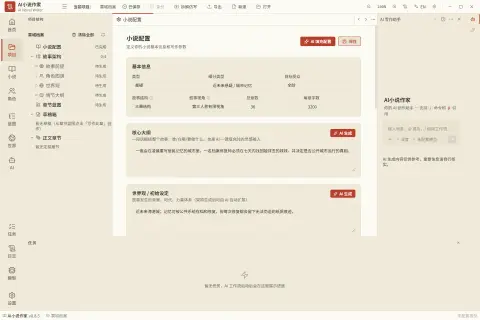
It is not a hosted model service. The app is the orchestration layer: it keeps project state, organises prompts and context, manages blueprints and draft versions, and connects generation, review and revision. For each chapter it assembles the chapter blueprint, the relevant character material, worldbuilding, history summaries and optional style references, which is how it tries to reduce forgetting and contradictions across a long book. You bring the model — any OpenAI-compatible service such as OpenAI, DeepSeek or a local Ollama server, or a native Gemini endpoint — and projects, characters, drafts and imported reference material stay in your project folder and a local SQLite database.
Review is human-confirmed: the app produces a structured review of a draft, you edit, ignore or add review items, and the confirmed checklist becomes the input for a revision whose diff you inspect before merging. Around that loop sit a story map of main plots and subplots, foreshadowing and narrative-thread tracking, a character roster and relationship graph, EPUB and text import for reference material, installable Writing Skills per stage, and a batch task that writes one to ten chapters with pause and cancel. The repository also holds a separate, frozen DeepSeek Harness web plugin preview, which the README describes as having less than 10% of the desktop app's capabilities.
What it does
- A staged writing workflow — premise, characters, worldbuilding, outline and chapter blueprints, draft, review, revision, final — with each stage kept as project material
- Chapter-level context assembly from the blueprint, related characters, worldbuilding, history summaries and optional style references, rather than the whole novel in one prompt
- A human-confirmed review loop: edit or ignore review items, revise from the confirmed checklist, then inspect the diff before merging
- Story map and narrative-thread tracking for main plots, subplots, foreshadowing hooks, planting and payoff chapters, plus a character roster and relationship graph
- Batch outline and blueprint generation with resumable checkpoints, per-chapter target length and model choice, and a batch chapter task of 1–10 chapters
- Bring-your-own model over the OpenAI-compatible protocol (OpenAI, DeepSeek, Ollama, a NovelAI preset) or native Gemini, with project data kept locally
Getting started
AI Novel Writer ships as desktop installers on the project's GitHub Releases page; there is no hosted version. You supply the model, either a local Ollama server or a cloud API key.
Download the installer for your machine
Get it from https://github.com/EthanYoQ/AI-Novel-Writer/releases. Windows x64 uses an NSIS installer; macOS has separate DMGs for Apple Silicon (arm64) and Intel (x64) — drag the app to Applications.
ai-novel-writer-setup-<version>.exe
ai-novel-writer-mac-arm64-<version>-installer.dmg
ai-novel-writer-mac-x64-<version>-installer.dmg
Get past the unsigned-installer prompts
The Windows installer is not code-signed and the macOS builds are ad-hoc signed and not notarized, so the OS may warn. After confirming the download came from the repository's official release, on macOS Control-click the app in Finder and choose Open, or allow it in System Settings → Privacy & Security.
Connect a model
In the model settings, pick a provider. For a local Ollama server use its OpenAI-compatible endpoint (with `/v1`, not Ollama's native `/api` path). Cloud providers such as OpenAI, DeepSeek or Gemini take a Base URL and API key; keys are stored locally in `~/.vela/models.json`.
Provider:  Ollama (local) or Custom
Protocol:  OpenAI-compatible
Base URL:  http://127.0.0.1:11434/v1
API key:   may be left blank; if the UI requires one, use a local placeholder
Model:     your Ollama model name, for example qwen3:14b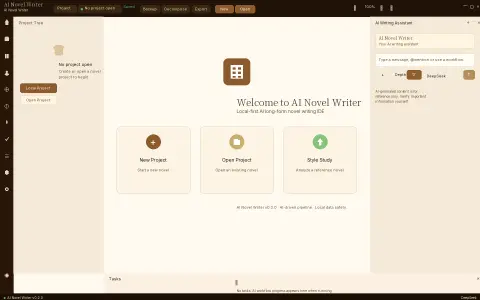
Create a project and work through the stages
From the welcome page choose New Project, fill in the novel configuration (genre, structure, point of view, chapter count and words per chapter), then generate the story architecture, chapter blueprints and drafts. Projects longer than 20 chapters default to generating the outline for chapters 1–20; continue from the next chapter or resume from a checkpoint when a batch stops.
Optional: the DeepSeek Harness web plugin
A separate, MIT-licensed npm package offers a narrow human-reviewed authoring chain inside DeepSeek Harness. It is a frozen preview, does not read desktop projects, and is not a replacement for the desktop app. After Web starts, open Novel Workbench and install the AI 小说作家 V2 Preset.
dsh plugin --profile web add @ethanyoq/dsh-ai-novel-writer
dsh --profile web
Commands and code are distilled from the project's own documentation — always check the official repo for the latest.
When to use it
- Reach for it when you are writing a serialised or long novel and want characters, worldbuilding and chapter blueprints carried into every chapter instead of re-pasting them into a chat
- Reach for it when you want to draft with a local model through Ollama and keep the manuscript and reference material on your own computer
- Reach for it when you want AI review of a chapter but insist on approving the review checklist and the revision diff yourself
- Reach for it to track foreshadowing, subplots and payoffs across dozens of chapters in a Chinese or English long-form project
How AI Novel Writer compares
AI Novel Writer alongside other open-source writing & marketing tools AI/TLDR tracks, ranked by GitHub stars.
| Tool | Stars | What it does |
|---|---|---|
| AiToEarn | ★ 27.6k | An AI content-marketing agent that creates, schedules and publishes posts to 14+ Chinese and global social platforms, with an MCP server, an agent skill bundle and a self-hosted Docker stack. |
| InkOS | ★ 11.1k | Story-creation agent for long novels, short fiction, scripts, storyboards, interactive film and translation, sharing one tool loop across a Studio web app, a TUI and a CLI while it keeps story state on disk. |
| xiaobei | ★ 8.7k | A self-hosted team of AI agents, built on openclaw, that small businesses control from WeChat to write, publish and track social-media content and win customers. |
| chinese-novelist | ★ 4.8k | An agent skill that interviews you, plans an outline, cast and chapter plan, then writes, polishes and checks a complete 10–50 chapter Chinese novel, one Markdown file per chapter. |
| GEOFlow | ★ 4.1k | An open-source, self-hosted platform for generative engine optimization that runs knowledge-grounded AI content through quality checks, human review and multi-site publishing. |
| md2wechat | ★ 3.8k | Command-line tool that AI agents can drive to turn Markdown into WeChat Official Account articles, generate covers and infographics, check readiness and create drafts. |
| AI Novel Writer | ★ 2.6k | A local-first desktop workspace that runs a novel from premise through characters, worldbuilding, chapter blueprints, drafts, review and revision |
| Jasper | — | AI platform for marketing teams that runs brand-aware content workflows, campaigns and copy at scale using specialized agents. |