
What is Plannotator?
Plannotator is Review an agent's plans, diffs and documents in your browser, then send the feedback back. It works with Amp, Claude Code, Codex, Copilot CLI, DeepSeek Harness, Droid, Gemini CLI, Kiro CLI, OpenCode, Pi and T3 Code. It sits in the Coding-Agent Harnesses & Runtimes category of the AI Coding tools and is open-source, written in TypeScript and licensed Apache-2.0 or MIT.
Overview
Plannotator is a local, browser-based review surface for AI coding agents, published on GitHub under Apache-2.0 or MIT. When an agent proposes a plan or finishes a piece of work, Plannotator opens it in your browser: you annotate it, comment, approve or deny, and the feedback goes back to the agent as structured input. It works with Amp, Claude Code, Codex, Copilot CLI, DeepSeek Harness, Droid, Gemini CLI, Kiro CLI, OpenCode, Pi and T3 Code.
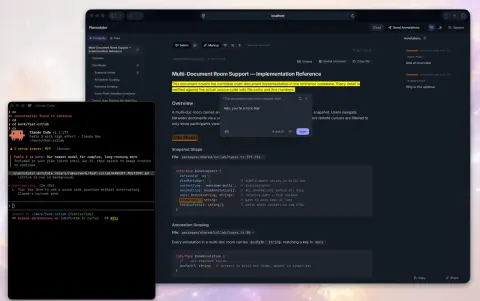
Plan review runs through the agent's own plan step. In Claude Code, a hook catches `ExitPlanMode`, starts a local server that reads the plan and opens the review UI; approving lets the agent go on, while denying sends your annotations back so the agent revises the plan. Code review works the same way for a diff: run `/plannotator-review` or pass a pull request or merge request URL, comment on lines, stage files and send the result to the agent. Git, GitButler, Jujutsu, Perforce, GitHub and GitLab are supported.
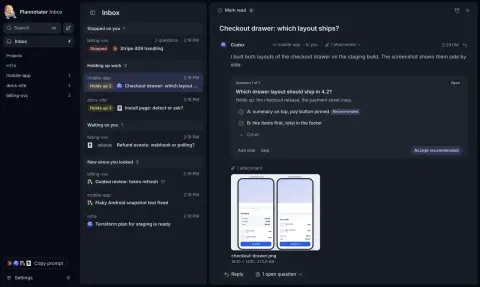
Plannotator Inbox, started with `plannotator inbox`, is a single local window where agents send messages, questions and files, so you can answer them without keeping each session open. Claude Code, Pi and OpenCode connect through plugins and other agents connect over MCP. The project has no telemetry: the README says content leaves your machine only when a feature needs it, such as fetching a URL, an AI request or sharing.
What it does
- Plan review: annotate the plan an agent proposes, then approve it or deny it with structured feedback the agent uses to revise
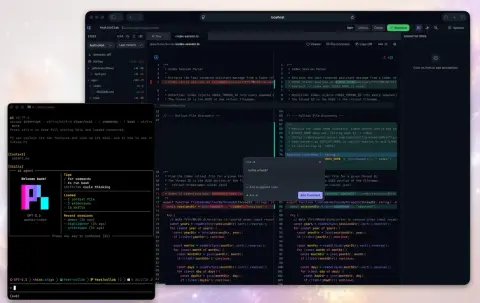
- Code review of local changes or remote pull requests and merge requests, with a diff viewer, inline comments and file staging
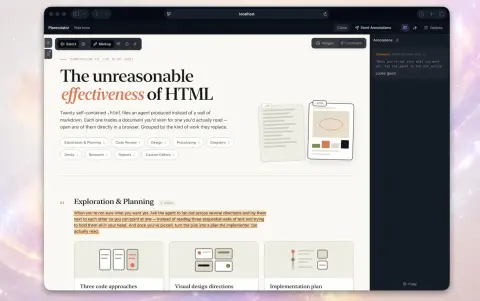
- Annotate local files, folders, URLs, rendered HTML artifacts and the agent's last message
- Plannotator Inbox: one local window for questions, files and replies from many agent sessions, over plugins or MCP
- Ask AI about what you are reviewing, or launch AI reviews that post comments onto the diff
- Terminal options (Herdr Annotate and the Plannotator TUI), plus VS Code, Obsidian, Bear and Notion integrations
- Works over SSH and in devcontainers and Docker; releases ship SHA256 checksums, SLSA provenance and SBOM attestations
Getting started
The installer downloads the binary and configures the agents it detects; each agent then needs its plugin or extension.
Install Plannotator
On Windows PowerShell use `irm https://plannotator.ai/install.ps1 | iex` instead.
curl -fsSL https://plannotator.ai/install.sh | bashAdd the Claude Code plugin
Run these inside Claude Code, then restart it. Plan mode now opens the review UI in your browser.
/plugin marketplace add backnotprop/plannotator
/plugin install plannotator@plannotator
Or set it up for OpenCode or Pi
For OpenCode, add the plugin to opencode.json and restart OpenCode. For Pi, install the extension.
# opencode.json
"plugin": ["@plannotator/opencode@latest"]

# Pi
pi install npm:@plannotator/pi-extension
Review a diff or open the Inbox
Run the review command in your agent to open the current changes, or start the Inbox so agents can send you questions and files.
/plannotator-review

plannotator inbox
Commands and code are distilled from the project's own documentation — always check the official repo for the latest.
When to use it
- Correcting an agent's plan line by line before it writes any code, instead of retyping objections in chat
- Reviewing an agent's local changes or a pull request with inline comments that go straight back to the agent
- Answering questions from several running agents in one Inbox without watching each terminal
- Annotating a spec, a markdown folder or a rendered HTML artifact an agent produced
How Plannotator compares
Plannotator alongside other open-source coding-agent harnesses & runtimes tools AI/TLDR tracks, ranked by GitHub stars.
| Tool | Stars | What it does |
|---|---|---|
| CC Switch | ★ 154k | A cross-platform desktop app that manages provider configuration for eight coding-agent CLIs from one place, with a local failover proxy, MCP and skill management, and spend tracking. |
| Oh My OpenAgent | ★ 70.9k | Opinionated agent bundle for OpenCode and Codex CLI that ships preconfigured sub-agents, lifecycle hooks and built-in MCP servers behind a single ultrawork command. |
| herdr | ★ 51k | A single-binary terminal multiplexer built for coding agents: persistent sessions across local and SSH machines, per-pane working/blocked/idle status, and a socket API agents drive themselves. |
| oh-my-claudecode | ★ 40.8k | A plugin and CLI that adds multi-agent orchestration to Claude Code: staged autopilot workflows, parallel tmux workers, and advisors that route a second opinion to Codex, Gemini, Grok or Cursor. |
| AionUi | ★ 34.3k | An open-source desktop workspace that pairs a built-in agent engine with dozens of external CLI agents, adding scheduled runs, MCP tools and remote access from a WebUI or chat apps. |
| DSH Go | ★ 22.7k | A native Android client for DeepSeek Harness that runs the agent on the phone in a built-in Linux environment or drives DSH on your computer or server over SSH, with plugins and phone control. |
| cc-connect | ★ 16.4k | A Go daemon that bridges local coding agents — Claude Code, Codex, Cursor Agent, Gemini CLI, OpenCode, Kimi CLI and more — to Feishu, DingTalk, Slack, Telegram, Discord, LINE and WeCom, so you drive them from chat. |
| Plannotator | ★ 11.1k | Review an agent's plans, diffs and documents in your browser, then send the feedback back |